
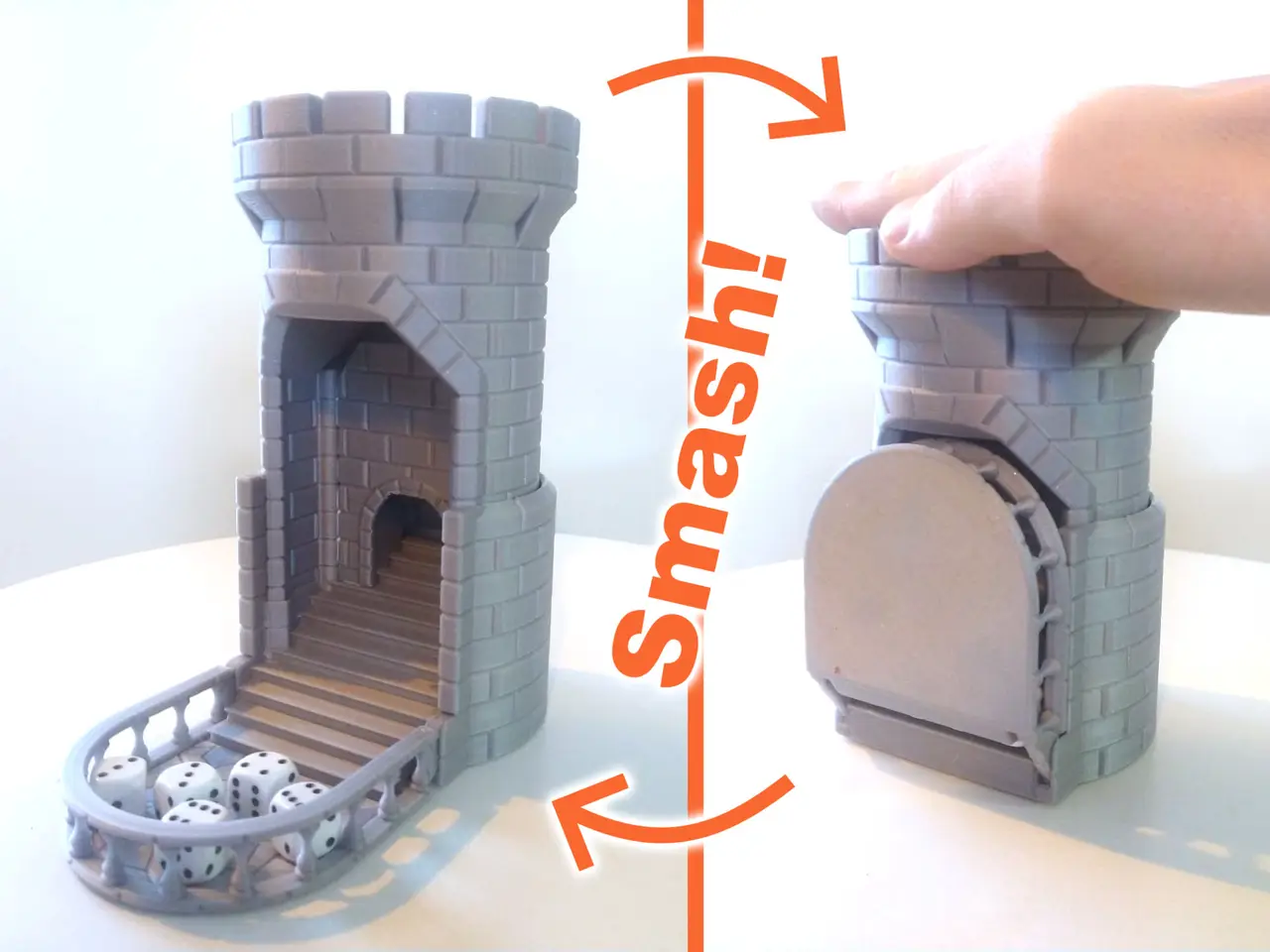
Smash! The Auto-Reload Dice Tower
por Rossero en MakerWorld
Smash! For commercial use, please have a look at my Patreon. Most Dice Towers are awesome additions to your board game experience. But it doesn't make rolling the dice any easier. If anything, it makes it more fun but also slightly more inconvenient.
MakerWorld entrega los archivos a usuarios con cuenta gratuita
Licencia
Solo uso personalStandard Digital File License
Licencia estándar de archivos digitales: solo uso personal. No se permite compartir, revender ni subir el archivo a otros sitios, ni vender las impresiones.
Al descargar aceptas respetar la licencia y dar crédito a Rossero.
Archivos (2)
- Smash Dice Tower V3.STL STL · 7,3 MB
- Smash Dice Tower springs V2 V3.3mf 3MF · 107 KB
- Categoría
- Juguetes y juegos
- Formatos
- STL, 3MF
- Descargas
- 26,256
- Publicado
Sobre este modelo
Smash!
For commercial use, please have a look at my Patreon
Most Dice Towers are awesome additions to your board game experience. But it doesn't make rolling the dice any easier. If anything, it makes it more fun but also slightly more inconvenient.
Smash! resolves this by having an auto reload functionality. Just smash the top and the dice are automatically rerolled for you. You can still drop them in from the top or change them out. But then, just Smash!
The dice tower should handle any dice up to a diagonal/diameter of 30mm.
There is a printable spring included in the print file, but due to creep this spring can fatigue over time and not lift the top of the dice tower up again (but can easily be replaced). It is therefore advised to use an 80*8mm spring (not yet tested because of Bambu shipping mess, but it should work).
If you go the printable spring route, it works better if you lube the coils of the spring and the bottom of the top part (ptfe/silicone) to reduce friction. Depending on the filament used you might need to swap it out once in a while, or upgrade to the coil springs mentioned above.
Just drop the coil springs (or slide the printed spring) in place and slide the top part of he tower down. It will click in place and if you use the printed spring you might need to nudge the top backwards. If you ever want to take the castle apart again, there are two holes in de side through which you can unlock the clips that keep the castle together.
If the bridge doesn't come down by itself you might need to work the hinges a bit before it becomes a smooth action. If that still didn't help, use a bit of lube on the hinges. If the top parts has issues reach the bottom, lube like described above and make sure the spring is pushed all the way into the slot. If you are not using the provided print profile, make sure to disable supports, whatever Bambu Studio tries to tell you.
V2 improvements: Stiffer, longer lasting, spring Easier removal of printed spring Tiled pattern on the stairs Better Maze (reduced chance of dice jumping out when using the top)
V3 improvements: Made tab connection bigger with a fillet Added an M3 grub screw hole above the stairs as backup if your tabs break Added thickness to the bottom prevents spring from protruding and makes the terrace a bit heavier
Other than that, just Smash! it and have fun!
Happy Printing!
- Rossero
Coil spring: BB019 http://store.bambulab.com/products/compression-spring?variant=49424974446940
Descripción original del autor, publicada en MakerWorld.



