
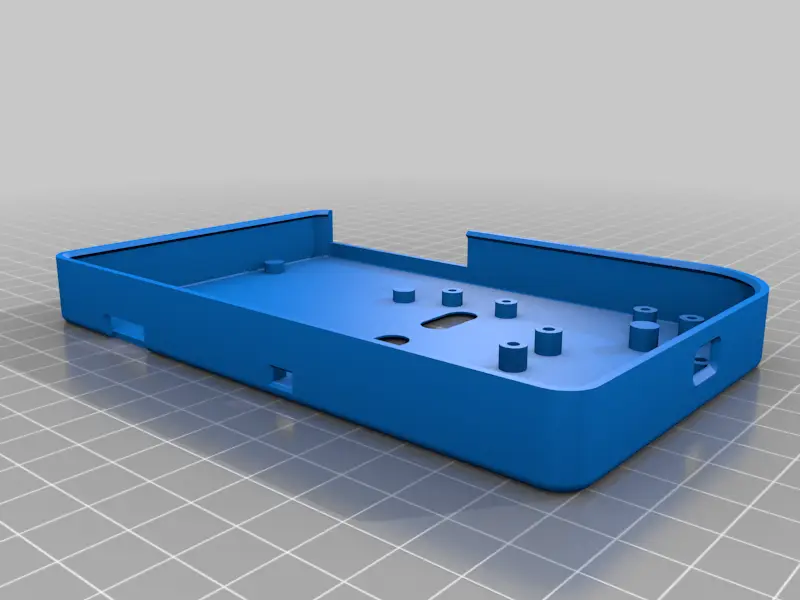
PiGRRL 2 - Raspberry Pi Game Console
por Adafruit Industries en Thingiverse
UPDATE 1.2 (10/12/17) Top and bottom case has been update. Replaced standoff "nubs" with mounting holes. Mounting holes updated to 2.6mm diameter (works with M2.5 x 5mm screws). Holder updated to better house slide switch. UPDATE 1.1 The case has been updated! Added new switch holder. New lip snap..
Licencia
Uso comercial permitidoPuedes imprimirlo, modificarlo y venderlo dando crédito al autor.
Al descargar aceptas respetar la licencia y dar crédito a Adafruit Industries.
Archivos (19)
- pause-start.stl STL · 93 KB
- pitft-btns.stl STL · 111 KB
- shoulder-mount.stl STL · 70 KB
- shoulder-btns.stl STL · 113 KB
- action-btns.stl STL · 232 KB
- pigrrl2-bot.stl STL · 357 KB
- dpad2.stl STL · 2,5 MB
- pigrrl2-top.stl STL · 367 KB
- PiGRRL-ButtonPCB.zip ZIP · 39 KB
- pigrrl2-top-splitA.stl STL · 127 KB
- pigrrl2-bot-splitA.stl STL · 156 KB
- pigrrl2-top-splitB.stl STL · 272 KB
- pigrrl2-bot-splitB.stl STL · 235 KB
- pigrrl2-bot-v1-1.stl STL · 302 KB
- pigrrl2-top-v1-1.stl STL · 416 KB
- washer.stl STL · 42 KB
- washerB.stl STL · 34 KB
- pigrrl2-bot-v1-2.stl STL · 306 KB
- pigrrl2-top-v1-2.stl STL · 424 KB
- Categoría
- Juguetes y juegos
- Formatos
- STL, ZIP
- Descargas
- 64,649
- Publicado
Sobre este modelo
UPDATE 1.2 (10/12/17) Top and bottom case has been update. Replaced standoff "nubs" with mounting holes. Mounting holes updated to 2.6mm diameter (works with M2.5 x 5mm screws). Holder updated to better house slide switch. UPDATE 1.1 The case has been updated! Added new switch holder. New lip snap fits halves together, so no need for news! Removed screws holes for amp, Pi 2 and powerboost, just snap fit onto nubs! Added washers to prevent screws from puncturing case. https://www.youtube.com/watch?v=xzfvlyLVFtw Full Parts List & Tutorial: https://learn.adafruit.com/pigrrl-2/overview Download Fusion 360 FREE http://autode.sk/1Ro3wkb PiGRRL Gamepad PCB on Oshpark https://oshpark.com/shared_projects/i2TaIEic Raspberry Pi Retro Game Console This project takes the original concept of the PiGRRL and makes it more powerful, using a Raspberry Pi 2 (or Model B+). It's about the same size but features more buttons (D-Pad, A,B,X,Y, L, R, pause and start.) and four extra buttons on the PiTFT. It's sporting a small audio amplifier and speaker, so you can enjoy the crispy sounds of 8-bit goodness. Easier to build! With this update, we really wanted to make it easier to build. We've dramatically cut the build time in half by making a custom gamepad PCB. Just solder in the buttons and an IDC box header to the gamepad PCB - No more tedious button wiring! Project Expectations This project is geared towards beginners, but is still a big project to take on. This guide will walk you through all the necessary steps to wire, assemble and build your very first Raspberry Pi game console. It does require a good amount of soldering, wire tinning and good ol' elbow grease, but don't be discouraged! If your dedicated to take on this project, it'll only take a weekend to make.
Descripción original del autor, publicada en Thingiverse.



