
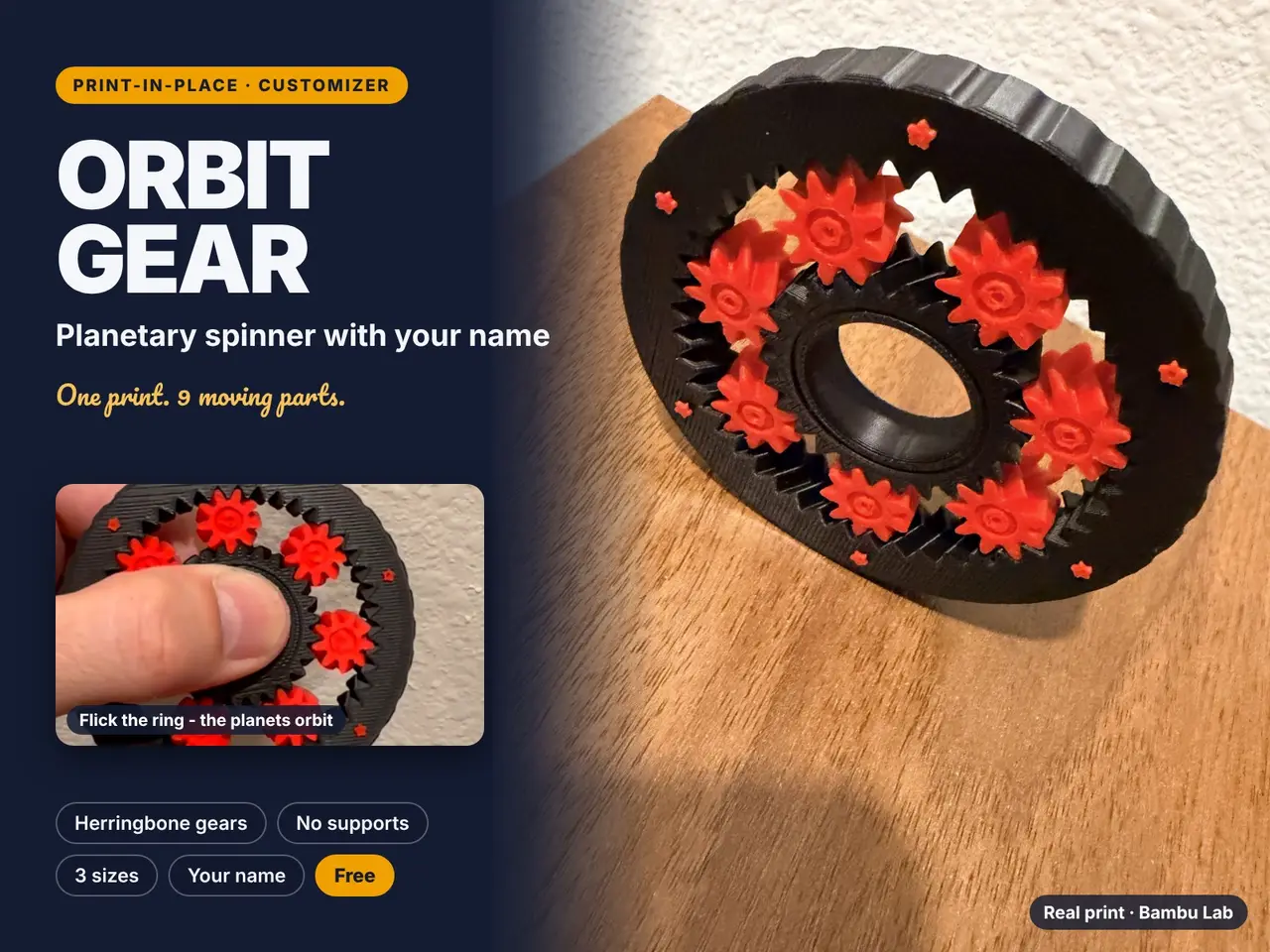
ORBIT GEAR - Planetary Spinner With Your Name
por A Arte D en Printables
Print-in-place herringbone planetary finger spinner. 7 planets orbit around your name. One piece, no supports.
Licencia
Solo uso personalStandard Digital File License
Licencia estándar de archivos digitales: solo uso personal. No se permite compartir, revender ni subir el archivo a otros sitios, ni vender las impresiones.
Al descargar aceptas respetar la licencia y dar crédito a A Arte D.
Archivos (22)
- ORBIT_GEAR_classic_name.stl STL · 11 KB
- ORBIT_GEAR_customizer_OpenSCAD.scad SCAD · 22 KB
- ORBIT_GEAR_classic_planets.stl STL · 4,1 MB
- ORBIT_GEAR_classic_ring.stl STL · 1,4 MB
- ORBIT_GEAR_classic_sun.stl STL · 958 KB
- ORBIT_GEAR_pocket_planets.stl STL · 3,0 MB
- ORBIT_GEAR_pocket_sun.stl STL · 972 KB
- ORBIT_GEAR_pocket_ring.stl STL · 1,4 MB
- ORBIT_GEAR_pocket_name.stl STL · 11 KB
- ORBIT_GEAR_big_sun.stl STL · 920 KB
- ORBIT_GEAR_big_name.stl STL · 11 KB
- ORBIT_GEAR_big_planets.stl STL · 3,8 MB
- ORBIT_GEAR_big_ring.stl STL · 1,4 MB
- ORBIT_GEAR_mia_sun.stl STL · 958 KB
- ORBIT_GEAR_mia_name.stl STL · 186 KB
- ORBIT_GEAR_mia_ring.stl STL · 1,4 MB
- ORBIT_GEAR_mia_planets.stl STL · 4,1 MB
- ORBIT_GEAR_1colour_X2D_0.4.3mf 3MF · 5,3 MB
- ORBIT_GEAR_2colour_dual-nozzle_X2D_0.4.3mf 3MF · 5,4 MB
- ORBIT_GEAR_1colour_X2D_0.2.3mf 3MF · 5,3 MB
- ORBIT_GEAR_README.txt TXT · 1 KB
- ORBIT_GEAR_fonts_for_OpenSCAD.zip ZIP · 149 KB
- Categoría
- Juguetes y juegos
- Formatos
- STL, SCAD, 3MF, TXT, ZIP
- Descargas
- 3
- Publicado
Sobre este modelo
Slip it on a finger, flick the ring and watch 7 planets orbit around your name. ORBIT GEAR is a print-in-place planetary gear spinner with herringbone (V-shaped) teeth. The sun sits on your finger, the planets roll around it and the outer ring with your name keeps spinning. It comes off the plate as one piece with 9 moving parts: no assembly, no pins, no glue. Test-printed before release: the first three photos show the actual print, straight off the plate and spinning freely (black ring and sun, red planets and stars, Classic 73 mm). Why it is different - Your name on the ring: raised in a second colour or engraved for one colour, once or twice (balanced on opposite sides). Leave it empty and you get a ring of stars.
- Herringbone teeth lock every part together. Nothing can fall out, yet everything turns freely. Angled teeth always share the load, so it rolls smoothly instead of clicking.
- Real involute gears (26-tooth sun, 9-tooth planets, 44-tooth ring) generated exactly, with an even 0.30 mm gap on every tooth and a small first-layer relief against elephant's foot.
- Checked before release: no part touches another in any position, every part is locked in all directions, and the sliced G-code keeps all 9 parts apart on every layer.
Customizer (OpenSCAD file included) - Name, font (Rounded, Script, Retro script, Festive, Clean), raised or engraved, once or twice.
- Size: Pocket 65 mm (5 planets), Classic 73 mm or Big 81 mm. 5 or 7 planets on any size.
- Finger hole 16 to 23 mm (20 mm fits most adults), gear height 7 to 12 mm.
- Grip: smooth, scalloped or cog teeth. Planets: solid, Saturn rings or hollow.
- Clearance 0.20 to 0.40 mm: 0.30 suits most printers. Stiff? Use 0.35. Too loose? Use 0.25.
- Colours for ring, planets, sun and name, and export of single parts.
Print files included - Classic 73 mm with 7 planets and stars.
- Pocket 65 mm with 5 planets.
- Big 81 mm with 7 planets.
- Name example (MIA) on the Classic.
Profiles: 1 colour 0.4 nozzle, 2 colours for dual-nozzle printers (X2D, H2D) with the planets and name in the second colour, and 1 colour 0.2 nozzle for the crispest teeth. Printing tips - Print it as it comes: flat on the plate, no supports, no brim, 0.20 mm layers.
- Bambu Studio may show 'Isolated objects detected' for the planets. That is expected for print-in-place: just close it and do not click 'Move closer', or the planets will be pushed into the ring and fuse.
- Keep the parts separate: if you import STLs into another slicer, load them as parts of one object (or use split to parts) so the slicer never joins neighbouring gears.
- After printing, hold the sun and twist the ring a few times in both directions. The first turns can feel stiff; it frees up and gets smoother within a minute.
- Use PLA or PETG. A little dry PTFE lubricant makes it spin even longer.
- Not a toy for small children: it contains small parts.
Files - ORBIT_GEAR_customizer_OpenSCAD.scad + ORBIT_GEAR_fonts_for_OpenSCAD.zip (unzip it into a folder named fonts next to the .scad): open in OpenSCAD 2021.01 or newer, set Name and options in the Customizer panel, then export each part (Export = Ring, Planets, Sun, Name).
- STL files ORBIT_GEAR_<size>_<part>.stl: Classic, Pocket, Big and the MIA example, one STL per part (ring, planets, sun, name/stars), all sharing the same origin.
- 3MF files: Bambu Studio projects with 4 plates each (1 colour 0.4, 2 colours dual nozzle, 1 colour 0.2).
PrusaSlicer / OrcaSlicer - Import the ring STL, then right-click > Add part > Load and add the sun, planets and name STLs. Keeping them as parts of one object keeps the gaps exact.
- 0.20 mm layers, 3 perimeters, 15% infill, no supports, no brim.
Support the design Original design by A Arte De. If you print one, please post a Make and give it a Like - it helps me keep publishing free models.
Descripción original del autor, publicada en Printables.



