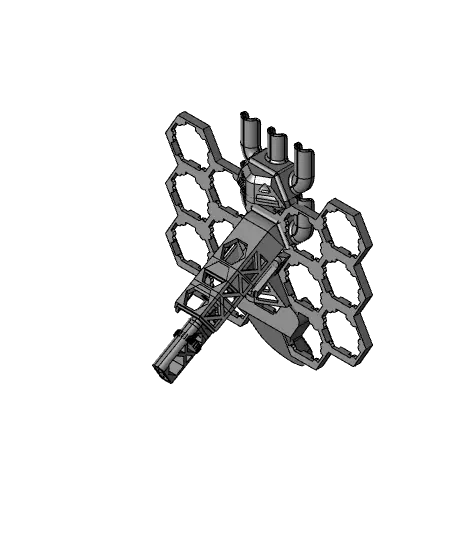
Modular Hextraction Board!
Modular Hextraction!
Thangs entrega los archivos a usuarios con cuenta gratuita
Licencia
Uso comercial permitidoPuedes usarlo, modificarlo y venderlo manteniendo el aviso de copyright del autor.
Al descargar aceptas respetar la licencia y dar crédito a Inaudable.
Archivos (28)
- Blank_Hex.stl STL · 469 KB
- Goal_Left_+.stl STL · 748 KB
- Goal_Middle.stl STL · 2,3 MB
- Goal_Right_-.stl STL · 741 KB
- Gutter_EndLong.stl STL · 627 KB
- Gutter_EndShort.stl STL · 495 KB
- Gutter_Left_+.stl STL · 233 KB
- Gutter_Right_-.stl STL · 318 KB
- Gutter_Spring.stl STL · 24 KB
- Hex.stl STL · 647 KB
- Hex_-_Fix.stl STL · 40 KB
- Hex_+_Fix.stl STL · 42 KB
- Leg_25mm.stl STL · 419 KB
- Leg_50mm.stl STL · 658 KB
- Leg_100mm.stl STL · 1,2 MB
- Leg_Foot_Long.stl STL · 326 KB
- Leg_Foot_Short.stl STL · 229 KB
- Leg_Foot_Shortest.stl STL · 175 KB
- LegAttachment.stl STL · 462 KB
- MouseEars.stl STL · 21 KB
- Nut.stl STL · 384 KB
- OnRamp_Left_+.stl STL · 412 KB
- OnRamp_Middle.stl STL · 328 KB
- OnRamp_Right_-.stl STL · 285 KB
- SpannerHandle.stl STL · 2,8 MB
- SpannerSocket_M15.stl STL · 319 KB
- Example_DONOTPRINT.stl STL · 32,7 MB
- Leg_Foot_Longest.stl STL · 438 KB
- Categoría
- Juguetes y juegos
- Formatos
- STL
- Descargas
- 1,091
- Publicado
Sobre este modelo
Modular Hextraction!
-- Revisions. Updated 5th January 2025. - Added Combined Hex : 5x1 (https://than.gs/m/1239020) - Added Combined Hex : 5x3 (https://than.gs/m/1239040) - Added Combined Hex : 5x5 (https://than.gs/m/1239043) - Added Combined On Ramp : Combined On Ramp (https://than.gs/m/1239046)
--
Revisions. Updated 13th June 2024. - Added a Super Fancy Gutters similar to my Super Fancy board remix Hextraction board. Download here: Super Fancy Gutters (https://than.gs/m/1080338)
--
Revisions. Updated 27th May 2024. - Revised Hex.stl to make it easier to print the overhangs around the threaded parts. - Added a single goal similar to the original board. Download here: Single Goal (https://than.gs/m/1067616) - Added an easier to use magnetic gutter system. Download here: Magnetic Gutters (https://than.gs/m/1067624)
--
I've made another full remix of Zack’s Hextraction board game. This time it’s fully modular! Allowing you to make a board in any shape, size and color you wish, even change the board in between games! This remix also includes something you can’t easily do in the standard version, blank hexes. These can replace a standard hex where you normally place tiles, with a blank. These stop players placing a tile there and instead forcing players to go around them. Allowing for even more interesting board layouts. The blank hexes can also be used to strengthen the board if a design gets too crazy.
This remix adds a full gutter system, however it is a little different from my Super Fancy Remix and other gutter designs out there. Once a ball is trapped in the gutter, you need to slide the ball out with a finger and it will pop out. This design allows the gutters to work no matter how crazy the board layout is!
Perhaps best of all this remix uses no glue and no hardware! It's all 3D printed! Want to add more pieces? Easy! Break a piece, just remove it and reprint!
Unlike my Super Fancy remix, it does not include easy storage on the back of the board. Instead the idea behind this version is that you can just break the board into as many or few pieces as needed to store everything in a box. You can store up to 9 balls in a 100mm leg. Print a Leg_Foot_Shortest to use as a lid. But it won’t attach to the board like my Super Fancy remix. Printing both this and my Super Fancy remix (or enough pieces of the Modular for 2 large boards) is a good option for more than 2 people. Two people can play while the other designs the board for the next game. Perhaps the winner or loser of the previous game designs the next board!
-- Print Settings:
This board is a little more difficult to print than my super fancy remix, and despite my best efforts you will need to use some supports on a select few parts.
Many of the pieces have a small bed contact area, so good bed adhesion is a must. I printed all my pieces on fairly stock standard ender 5, with a glass bed with that black dotted coating on top, and have not had any issues. So give it a try without first and see how you go. If you are having trouble with this then I have added a MouseEars.stl file to add to pieces you are having failures with. Add them where parts are coming loose, usually around the threaded part of any piece. Then merge them together. See the picture with MouseEars. Adding supports from the build plate only or adding a brim is another way to increase bed adhesion. Make sure to clean it up really well as this may cause issues with attaching pieces together.
I printed everything with PLA+ with 2 perimeters, 0.2mm layer height. 15% infill, 4 top and bottom layers with the exception of:
Nut.stl and LegAttachment.stl = 3 perimeters, 60% Infill and 5 top and bottom layers.
Hex.stl = 3 Perimeters 30% Infill - If you want to save some filament for each hex, see my filament usage section below.
Leg_100mm = If you have a printer where the bed moves, you may have trouble with this part as it has a small bed contact area and is tall. Consider using a brim.
These are just suggestions, print them at what settings you wish. If you are going to make really big boards, I would recommend doing the legs with 3 perimeters for extra strength.
Print everything in the orientation of the file for best results. With the exception of the goals that can be printed so the front or the back sit flat. The goals screw on and line up best if printed in the orientation of the file (back down). However they can all be printed when rotated 30 degrees so that the fronts sit flat. This will allow you to do a color change for the checkered and X areas. With the tradeoff that the thread may not be quite as nice and may orient the part a few mm off. Depending on your printer the ends may need support, especially for the internal threaded area.
After prints are complete make sure to check them for blobs, stringing and bits, especially in the threaded parts and nuts as this can cause parts to not go together correctly or break them. Also make sure that Aligned Seam is not turned on in the slicer, this can cause issues with parts not fitting together. (at least it did for me especially with the nuts and feet)
-- How many to print: All of the print amounts below are for a 22 hex board. The beauty of the modular version is that you can start with that many then print more as needed.
Hex.stl x 22 Nut.stl x 61 = without gutters add +19 if using gutters (do a few extra for spares) Goal Left Middle and Right x 2 of each OnRamp Left Middle and Right x 2 of each LegAttachment.stl x 2 Leg_50mm x 2 Leg_25mm x 2 Leg_Foot_Long.stl x 2
This will get you a basic board similar to the one shown in Zack’s video (5 hexes from on ramp to goal). Since it is modular, once you have the hang of the game, and how long each game takes with your group. You can adjust the size of the board for a longer or shorter game.
Or if you want more of a challenge try only having 1 or two goals or on ramps? Have them in opposite corners? Add blank joiners (Blank_Hex.stl) in so that players can no longer place a tile there and have to go around it! And any other crazy board shape size or goal and on ramp locations you can think of! A good amount to allow for modularity is to double all of the above suggested amounts. Or see amounts used in some of the examples.
It would be awesome to see some photos of your crazy board shapes and colors! I’d love it if someone tested how big the board could get before becoming unstable! Curious how big it could go!
-- If you want to add side gutters:
This works by catching the balls that go off the edge into a little slot (holds 2 max before its full) To release the ball, slide your finger down (sideways is easiest) and the ball will pop out. This design allows you to add gutters no matter what crazy board design you have, as they are small enough to fit next to each other in any configuration.
Print: Gutter_Left_+ x 8 Gutter_Right_-.stl x 8 Gutter_Spring.stl x 16 (do 18 just in case you break a few)
End gutters for standard layout board: Gutter_EndLong x 3 For a standard board layout print 3 of these for the middle, left and right.
Descripción original del autor, publicada en Thangs.