
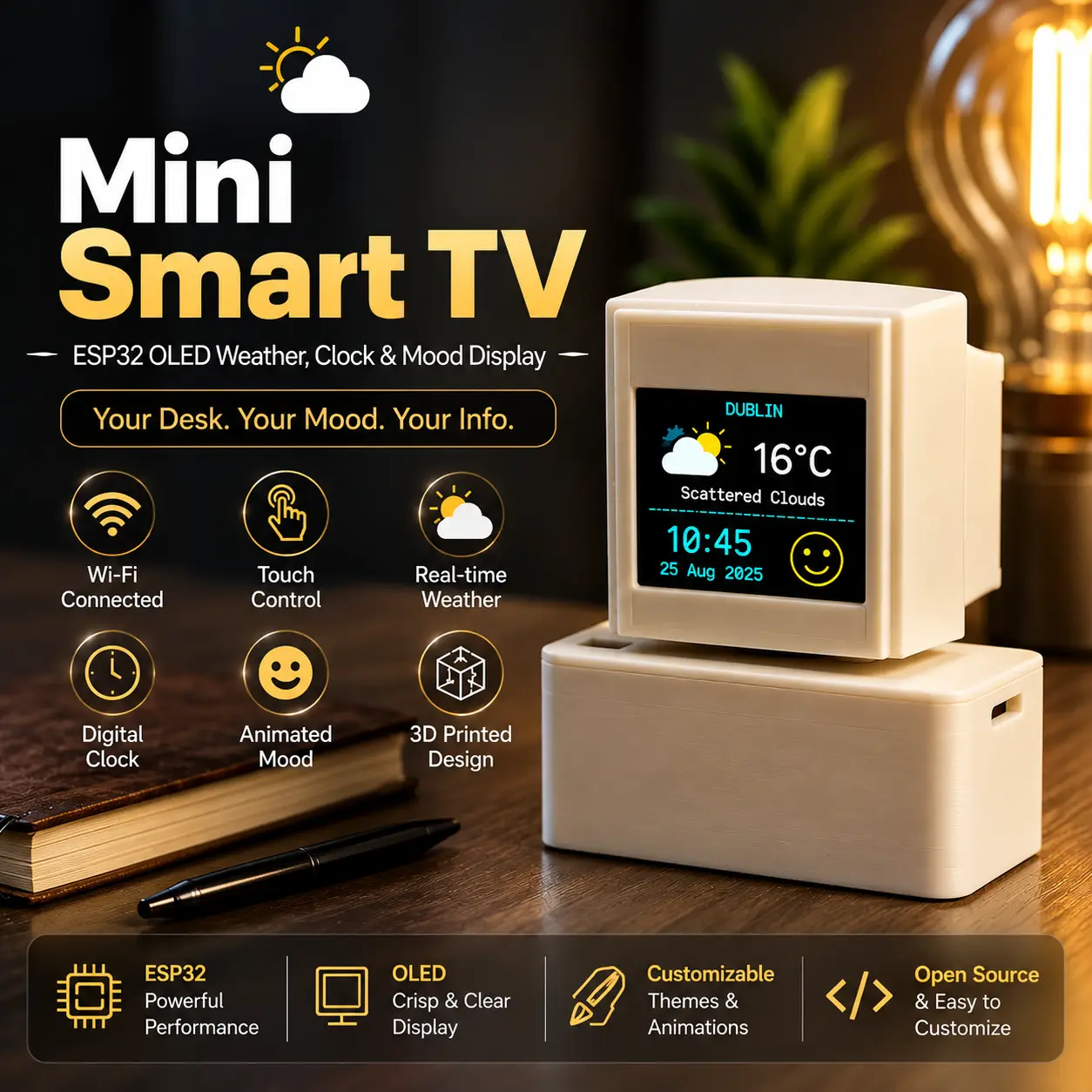
Mini Smart TV – Weather, Clock & Mood Display
por Bambu3Design en MyMiniFactory
This Mini Smart TV is a compact 3D-printed ESP32 desk display designed to combine useful information with a fun animated interface. The project uses a small 0.96-inch OLED display mounted inside a TV-style upper housing, while the ESP32 board, battery, charging module, power electronics, and wiring
Licencia
Solo uso personalCC BY-NC-SA 4.0 — Atribución, no comercial, compartir igual
Uso personal dando crédito; sin fines comerciales y las modificaciones con la misma licencia.
Al descargar aceptas respetar la licencia y dar crédito a Bambu3Design.
Archivos (7)
- Categoría
- Juguetes y juegos
- Formatos
- 3MF, STL
- Descargas (todas las plataformas)
- 26
- Publicado
Sobre este modelo
This Mini Smart TV is a compact 3D-printed ESP32 desk display designed to combine useful information with a fun animated interface. The project uses a small 0.96-inch OLED display mounted inside a TV-style upper housing, while the ESP32 board, battery, charging module, power electronics, and wiring are placed inside the lower base.
The display can show useful information such as the current time, date, temperature, humidity, and weather conditions using data from the OpenWeather API. It can also display different animated mood faces, giving the project a more interactive and character-like appearance.
A TTP223 capacitive touch sensor is used to control the display without needing a mechanical push button. A short touch can be used to move between the different display pages, while holding the touch sensor for around 2 seconds changes the mood expression. Holding it for approximately 5 seconds can be used to enter the Wi-Fi and API configuration mode.
The Wi-Fi name, Wi-Fi password, OpenWeather API key, city, and other settings can be entered through a local ESP32 configuration page. Once the settings are saved, they are stored in the ESP32 memory, so they remain available even after the device is switched off or the battery is disconnected. When the device is powered on again, it can automatically reconnect using the previously saved settings.
The enclosure was designed to be easy to 3D print and assemble. The electronics are separated into two main sections: the OLED display is located inside the upper TV-style housing, while the ESP32 and power system are protected inside the larger base. Wires between the display and the ESP32 can be routed internally through the support between the two sections.
The project can be powered using a 3.7V lithium-ion battery together with a charging and 5V boost module. An ON/OFF switch can also be added to the enclosure for convenient power control.
Main Features ESP32-based smart desk display 0.96-inch I2C OLED display Current time and date Live weather information Temperature and humidity display OpenWeather API integration Animated mood faces TTP223 capacitive touch control Short touch for page navigation 2-second hold for changing mood 5-second hold for Wi-Fi/API setup Wi-Fi credentials stored in ESP32 memory Automatic reconnection after power cycling Battery-powered design 3.7V Li-ion battery support Charging and 5V boost module ON/OFF power switch Fully 3D-printable enclosure Separate display and electronics compartments Compact desktop design Electronics Used ESP32 Development Board
https://s.click.aliexpress.com/e/_c4dAsZwj 0.96-inch I2C OLED Display
https://s.click.aliexpress.com/e/_c4BYl9Tz
https://s.click.aliexpress.com/e/_c3VDBdgr TTP223 Capacitive Touch Sensor
https://s.click.aliexpress.com/e/_c3ef7nMX
https://s.click.aliexpress.com/e/_c3kRtScL 3.7V Lithium-ion Battery
3.7V Recycled Vape Battery See the link below for how to extract and reuse it safely.
https://www.youtube.com/watch?v=IeT6NTGdaz0
Lithium Battery Charging / 5V Boost Module
https://s.click.aliexpress.com/e/_c3sxGHyr
https://s.click.aliexpress.com/e/_c3DrTjvh ON/OFF Switch
https://s.click.aliexpress.com/e/_c3lNTaZH
https://s.click.aliexpress.com/e/_c3CvK54r Connecting Wires
https://s.click.aliexpress.com/e/_c3m1poCF Code The complete ESP32 code, including the OLED interface, Wi-Fi configuration, weather API integration, touch control, clock, date, and mood functions, is available at the link below:
Code: https://bambu3design.com/esp32-oled-smart-display-with-weather-touch/
Assembly Tutorial For the complete assembly process, wiring, ESP32 setup, OLED installation, touch sensor connection, and final testing, you can watch the full tutorial on YouTube:
YouTube Assembly Tutorial:
https://www.youtube.com/watch?v=YXixhIBKxY8
If you build this project, feel free to share your make. I would love to see your version and any modifications you add to the design.
Descripción original del autor, publicada en MyMiniFactory.



