
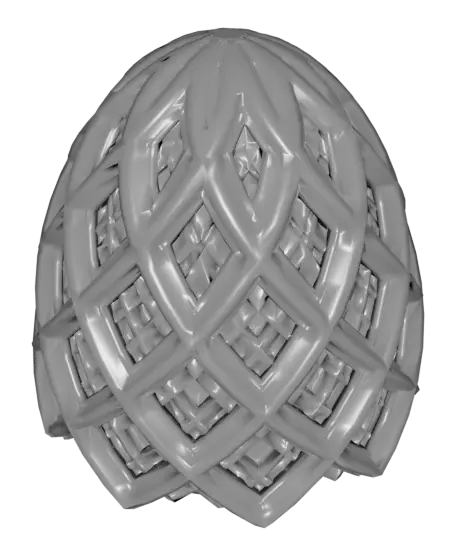
Lattice Easter Egg 2024
A new take on a classic design with complex intersecting geometry creating beautiful patterns.
Thangs entrega los archivos a usuarios con cuenta gratuita
Licencia
Uso comercial permitidoCC BY-ND 4.0 — Atribución, sin derivadas
Puedes imprimirlo y compartirlo sin cambios dando crédito; no se permite distribuir versiones modificadas.
Al descargar aceptas respetar la licencia y dar crédito a Scott M.
Archivos (6)
- Lattice Easter Egg 2024 Bottom.3mf 3MF · 913 KB
- Lattice Easter Egg 2024 Top.3mf 3MF · 1,2 MB
- Lattice Egg 2024 Bottom.stl STL · 3,4 MB
- Lattice Egg 2024 Top.stl STL · 4,3 MB
- Lattice Easter Egg 2024 Bottom_0.15mm_PLA_MK3S_6h15m.gcode GCODE
- Lattice Easter Egg 2024 Top_0.15mm_PLA_MK3S_8h5m.gcode GCODE
- Categoría
- Juguetes y juegos
- Formatos
- 3MF, STL, GCODE
- Descargas
- 230
- Publicado
Sobre este modelo
A new take on a classic design with complex intersecting geometry creating beautiful patterns.
Not for commercial use. Please see license agreement.
This is relatively easy to print. Both pieces can be printed “right side up” so you can use 3-color filament or rainbow filament and have the colors match up.
To open the egg, grab both halves, wiggle & pull apart. The bottom half has a slight ridge on 2 sides that clicks into a groove in the top. Because of that, it's easier to separate them wiggling in one direction than another. If wiggling one way doesn't work, try the other. It does get easier to open with use. When the pieces are together, hold one side and twist the other 360 degrees a few times and it will loosen up dramatically. You can also encourage it a little (if necessary) with a little sand paper.
For settings, you can give it 2 perimeters, 15% infill, and default top and bottom thickness. The top prints best with supports for the inner dome (I used paint-on supports) and the bottom works best with a brim or supports for bed adhesion. I used PrusaSlicer's pain-on supports.
If you want it to print lighter and faster, you can use the settings I've provided in my PrusaSlicer 3MF files and MKS3+ GCODE. There, I've used layer height adjustments to vary infill and top/bottom thickness to reduce weight and improve print time.
If you want to print eggs that fit inside each other like Matryoshka dolls (https://en.wikipedia.org/wiki/Matryoshka_doll), I recommend scaling to 100%, 70%, and 50%. To print below 50%, you'll need to use a 0.25mm nozzle.
Tightness of the pieces will vary based on a lot of factors, including scale. If you find the pieces are too tight, you could sand the rim of the bottom piece a little. If that doesn't work, consider reprinting with less flow, lower temperature, more elephant foot compensation, but first make sure you have the printer calibrated so the first layer prints well.
Descripción original del autor, publicada en Thangs.



