
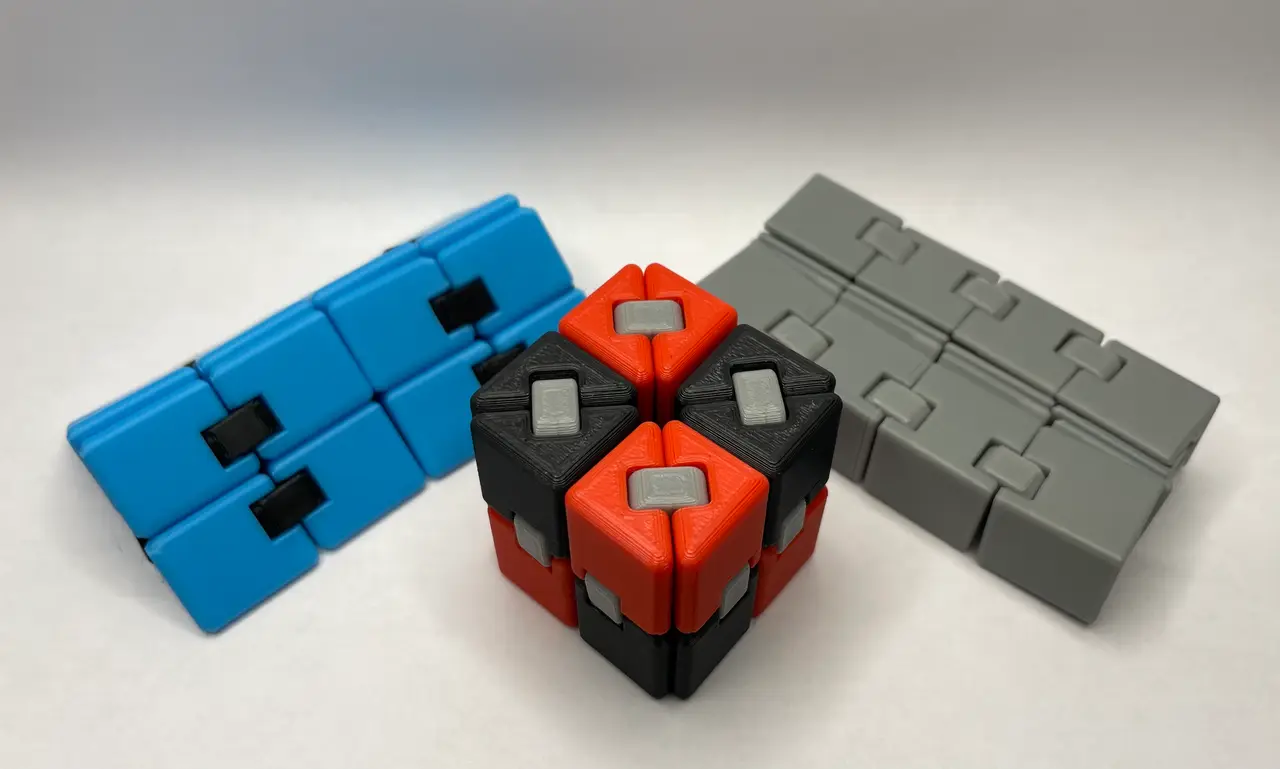
Infinity Fidget Cube Ultra
por DaHouzKat en Printables
My take on the very popular fidget infinity cube
Licencia
Solo uso personalCC BY-NC-ND 4.0 — Atribución, no comercial, sin derivadas
Solo para uso personal, sin modificarlo y dando crédito. No se permite vender ni redistribuir cambios.
Al descargar aceptas respetar la licencia y dar crédito a DaHouzKat.
Archivos (11)
- fidget_mmu_3colors.3mf 3MF · 1,6 MB
- fidget_mmu_test_3colors.3mf 3MF · 478 KB
- fidget_parts_1color.3mf 3MF · 998 KB
- fidget_parts_2colors.3mf 3MF · 974 KB
- fidget_links.3mf 3MF · 174 KB
- fidget_templates.3mf 3MF · 999 KB
- fidget_box.3mf 3MF · 1,9 MB
- fidget_parts.stl STL · 4,0 MB
- fidget_links.stl STL · 8,2 MB
- fidget_templates.stl STL · 4,3 MB
- fidget_box.stl STL · 7,7 MB
- Categoría
- Juguetes y juegos
- Formatos
- 3MF, STL
- Descargas
- 2,955
- Publicado
Sobre este modelo
Here is my take on the very popular "Infinity Cube" with a twist ! Features - Easy to print in single or multiple colors - Model can be printed in one or more colors with or without a MMU
- Easy to assemble- Templates are provided for easy assembly
- Follows you everywhere- Box allows storage and transport
Be advised, this model is not that « easy » to print - Consider this model as a torture test for you printer, filament profile and your skills- This model can be “Print-In-Place” with a MMU - Everything must be very fine tuned to be printed successfully - Please, try to print the “mmu_test” first
- The tolerances between parts are very tight- You may need to resize the links to make them snap into place
Print instructions - Filament- PLA (recommended)
- Print settings- Default Prusa Slicer 0.20mm STRUCTURAL - Supports : None - Fidget parts- Perimeters : 2 - Infill : 100% Rectilinear (the heavier the fidget, the better the feeling) - Seam position : Rear (recommended)- Paint-on-seam (for aesthetic reasons)- Make sure the seams are on the edge of the fidget parts
- Fidget Links - Be advised- Not all 3D Printers and print profiles produce the same results - You may need to resize the links to make them snap into place - Please, post a make to let us know
- Infill : 25% Grid ~ Zig Zag - Perimeters : 3
- Fidget Templates & Box - Infill : 15% Grid ~ Zig Zag - Perimeters : 2~3
Change Log - 2024-12-17 Split the MMU Plate into two- One plate for the fidget and one plate for the test
Assembly
- Place the fidget parts in the storage box and make sure the top parts are aligned correctly
- Flip the box and make sure the bottom parts are also aligned correctly
- Place the template on top of the parts - Place the links into the slots
- Press all the links into place - If the links are to hard to press in by hand, use a small hammer ;-) - Flip and repeat
Descripción original del autor, publicada en Printables.



