
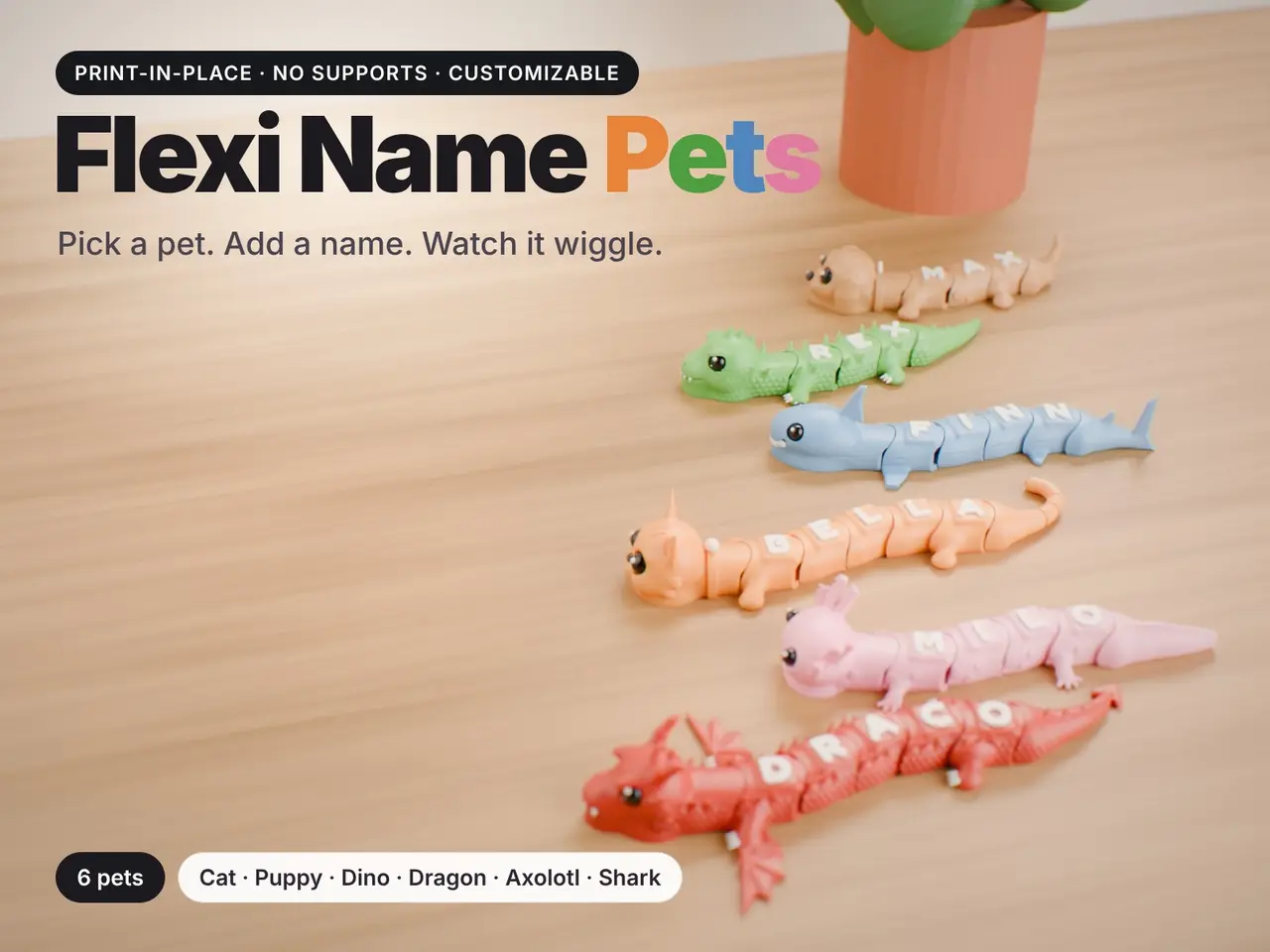
Flexi Name Pets - The Collection
por A Arte D en Printables
Six sculpted, print-in-place pets with a name on their backs: one letter per segment, e
Licencia
Solo uso personalStandard Digital File License
Licencia estándar de archivos digitales: solo uso personal. No se permite compartir, revender ni subir el archivo a otros sitios, ni vender las impresiones.
Al descargar aceptas respetar la licencia y dar crédito a A Arte D.
Archivos (32)
- Flexi_Name_Pets_Shark_FINN_multicolor.3mf 3MF · 602 KB
- Flexi_Name_Pets_Axolotl_MILO_part3_Eyes_and_nose.stl STL · 131 KB
- Flexi_Name_Pets_Cat_BELLA_part2_Letters_and_accents.stl STL · 137 KB
- Flexi_Name_Pets_Axolotl_MILO_part2_Letters_and_accents.stl STL · 91 KB
- Flexi_Name_Pets_Cat_BELLA_part3_Eyes_and_nose.stl STL · 249 KB
- Flexi_Name_Pets_Dog_MAX_part3_Eyes_and_nose.stl STL · 259 KB
- Flexi_Name_Pets_Dinosaur_REX_part3_Eyes_and_nose.stl STL · 149 KB
- Flexi_Name_Pets_Dragon_DRACO_multicolor.3mf 3MF · 795 KB
- Flexi_Name_Pets_Dog_MAX_multicolor.3mf 3MF · 569 KB
- Flexi_Name_Pets_Cat_BELLA_single_color.3mf 3MF · 700 KB
- Flexi_Name_Pets_Dinosaur_REX_single_color.3mf 3MF · 655 KB
- Flexi_Name_Pets_Dog_MAX_single_color.3mf 3MF · 567 KB
- Flexi_Name_Pets_Axolotl_MILO_single_color.3mf 3MF · 589 KB
- Flexi_Name_Pets_Dinosaur_REX_multicolor.3mf 3MF · 657 KB
- Flexi_Name_Pets_Cat_BELLA_multicolor.3mf 3MF · 703 KB
- Flexi_Name_Pets_Axolotl_MILO_multicolor.3mf 3MF · 591 KB
- Flexi_Name_Pets_Dinosaur_REX_part2_Letters_and_accents.stl STL · 368 KB
- Flexi_Name_Pets_Dragon_DRACO_part2_Letters_and_accents.stl STL · 422 KB
- Flexi_Name_Pets_Dog_MAX_part2_Letters_and_accents.stl STL · 225 KB
- Flexi_Name_Pets_Dragon_DRACO_part3_Eyes_and_nose.stl STL · 149 KB
- Flexi_Name_Pets_Shark_FINN_part3_Eyes_and_nose.stl STL · 131 KB
- Flexi_Name_Pets_Shark_FINN_part2_Letters_and_accents.stl STL · 204 KB
- Flexi_Name_Pets_Dragon_DRACO_single_color.3mf 3MF · 793 KB
- Flexi_Name_Pets_Shark_FINN_single_color.3mf 3MF · 600 KB
- Flexi_Name_Pets_Cat_BELLA_part1_Body.stl STL · 2,9 MB
- Flexi_Name_Pets_Dinosaur_REX_part1_Body.stl STL · 2,4 MB
- Flexi_Name_Pets_Axolotl_MILO_part1_Body.stl STL · 2,5 MB
- Flexi_Name_Pets_Shark_FINN_part1_Body.stl STL · 2,6 MB
- Flexi_Name_Pets_Dog_MAX_part1_Body.stl STL · 2,3 MB
- Flexi_Name_Pets_Dragon_DRACO_part1_Body.stl STL · 3,0 MB
- Flexi_Name_Pets_Collection_full_detail.scad SCAD · 8,6 MB
- Flexi_Name_Pets_fonts.zip ZIP · 386 KB
- Categoría
- Juguetes y juegos
- Formatos
- 3MF, STL, SCAD, ZIP
- Descargas
- 52
- Publicado
Sobre este modelo
Cat (BELLA) · Dog (MAX) · Dinosaur (REX) · Dragon (DRACO) · Axolotl (MILO) · Shark (FINN) WHAT'S IN THIS MODEL Flexi_Name_Pets_<Animal>_<NAME>_multicolor.3mf ready to print, 3 colours (one per pet) Flexi_Name_Pets_<Animal>_<NAME>_single_color.3mf ready to print, 1 colour (one per pet) Flexi_Name_Pets_<Animal>_<NAME>_part1_Body.stl \ Flexi_Name_Pets_<Animal>_<NAME>_part2_Letters_and_accents.stl > the same example as STL, Flexi_Name_Pets_<Animal>_<NAME>_part3_Eyes_and_nose.stl / one file per colour Flexi_Name_Pets_Collection_full_detail.scad make ANY pet with ANY name (OpenSCAD, full detail) Flexi_Name_Pets_fonts.zip the 5 fonts used by the .scad (SIL Open Font License) PRINT AN EXAMPLE FROM 3MF (Bambu Studio, OrcaSlicer, PrusaSlicer) Open the multicolor.3mf (3 colours) or the single_color.3mf (1 colour) and print. PRINT AN EXAMPLE FROM STL (PrusaSlicer, OrcaSlicer, Cura...) 1. Drag the 3 STLs of ONE pet into the slicer at once. 2. Answer "Yes" when asked to load them as a single object with multiple parts. 3. Give each part its own filament: body colour / white / black. (Single colour: just print it.) 4. Do not move the parts - they are already aligned. MAKE YOUR OWN PET AND NAME (about 5 minutes) 1. Install OpenSCAD: https://openscad.org/downloads.html (the newest "development snapshot" is much faster). 2. Put Flexi_Name_Pets_Collection_full_detail.scad in a folder and unzip Flexi_Name_Pets_fonts.zip in the SAME folder (you get a "fonts" folder next to the .scad). Open the .scad file. 3. Window > Customizer. Choose the animal, type the name (2 to 12 characters; lowercase becomes capitals), pick font, letter size and colours. Press F5 to preview. 4. Export one STL per colour: set "part" in the Hidden section (body / letters / details), press F6 and File > Export > STL each time. Or from a terminal: openscad -o body.stl -D 'animal="Dragon"' -D 'name="EMMA"' -D 'part="body"' Flexi_Name_Pets_Collection_full_detail.scad openscad -o letters.stl -D 'animal="Dragon"' -D 'name="EMMA"' -D 'part="letters"' Flexi_Name_Pets_Collection_full_detail.scad openscad -o details.stl -D 'animal="Dragon"' -D 'name="EMMA"' -D 'part="details"' Flexi_Name_Pets_Collection_full_detail.scad 5. Load the 3 STLs as one multi-part object (see above) and print. Names of 10 letters or more are about 25-30 cm long: place them diagonally on the plate. Without the fonts folder OpenSCAD still works, but uses its default font. PRINTING 0.20 mm layers, 2 walls, 12% infill, PLA. No supports, no brim. Elephant-foot compensation 0.15 mm. Print flat, exactly as placed. After printing, bend each joint gently a few times to free it. Joints have a 0.4 mm gap; a squished first layer can fuse them - use a clean plate and normal first layer. Fits any 256 mm-class printer (Prusa MK4/Core One, Bambu X1/P1/A1/X2D, Creality K1...). If you print one, please post a Make - thank you!
Descripción original del autor, publicada en Printables.



