
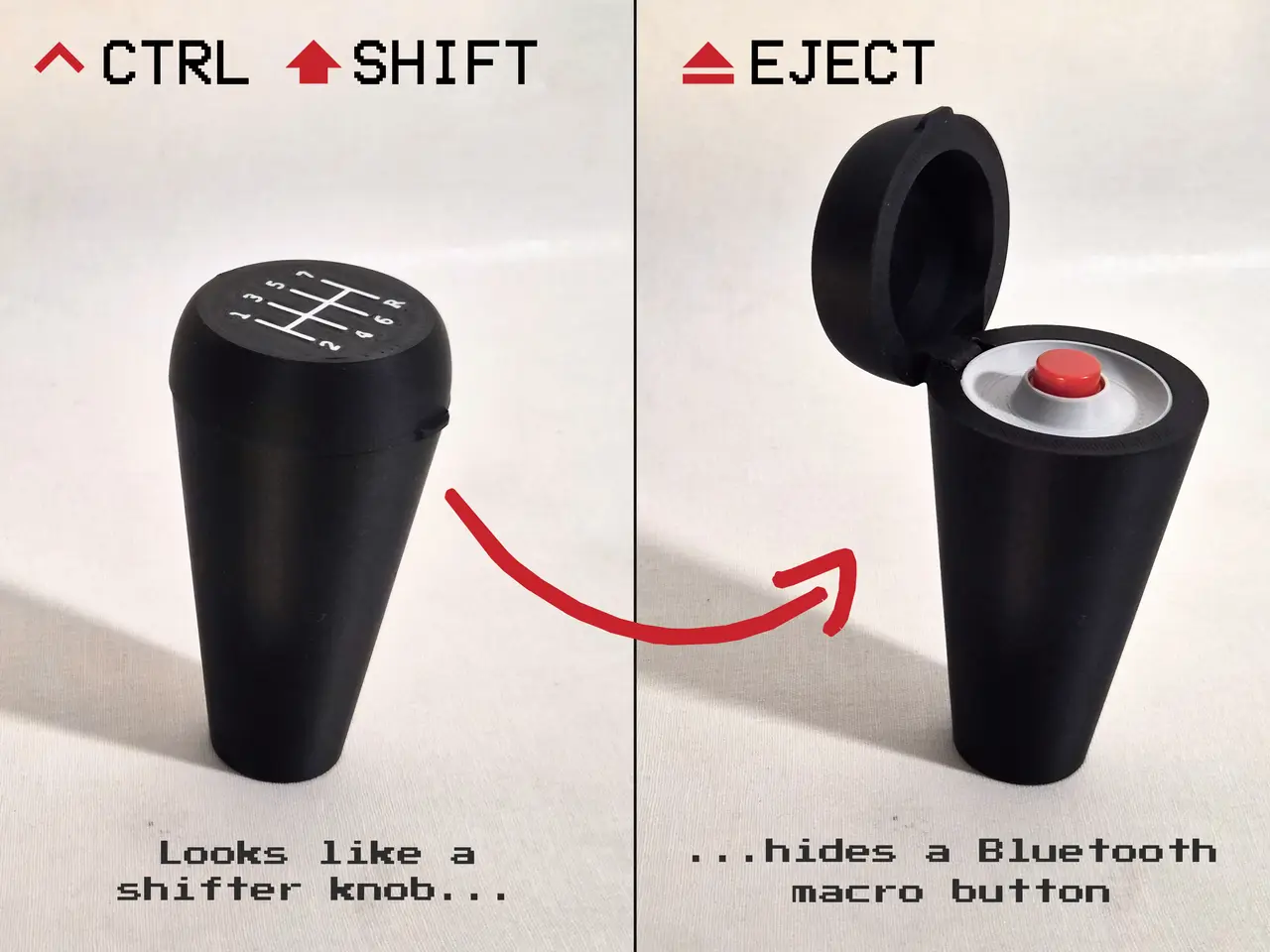
Ctrl Shift Eject - Thrustmaster TH8S Shifter Knob with Hidden Bluetooth Macro Button
por Paul Staal en Printables
A TH8S shift knob hiding a wireless red macro button under a flip-top lid. Map it to any key you want.
Licencia
Uso comercial permitidoCC BY-SA 4.0 — Atribución, compartir igual
Puedes usarlo y modificarlo dando crédito; las versiones modificadas deben compartirse con la misma licencia.
Al descargar aceptas respetar la licencia y dar crédito a Paul Staal.
Archivos (9)
- Categoría
- Juguetes y juegos
- Formatos
- 3MF, STL, ZIP
- Descargas
- 3
- Publicado
Sobre este modelo
CTRL SHIFT EJECT It looks like an ordinary shifter knob for the Thrustmaster TH8S, complete with a 7-speed shift pattern on top. Flip open the lid and you'll find a big red button. It's a battery-powered Bluetooth keyboard key, so it can trigger anything you want: handbrake, horn, pit limiter, push-to-talk, screenshot, replay, or a sneaky game of Chrome Dino in between races. Basically anything except ejecting your passenger*.
FEATURES - Fits the official Thrustmaster TH8S adapter
- Flip-top lid with snap closure, so you can't press the button by accident
- Wireless: shows up as a normal Bluetooth keyboard named "CTRL SHIFT EJECT". No drivers or software needed
- Rechargeable over USB-C, with deep sleep for long battery life (can also be used wired)
- Sends Space by default; you can remap it to any key or shortcut
PRINTED PARTS - Body
- Lid with shift-pattern inlay (non-AMS version is also included)
- Button bezel (grey)
- Switch bracket
- Optional printable button-cap
ELECTRONICS (BOM) - Seeed Studio XIAO nRF52840 (also works with the Sense version)
- 12×12 mm tactile switch with round red cap
- 3.7 V LiPo, 150 mAh (about 30×20×5 mm)
- Short silicone wires
WIRING - Button: pin D2 → GND
- Battery: red → BAT+, black → BAT− (pads on the back of the XIAO). Check the polarity with a multimeter before soldering, because the XIAO has no reverse-polarity protection.
FIRMWARE The ready-to-flash firmware (ZMK) is in the files section: - Plug in the XIAO and double-tap its reset button. A USB drive appears.
- Drag ctrl_shift_eject_xiao_ble.uf2 onto it.
- Pair "CTRL SHIFT EJECT" in your Bluetooth settings.
To change the key, edit the keymap in the included ZMK config and rebuild it with GitHub Actions. ASSEMBLY - Solder the button and battery to the XIAO.
- Seat the XIAO in the main body, with the USB-C port lined up with the side opening.
- Fit the battery in the cavity, then put the bracket with the button on top of the XIAO.
- Click the bezel in place and snap on the lid.
- Mount the knob on the TH8S adapter.
* Aston Martin DB5 is sold separately.
Descripción original del autor, publicada en Printables.



