
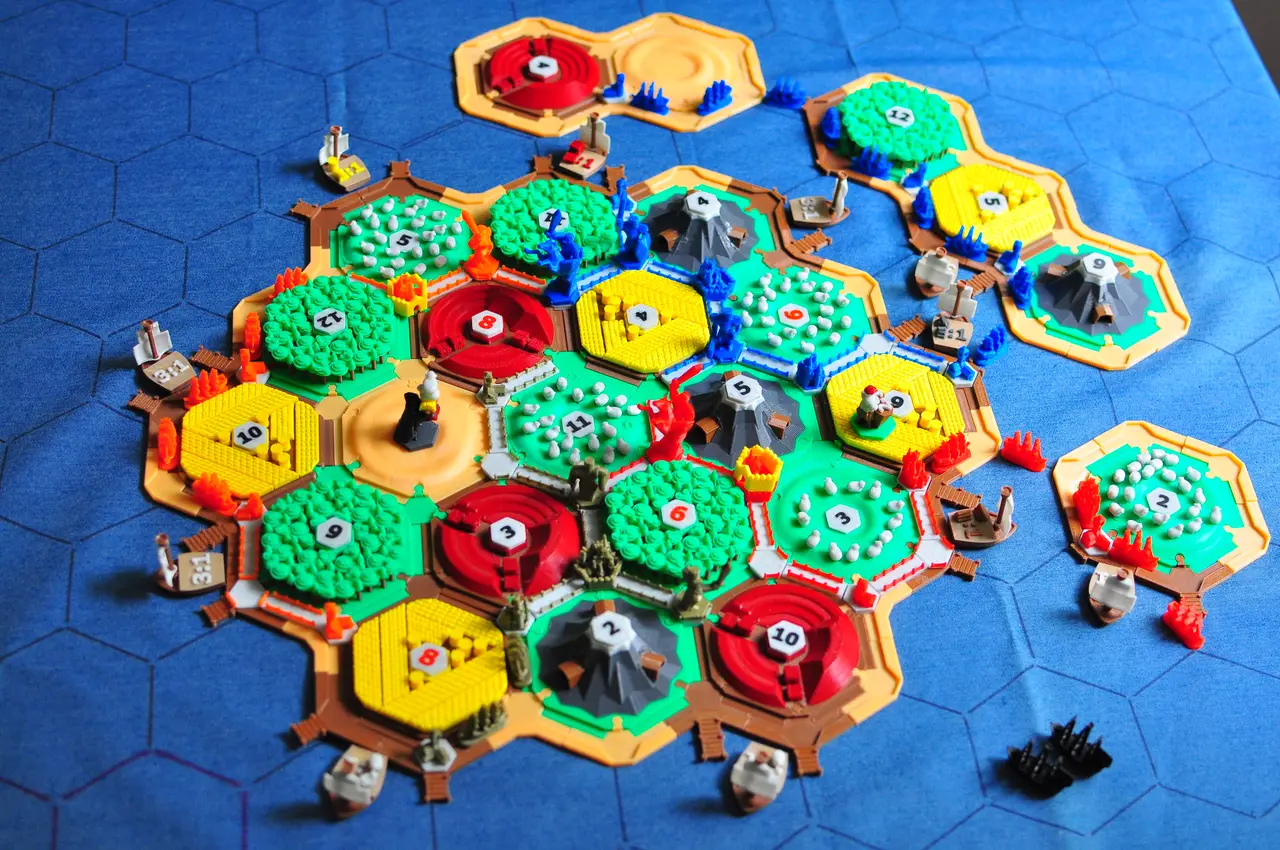
Catan + Cities & Knight + Seafarers
por MioPrint en Printables
The amazing Catan together with pieces for expansions for Cities & Knight and Seafarers!
Licencia
Uso comercial permitidoPuedes imprimirlo, modificarlo y venderlo sin pedir permiso ni dar crédito.
Al descargar aceptas respetar la licencia y dar crédito a MioPrint.
Archivos (99)
- Desert.stl STL · 1,7 MB
- Wood.stl STL · 89,8 MB
- Brick.stl STL · 358 KB
- Wheet.stl STL · 1,1 MB
- Ore (mountain).stl STL · 39 KB
- Ore (mine).stl STL · 2 KB
- Sheep (field).stl STL · 2,2 MB
- Sheep (piece).stl STL · 212 KB
- Joint.stl STL · 7 KB
- 2.stl STL · 52 KB
- 3.stl STL · 88 KB
- 4.stl STL · 7 KB
- 5.stl STL · 57 KB
- 6.stl STL · 98 KB
- 8.stl STL · 129 KB
- 9.stl STL · 99 KB
- 10.stl STL · 98 KB
- 11.stl STL · 19 KB
- 12.stl STL · 61 KB
- Sail.stl STL · 381 KB
- Ore Boat.stl STL · 263 KB
- Wood Boat.stl STL · 286 KB
- Brick Boat.stl STL · 356 KB
- Sheep Boat.stl STL · 673 KB
- Wheat Boat.stl STL · 454 KB
- 3 to 1 Boat.stl STL · 279 KB
- Mast.stl STL · 25 KB
- Sea connector (B2B).stl STL · 2 KB
- Beach - OUT.stl STL · 5 KB
- Sea connector (B2P).stl STL · 16 KB
- Port - OUT long.stl STL · 52 KB
- Beach - IN.stl STL · 7 KB
- Port - IN.stl STL · 74 KB
- Sea connector (P2P).stl STL · 30 KB
- Port - OUT short.stl STL · 28 KB
- Village.stl STL · 76 KB
- City.stl STL · 729 KB
- Road.stl STL · 57 KB
- Crossroads.stl STL · 54 KB
- Boat.stl STL · 237 KB
- Walls.stl STL · 21 KB
- Knight lvl1.stl STL · 296 KB
- Knight lvl2.stl STL · 292 KB
- Knight lvl3.stl STL · 2,0 MB
- Sword for knights.stl STL · 49 KB
- Science lvl1 - Library.stl STL · 247 KB
- Science lvl2 - School.stl STL · 104 KB
- Science lvl3 - Aquaduct.stl STL · 755 KB
- Science lvl4 - Theater.stl STL · 148 KB
- Science lvl5 - Univercity.stl STL · 1,3 MB
- Politics lvl1 - Town Hall.stl STL · 39 KB
- Politics lvl2 - Church.stl STL · 53 KB
- Politics lvl3 - Fortress.stl STL · 496 KB
- Politics lvl4 - Cathedral.stl STL · 192 KB
- Politics lvl5 - Parlament.stl STL · 965 KB
- Economy lvl1 - Craftshop.stl STL · 44 KB
- Economy lvl2 - Guilds.stl STL · 227 KB
- Economy lvl3 - Bank.stl STL · 139 KB
- Economy lvl4 - Stock Market.stl STL · 615 KB
- Economy lvl5 - Grand Bazar.stl STL · 1,8 MB
- Categoría
- Juguetes y juegos
- Formatos
- STL, PDF
- Descargas
- 3,046
- Publicado
Sobre este modelo
Catan is one of my favorite board games of all time, and even thou there are already plenty of version of 3D printed Catans out there, I really wanted to make my own. I found a lot of inspiration and I have remixed a lot of designs that I found online, but at the same time I designed a large portion of models, so I will try to provide as much references as possible in this description. My main goal with this design was to relay on color change command (M600, but I prefer to use M600 {if layer_height<100}Z100{endif}, since it gives you 100mm of Z offset while you are changing filament so that you can clean the nozzle more easily etc.). I found a lot of nice designs online, but almost all of them relayed on you printing models in white and then paining them with the colors you like. I have also designed all parts to have 0.3mm fit offset so that you don't have to use XY Size Compensation in order to make things fit. Most models do not require any supports. I used SuperSlicer for most of the prints since it is based on PrusaSlicer and it has a lot of nice features that are still not available on PrusaSlicer. I also wanted to try out non-planar printing technique on some models, so I used this Slicer for those models (more on this bellow). In case anyone is interested I could also provide .3mf files for SuperSlicer prints. lets get to the models!
Desert and Sheep Lets talk about non-planar slicing. I really find this the most exciting way to 3D print, so I wanted to try it out on my desert model. I set up this Slicer on my ubuntu machine and the results were phenomenal. There are plenty of instructions online on how to do this, and if anyone is interested I would also be willing to help them out with some problems that I managed to overcome. I have also tried to integrate the non-planar functionality into the SuperSlicer and PrusaSlicer, but this work is not finished yet. For sheep fields, I printed the sheep pieces separately (~15 per field), applied some heat to the field with an soldering hot end and fused the sheep to the field. Bricks, Wheat, Woods and Ore - These are fairly straight forward for printing. They are designed for an easy color change as you can see bellow:
Classic C & K Seafarers Total
3-4 5-6 3-4 5-6 3-4 5-6
Desert 1 +1
+2 +1 5
Brick 3 +2
+2
7
Sheep 4 +2
+1
7
Ore 3 +2
+2
7
Wheat 4 +2
+1
7
Wood 4 +2
+1
7
Joints 36 +28
64
Number tokens for dice results In order to print these simply load the model in your PrusaSlicer, position it where you like, click on: Split to Objects (it should make 2 objects) and deactivate the main body (should be the first object, do not delete it!). The other object is the number. You should be able to see something like this when looking at the plate from underneath: You can go ahead and print this in a filament color you like at a first layer height of 0.2mm. Make sure that you don't turn off the heat-bed at the end of printing and don't remove letters from the heat-bed! Once this first print has finished, change the filament to a different color, and in slicer, deactivate the number object and activate the main body object. Keep the first layer height at 0.2mm and print the main body. The following is the result:
Classic C & K Seafarers Total
3-4 5-6 3-4 5-6 3-4 5-6
Numbers 18 +10
+10
38
Boats and Port markers These boats are another example of how color changes can be very cool. I also introduced a single layer of a relatively transparent material in order to make a distinction between brown colors. Print sails for boats with brim since they are very fragile at the base: I also like to print the mast horizontally for strength. The final results look like this:
Descripción original del autor, publicada en Printables.



