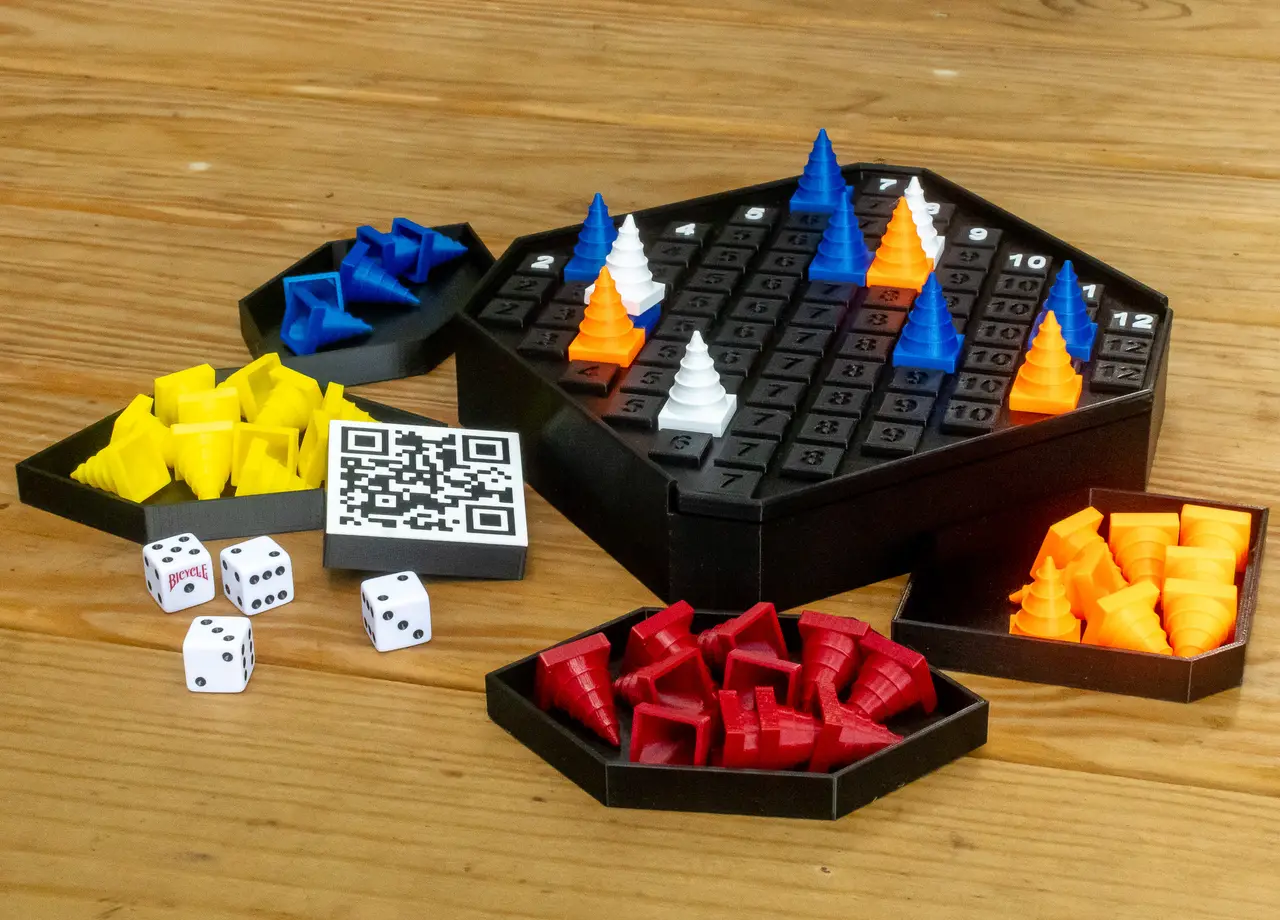
Can't Stop Dice Game
por Kyle Kindle en Printables
Original implementation of a board game designed by Sid Sackson, originally published by Parker Brothers in 1980.
Licencia
Solo uso personalCC BY-NC 4.0 — Atribución, no comercial
Puedes imprimirlo y modificarlo para uso personal dando crédito. No se permite vender las impresiones.
Al descargar aceptas respetar la licencia y dar crédito a Kyle Kindle.
Archivos (13)
- Board.3mf 3MF · 1,7 MB
- Box.3mf 3MF · 45 KB
- Marker.3mf 3MF · 166 KB
- Large Insert.3mf 3MF · 34 KB
- Small Insert.3mf 3MF · 25 KB
- Dice and Turn Marker Insert.3mf 3MF · 71 KB
- Board_0.2mm_PLA_MK3S_11h34m.gcode GCODE · 15,9 MB
- Box_0.2mm_PLA_MK3S_12h38m.gcode GCODE · 8,8 MB
- 2 Large Insert_0.2mm_PLA_MK3S_3h59m.gcode GCODE · 823 KB
- 2 Small Insert_0.2mm_PLA_MK3S_3h42m.gcode GCODE · 761 KB
- Dice and Turn Marker Insert_0.2mm_PLA_MK3S_1h25m.gcode GCODE · 982 KB
- 3 Marker_0.2mm_PLA_MK3S_44m.gcode GCODE · 2,0 MB
- 11 Marker_0.2mm_PLA_MK3S_2h23m.gcode GCODE · 7,3 MB
- Categoría
- Juguetes y juegos
- Formatos
- 3MF, GCODE
- Descargas
- 1,174
- Publicado
Sobre este modelo
If you like this design, please click “like”! Can’t Stop Game (Dice Game): This is an original implementation of a board game designed by Sid Sackson, originally published by Parker Brothers in 1980; however, that edition has been long out of print in the United States. The design of this game is the culmination of a learning experience both in 3D printing (Prusa I3 MK3S+ acquired March 2021) and Fusion 360 (started at the same time). The design shows off some of the capabilities of both the printer and design SW. Multicolor printing was accomplished through a virtual extruder and manual filament changes. Required Materials: - Printed plastic parts - 4 dice
Goal: The goal of the game is to "claim" (get to the top of) three of the columns before any of the other players can. But the more that the player risks rolling the dice during a turn, the greater the risk of losing the advances made during that turn. How to play: Full rules at https://en.wikipedia.org/wiki/Can%27t_Stop_(board_game) or https://boardgamegeek.com/boardgame/41/cant-stop as well as many other sites. And then there’s YouTube demonstrations such as below (that's not me): Printing: Total printing time is 43+ hours if optional inserts are included (recommended). I’ve printed this on both the flat steel and satin steel plates. I like it much more on the satin. Files to be printed include board (detailed print instructions below); box; 3 turn markers; 4 sets of 11 player markers; 4 box inserts for the player markers (2 of each size), dice and turn marker insert. Descriptions below reference colors pictured. Board_0.2mm_PLA_MK3S_11h34m.gcode The board slicing takes advantage of “parts” and “virtual extruders” in PrusaSlicer. Gcodes for color changes have been generated whenever the virtual extruder changes. Print starts with black and then color changes occur mid layer as follows. (The Gcode calls for a pause and the color change … times are listed so you can get a cup of coffee, or something.) - Layer 1, change to white at 10h16m remaining; - Layer 2, change to black at 10h2m remaining; - Layer 3, change to white at 9h18m remaining; - Layer 4, change to black at 9h9m remaining; - Continue with black until - Layer 34, change to white at 10m remaining; - Layer 35, change to black at 8m remaining; - Layer 36, change to white at 5m remaining; - Layer 37, change to black at 2m remaining.
Box_0.2mm_PLA_MK3S_12h38m.gcode 2 Large Insert_0.2mm_PLA_MK3S_3h59m.gcode 2 Small Insert_0.2mm_PLA_MK3S_3h42m.gcode The box and player marker box inserts are all black. Use each the associated files once … the large and small insert files each produce 2 inserts for a total of 4, 1 for each color marker. There are 2 different sizes since the box is not quite symmetric. Dice and Turn Marker Insert_0.2mm_PLA_MK3S_1h25m.gcode The dice and turn marker insert is two colors … the bottom of the insert includes the QR code to get you to the rules! 😊 In printing, there are color changes like was done for the first half of the board, but they occur much earlier in the process. I have not recorded the exact timings, but they all occur within the first 4 layers of printing. 3 Marker_0.2mm_PLA_MK3S_44m.gcode 11 Marker_0.2mm_PLA_MK3S_2h23m.gcode There are turn markers, used only within a players turn (multiple dice rolls), and player markers to keep track of cumulative gains in each column. The pictures show the 3 turn markers in white; player markers in yellow, orange, red and blue. The “11 Marker” gcode file is the only one used more than once … once for each player color. Design features/considerations: Board can slide into box with either side up. It serves as both the box top and playing surface. The columns are clearly labeled by the white contrasting top spot, but when playing we found it was sometimes hard to get the columns lined up when playing a piece … hence there are embossed numbers the full length of the columns. I experimented with the white print and found that I liked the raised numbers best. I tried ironing the numbers at the same height as the base board “buttons”, but it didn’t seem as crisp as the raised numbers. Originally the markers were modeled as smooth cones, but they were so smooth that they were hard to pick up. So, ridges were introduced. And of course, they need to stack up occasionally in the course of play, so that needed to be factored in. I experimented with how thick a color must print in order for it to be “true” to its color. For white printed with black, 0.8mm seemed best to be certain the white would be true. I may have gotten a little carried away with testing the capabilities of the printer when I introduced the QR code on the bottom of the dice insert. But it really wows people when they see it! This was a really fun project to design and print. I’m hooked on 3D printing! … and the game is a lot of fun too!
Descripción original del autor, publicada en Printables.