
Auto 9 Armored Spring-Loaded Deployable Holder
3Dモデルの説明
Thangs entrega los archivos a usuarios con cuenta gratuita
Licencia
Solo uso personalSin licencia indicada
El autor no indicó una licencia: todos los derechos le pertenecen. Úsalo solo para imprimir en casa y consulta al autor para cualquier otro uso.
Al descargar aceptas respetar la licencia y dar crédito a 雅広 尾.
Archivos (5)
- auto9holder ver3 base.stl STL · 1,1 MB
- auto9holder ver3 lock.stl STL · 20 KB
- auto9holder ver3 lockreleaselever.stl STL · 23 KB
- auto9holder ver3 TOPcover.stl STL · 126 KB
- auto9holder ver3 undercover.stl STL · 46 KB
- Categoría
- Juguetes y juegos
- Formatos
- STL
- Descargas
- 0
- Publicado
Sobre este modelo
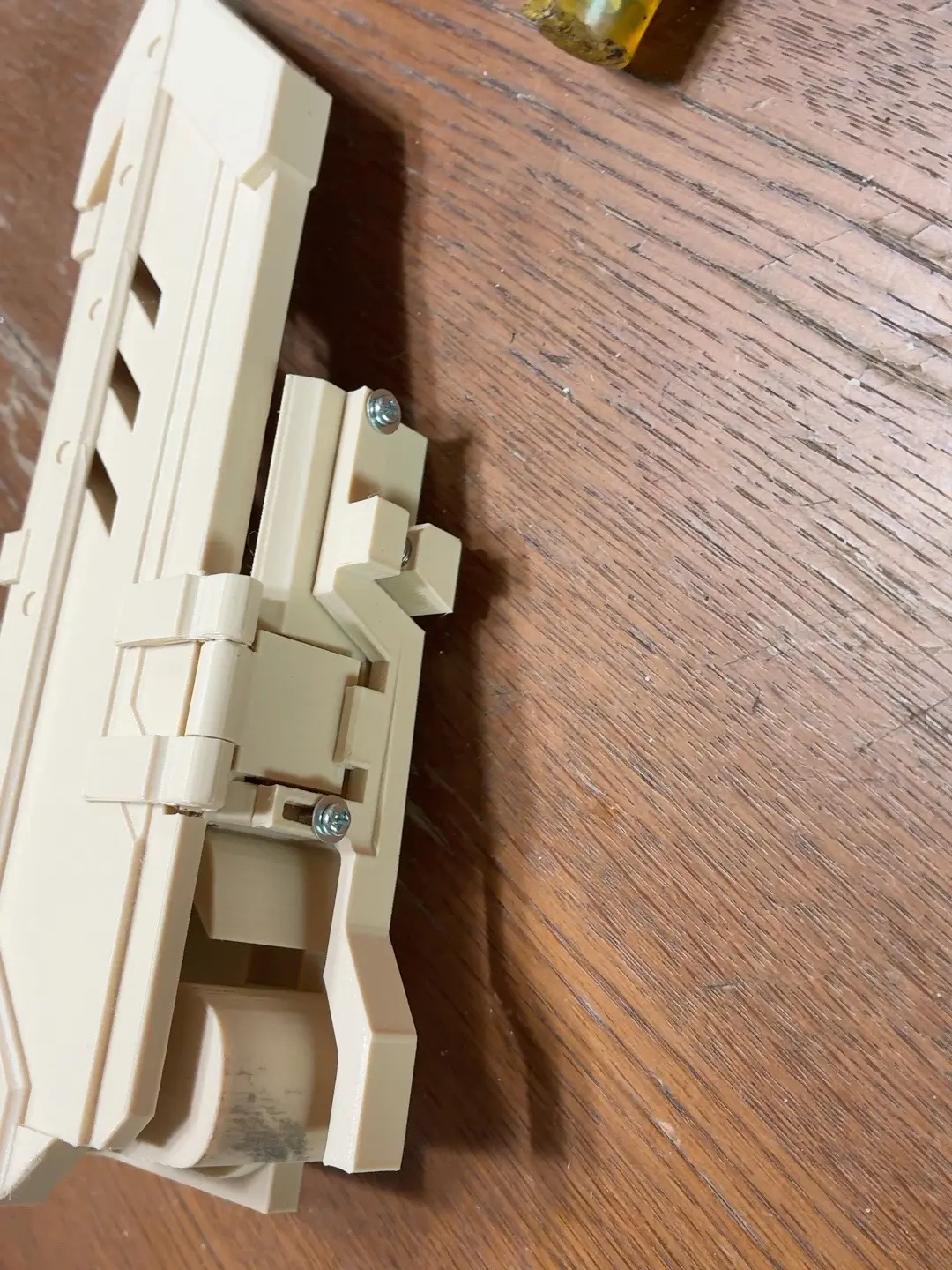
3Dモデルの説明 An armored, spring-loaded deployable holder designed specifically for the Auto 9 airsoft pistol. The Auto 9 is not an ordinary handgun. It’s big. It’s long. It’s heavy. And most importantly— It looks absolutely awesome. So why should its holder be ordinary? It shouldn’t. That’s why I built this. A large armored cover. A mechanical locking system. And a powerful spring-loaded deployment mechanism. Release the lock— CLICK. BANG! The armored cover snaps open. And there’s your Auto 9. That’s it. That’s exactly what I wanted. I redesigned it again and again. I printed prototype after prototype. I broke the lock. I ran out of space, so I made it bigger. It got heavier, so I installed a stronger spring. Normally, you would make a holster smaller, lighter, and simpler. But where’s the fun in that? This holder wasn’t designed around efficiency. It was designed around one moment: Mount the Auto 9. Release the lock. Watch the armor snap open. That moment is the whole reason this thing exists. So, let’s be clear... Is it compact? No. Is it lightweight? No. Does an Auto 9 really need a complicated spring-loaded armored deployment system? Probably not. Could I have made a normal holster instead? Of course. But— Does it look cool when the armor snaps open? YES. ABSOLUTELY. And that was reason enough to build it. Features - Designed specifically for the Auto 9 - Large armored cover - Powerful spring-loaded automatic deployment - Independent mechanical locking system - Armor snaps open when the lock is released - Compatible with BLACKHAWK! QD mounting systems - Can be mounted on a belt or leg platform depending on your QD setup - Unnecessarily large - Unnecessarily complicated - And that’s exactly why it’s fun Mounting The holder uses a mounting interface designed for the BLACKHAWK! QD system. The mating QD component, belt mount, leg platform, and other mounting equipment are not included. This holder is larger and heavier than a conventional handgun holster. If you mount it to a leg platform, make sure your platform, straps, and mounting hardware are strong enough to support it securely. Important This design uses a strong spring. When the lock is released, the armored cover opens quickly and with considerable force. After assembly, test the lock and deployment mechanism carefully in a safe condition before installing your Auto 9. Because this is a 3D-printed moving mechanism, tolerances and movement may vary depending on your printer, material, and print settings. Minor fitting or adjustment may be required. This is a digital download only. The Auto 9, BLACKHAWK! QD components, springs, screws, and all other equipment shown in the photos or videos are not included. For airsoft use only. Will there be a Ver.4? I don’t know. If I come up with another crazy idea, Ver.4 might happen. Until then, enjoy Ver.3. COOL & CRAZY.
3Dプリント設定 Printing & Assembly Instructions Recommended Print Settings This holder uses multiple moving parts and strong springs, so PETG or PETG-CF is recommended. - Layer height: 0.2 mm - Walls: 4 or more - Infill: 10% or more - Increase infill where additional strength is required. The lock, hinges, and spring-loaded components are subjected to repeated mechanical stress, so make sure your print settings provide sufficient strength. Required Hardware - 1 × Ø6 mm × 98 mm metal rod - 2 × Ø4 mm × 35 mm metal rods - 2 × M3 × 10 mm screws - 2 × M3 washers - 1 × torsion spring suitable for a Ø6 mm shaft - 1 × torsion spring suitable for a Ø4 mm shaft - 1 × compression spring, approx. Ø5.5 mm outer diameter × 20 mm long - 2 × Ø10 mm × 2 mm neodymium magnets The exact dimensions and strength of the springs are not critical. Similar springs can be used as long as they fit correctly and allow the mechanism to operate properly. For the armored cover in particular, use a torsion spring strong enough to open the cover reliably and completely. Assembly After printing, remove all supports and clean up any rough edges or excess material. Before assembly, check that all hinges and locking components can move smoothly. 1. Install the Armored Cover Position the armored cover on the main body and install the Ø6 mm × 98 mm metal rod as the hinge shaft. Install the torsion spring for the Ø6 mm shaft at the same time. Make sure the spring applies force in the direction that opens the armored cover. 2. Assemble the Locking Mechanism Use the two Ø4 mm × 35 mm metal rods to install the moving components of the locking mechanism. Install the torsion spring for the Ø4 mm shaft and check that the lock returns correctly after being operated. Install the Ø5.5 mm × approximately 20 mm compression spring in the corresponding spring-loaded mechanism. 3. Install the Neodymium Magnets Install the two Ø10 mm × 2 mm neodymium magnets. Check the polarity of the magnets before fixing them in place. Use adhesive if necessary. 4. Install the Screws and Washers Use the two M3 × 10 mm screws and two M3 washers to secure the corresponding components. Do not overtighten the screws if doing so restricts the movement of the mechanism. 5. Test the Mechanism Before installing your Auto 9, operate the mechanism several times with the holder empty. Check the complete sequence: Close the armored cover. Make sure the lock engages securely. Release the lock. Make sure the armored cover opens completely. Once everything operates correctly, install the Auto 9 and check retention, locking, and deployment again. Fitting & Adjustment Because this is a 3D-printed moving mechanism, dimensions may vary slightly depending on your printer, filament, and print settings. If a hinge is too tight, the lock does not move smoothly, or the clearance between parts is too small, minor sanding or fitting may be required. Pay particular attention to the locking mechanism. Make sure that: The lock engages securely. The mechanism moves smoothly when released. Both are important. ⚠ Spring Safety This holder uses strong springs. When the lock is released, the armored cover can open quickly and with considerable force. Always perform the first function tests without the Auto 9 installed. Keep your fingers, face, and other objects away from the path of the armored cover while testing the mechanism. Only install your Auto 9 after confirming that the locking and deployment mechanisms operate correctly.
Descripción original del autor, publicada en Thangs.



