
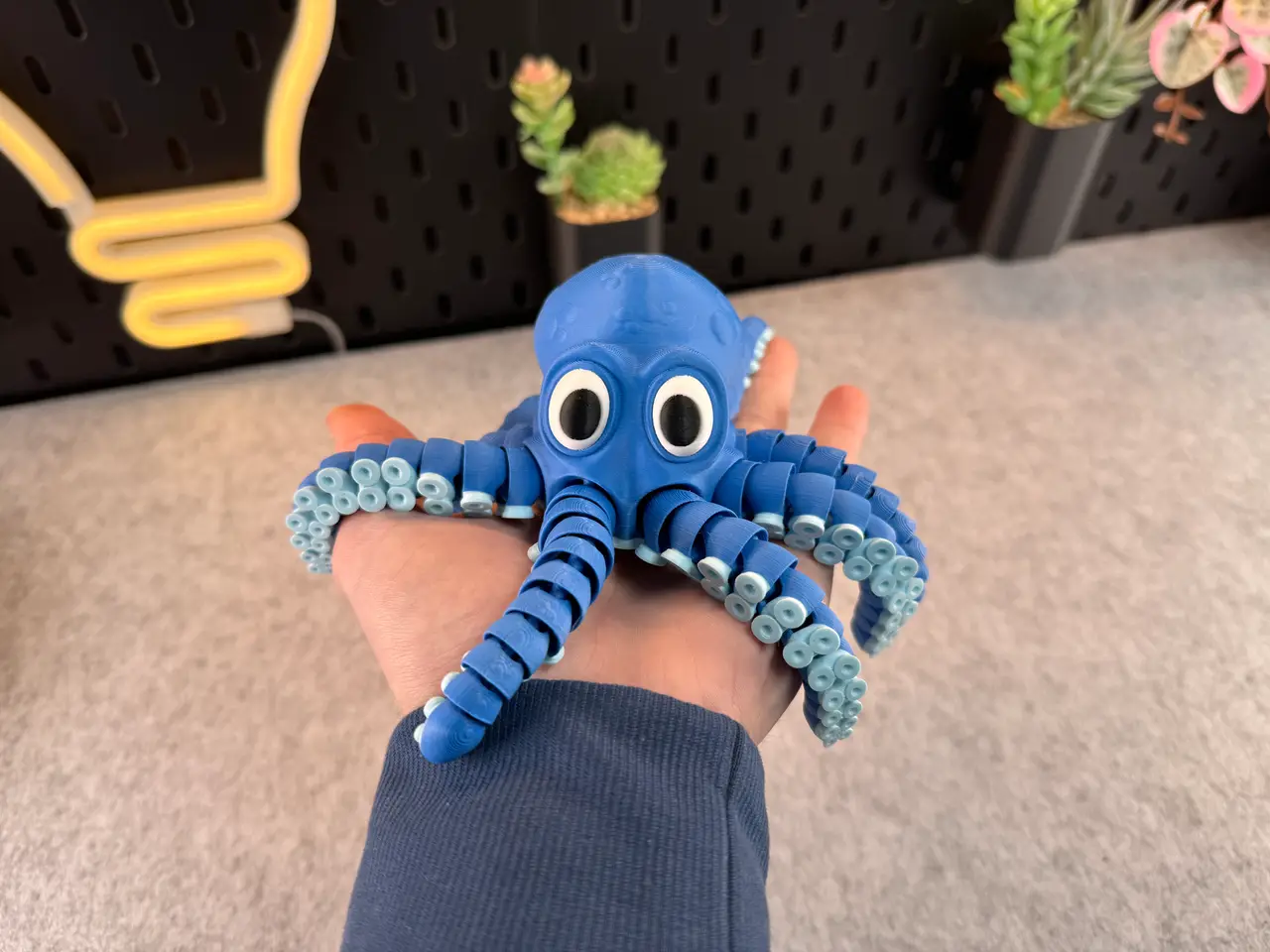
Articulated Cute Octopus
por 3DPrintyi en Printables
A Articulated Cute Octopus (Single, Multicolor or Multiple Parts)
Licencia
Solo uso personalStandard Digital File License
Licencia estándar de archivos digitales: solo uso personal. No se permite compartir, revender ni subir el archivo a otros sitios, ni vender las impresiones.
Al descargar aceptas respetar la licencia y dar crédito a 3DPrintyi.
Archivos (23)
- ArticulatedCuteOctopus_Multicolor4ColorPrusaSlicerXL.3mf 3MF · 11,5 MB
- ArticulatedCuteOctopus_MultiplePartsPrusaSlicerMK4.3mf 3MF · 12,2 MB
- ArticulatedOctopus_Multipart_LegPlugInSystem_PrusaSlicerCoreOne.3mf 3MF · 17,1 MB
- ArticulatedOctopus_Multipart_LegPlugInSystem_PrusaSlicerXL.3mf 3MF · 17,1 MB
- ArticulatedCuteOctopus_Multicolor4ColorBambuStudioX1C.3mf 3MF · 12,1 MB
- ArticulatedCuteOctopus_MultiplePartsBambuStudioX1C.3mf 3MF · 12,7 MB
- ArticulatedCuteOctopus_Multipart_LegPlugInSystem_BambuStudioX1C.3mf 3MF · 9,3 MB
- ArticulatedCuteOctopus_Multipart_LegPlugInSystem_BambuStudioH2C.3mf 3MF · 9,3 MB
- Eye_Outer_Right.stl STL · 1,1 MB
- Eye_Inner_Left.stl STL · 601 KB
- Eye_Inner_Right.stl STL · 601 KB
- Eye_Outer_Left.stl STL · 1,1 MB
- Body.stl STL · 37,3 MB
- Connector_ForNormalOctopus.stl STL · 16 KB
- Connector_ForLargerOctopus.stl STL · 16 KB
- Eye_Inner_Right_Multipart.stl STL · 581 KB
- Eye_Outer_Left_Multipart.stl STL · 1,1 MB
- Eye_Inner_Left_Multipart.stl STL · 806 KB
- Eye_Outer_Right_Multipart.stl STL · 928 KB
- BodyFull.stl STL · 11,1 MB
- Legs.stl STL · 3,7 MB
- BodyMultipart.stl STL · 11,0 MB
- ArticulatedCuteOctopus.stl STL · 37,3 MB
- Categoría
- Juguetes y juegos
- Formatos
- 3MF, STL
- Descargas (todas las plataformas)
- 84,285
- Publicado
También en
Sobre este modelo
28.12.2025 / New Multipart Version (Leg Plug In System) 🆕What’s new? The octopus legs can now be printed separately without any issues. Since many people had problems with bed adhesion when printing the legs, this should now fix that problem. There are now two multipart versions available: - the older version, where the legs are permanently attached to the octopus, and
- the new version, where the legs can be plugged in and removed.
ℹIn the new version, I’ve also added small labels to the eyes, making them easier to glue in the correct position. There are also two connector types: - a slightly tighter version (for normal octopus), and
- a looser version (for larger octopus) if you want to print a bigger octopus.
ℹThe connectors must be glued in place, so please wait a few minutes until the glue has fully cured. ℹIf a connector does not fit into a leg, simply scale it down slightly. ⚠ Important: Parts from the old version are not compatible with parts from the new version. Please print either only the old parts or only the new parts, but do not mix them. --------------------------------------------- Tips for printing: - Filament: PLA
- Supports: No!
- Layer height: 0.2mm
- Wall loops: 3
- Infill: 15%
- Seam position: back
- Wall generator: -
- Detect thin walls: -
- Brim: No!
- BuildPlate: Smooth (Textured Build Plates not recommended!) Use a build plate that you know has good adhesion!
- Info!!: Do not scale the Octopus any smaller otherwise the connections will no longer work!
- Info!!: if you apply too much force to the legs they may break because the connections are small!
- Info!!: Please be careful when removing the octopus from the print bed!
--------------------------------------------- ⚠Warning⚠ Please store this model safely in environments with young children and pets, as small parts may pose a choking hazard or cause injuries. Avoid applying strong force, as it may damage the model and create hazardous fragments. After 3D printing, keep the model in a secure location out of reach of children and pets. Follow these precautions for safe use. --------------------------------------------- Colors and filament I used (4 Color Version) - PLA / Blue
- PLA / LightBlue
- PLA / White
- PLA / Black
Or decide for yourself which colors and how many you want to use! --------------------------------------------- ℹThis model is very filament wasteful please keep that in mind! When you decide to print my multicolor Pre-Sliced (3mf file) for BambuLab I would recommend printing several models at once, not just one, to reduce waste! Or you can use my multiple parts version to avoid filament waste!
Descripción original del autor, publicada en Printables.



