
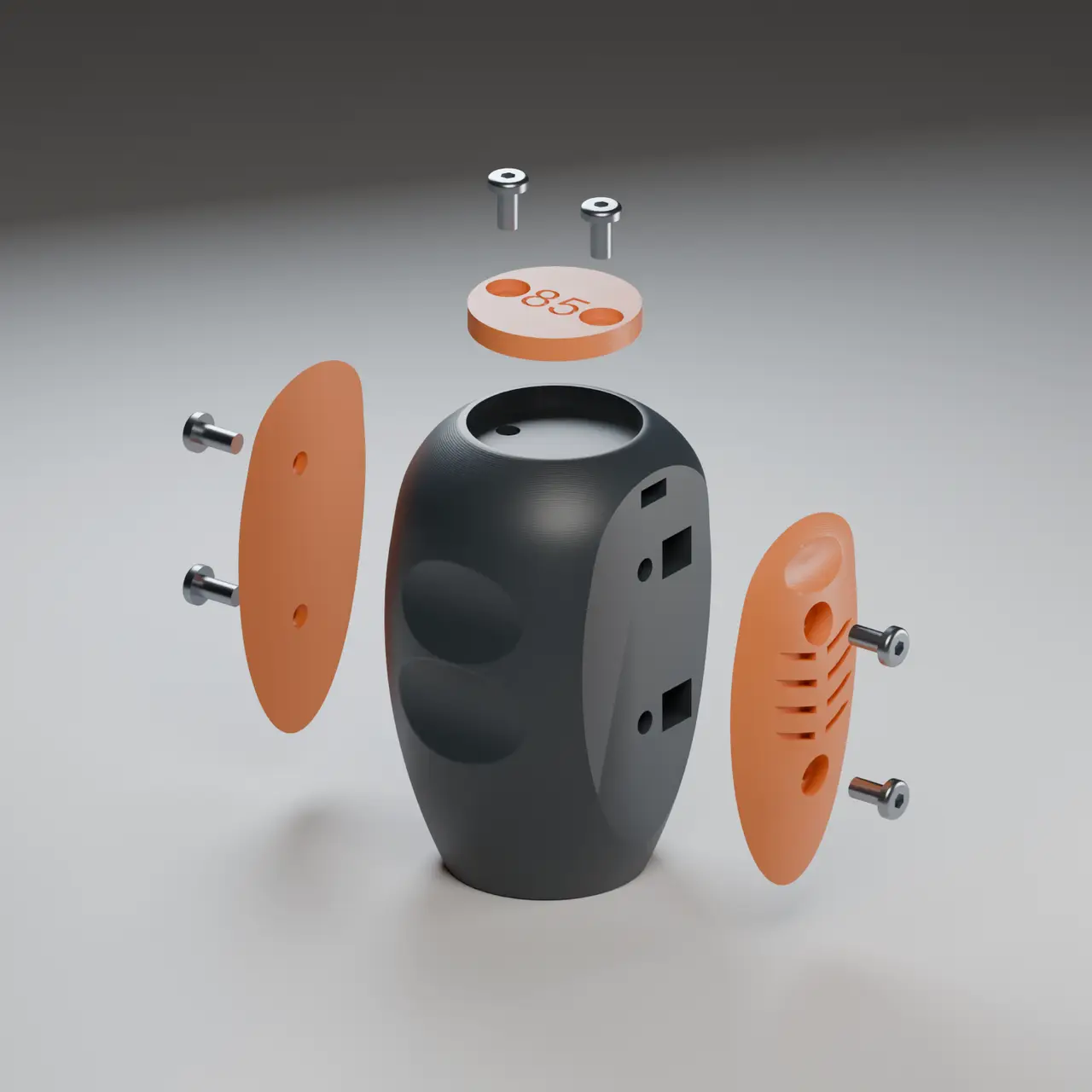
APEX — Modular TH8S Shifter Knob with Custom Initials
por Andris85 en Printables
Rally-inspired TH8S grip with replaceable panels, thumb recesses and a custom badge. No CAD needed for initials.
Licencia
Solo uso personalCC BY-NC-SA 4.0 — Atribución, no comercial, compartir igual
Uso personal dando crédito; sin fines comerciales y las modificaciones con la misma licencia.
Al descargar aceptas respetar la licencia y dar crédito a Andris85.
Archivos (14)
- Badge_85.stl STL · 123 KB
- APEX_Panel_Right_Smooth.stl STL · 224 KB
- Badge_Blank.stl STL · 58 KB
- APEX_Panel_Left_Smooth.stl STL · 225 KB
- APEX_Panel_Right.stl STL · 241 KB
- APEX_Panel_Left.stl STL · 242 KB
- APEX_Plate_Layout.3mf 3MF · 891 KB
- APEX_V3.2_Assembly.f3d F3D · 2,5 MB
- APEX_V3.2_Assembly.step STEP · 1,3 MB
- APEX_Core.stl STL · 3,0 MB
- TH8S_Adapter.stl STL · 1,9 MB
- Personalize_Badge.html.txt TXT · 5 KB
- Instructions.pdf PDF · 503 KB
- APEX_Assembly_and_Personalization_Guide.pdf PDF · 7,9 MB
- Categoría
- Juguetes y juegos
- Formatos
- STL, 3MF, F3D, STEP, TXT, PDF
- Descargas
- 5
- Publicado
Sobre este modelo
YOUR GRIP. YOUR COLOURS. YOUR INITIALS. Give your TH8S a look of its own. APEX brings a rally-inspired shape to your sim rig, with sculpted finger recesses, recessed thumb seats and contrasting side panels. Finish it with your initials or race number on top — a small detail that makes the whole grip yours. MAKE IT YOURS • Pick your grip: bold chevron texture or clean, smooth panels. • Pick your colours: print the body, panels and badge separately. No multi-material printer required. • Add your signature: create a badge with up to two letters or digits in your browser. No Fusion, no CAD skills needed. • Change the look later: replace the panels or badge without reprinting the core. BUILT AROUND THE TH8S APEX uses the official Thrustmaster TH8S adapter interface. Its rounded body combines broad finger recesses with shallow thumb seats, while recessed screws keep the removable panels and badge neatly integrated into the shape. Approximate assembled size: 45 × 45 × 65 mm. PRINT. PERSONALIZE. ASSEMBLE. Print one core, your preferred left/right panel pair and a badge. Choose the ready-made “85” badge, keep it blank, or open the included Personalize_Badge.html to create your own initials or number. Start with the small fit-test pieces to check your hardware and adapter before printing the full grip. YOU WILL NEED • 6 × M3×6 low/button-head screws, nominal head Ø5.7 × 1.65 mm. • 6 × standard M3 hex nuts, 5.5 mm across flats and approximately 2.4 mm thick. • The official TH8S adapter and its original mounting fastener. Four screw/nut pairs secure the panels; two secure the badge. No glue or heat-set inserts. Use regular nuts, not taller locknuts. PRINTING & ASSEMBLY Suggested starting settings: PLA or PETG, 0.4 mm nozzle, 0.20 mm layers, 5 perimeters, 30% infill and 5 top/bottom layers. Print the core upright with an 8 mm brim, panels flat inner face down, and the badge flat with lettering up. Check pocket roofs and overhangs in your slicer; support-free printing has not yet been physically confirmed. Fit the badge nuts through the upper side channels, then attach the badge. Slide the four panel nuts through their loading windows and beneath the screw holes, then attach the panels. The panels close the nut-loading openings. Tighten gently. Follow Thrustmaster’s instructions to fit the official adapter, then thread on the grip. Check its final orientation; there is no independent rotational adjustment. PERSONALIZE YOUR BADGE — NO CAD NEEDED 1. In Files > Other files, find Personalize_Badge.html (TXT). 2. In Safari, click Download beside Personalize_Badge.html (TXT). If a page of code opens, check that the address starts with files.printables.com and the text starts with <!doctype html>. This is the correct file. While ON THAT CODE PAGE, press Command+S, choose Page Source, and save it as Personalize_Badge.html. Do NOT use Save on the Printables model page or file list: that saves the website instead of the tool. If your browser downloads the TXT directly, continue with step 3. 3. In Finder (Mac) or File Explorer (Windows), rename the ENTIRE downloaded filename to Personalize_Badge.html. Printables may change the original name, so do not just delete .txt. Make sure the final name ends in .html, not .html.txt. On Mac, confirm “Use .html” if asked; on Windows, enable file name extensions if they are hidden. 4. Open the saved Personalize_Badge.html file with Safari, Chrome, Edge or Firefox. You should see “Make it yours.”, a round badge preview, an initials field and “Download my STL”. If you see the Printables logo, navigation or a Thrustmaster banner, you saved the website instead: repeat step 2 from the code page. If you still see code, check that the filename ends in .html, not .html.txt. 5. Enter up to two letters (A–Z) or digits (0–9), then click “Download my STL”. Import the downloaded STL into your slicer at 100% scale. The tool creates the badge only and works offline. ASSEMBLY GUIDE & SOURCE FILES The illustrated guide shows every screw, nut and assembly step. Save Assembly_Guide.html.txt in the same way and rename the entire filename to Assembly_Guide.html; place the downloaded guide images in an Images folder beside it. The 3MF files provide arranged parts; choose your own printer and material settings. Fusion and STEP files are included for further customization. A NOTE ON THE PREVIEW Product images are CAD renders; the slicer image shows the actual digital layout. The revised M3 nut fit-test piece has been printed and checked, with improved nut fit confirmed by the maker. Full grip assembly, adapter fit and durability testing are still pending. DESIGN & CREDITS Designed by Andris85, using Thrustmaster’s official TH8S mounting interface. The grip body, removable panels and personalized badge are additions to that interface. This is an independent project, not an official Thrustmaster product. CC BY-NC-SA 4.0 — free for noncommercial use with attribution; share adaptations under the same license. Which colour combination would you build? Share your version in Makes!
Descripción original del autor, publicada en Printables.



