
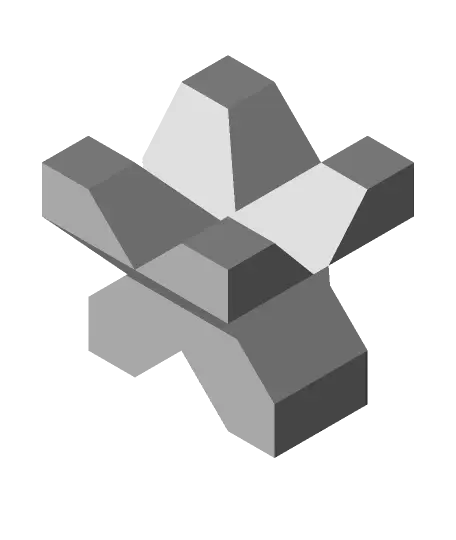
XYZ Calibration Test - Vase Mode
por spontaniel en Thangs
Quick 10 minute print - 0.3 m of filament
Thangs entrega los archivos a usuarios con cuenta gratuita
Licencia
Solo uso personalCC BY-NC-SA 4.0 — Atribución, no comercial, compartir igual
Uso personal dando crédito; sin fines comerciales y las modificaciones con la misma licencia.
Al descargar aceptas respetar la licencia y dar crédito a spontaniel.
Archivos (1)
- xyz_calibration_test.stl STL · 5 KB
- Categoría
- Para tu impresora
- Formatos
- STL
- Descargas
- 267
- Publicado
Sobre este modelo
Quick 10 minute print - 0.3 m of filament
Don't waste your precious time and filament printing a so called “calibration cube”!
This quick print provides clues for all the important features and settings:
Extrusion width E-steps / rotation distance (X, Y, Z) Bridging Cooling Overhangs Speed / accelleration First layer / bed adhesion Retraction (stringing test, seam test) Preassure advance / linear advance
Print Settings 1 perimeter 0.2 mm layer hight 3 bottom layers Disable “Ensure vertical shell thickness” (PrusaSlicer) No Infill, top layers, brim or supports
Troubleshooting https://www.reddit.com/r/3Dprinting/wiki/troubleshootingandcalibration
Some quick tipps:
_Extrusion width_ Check if the thickness of one of the outside walls at the top matches the setting in your silcer _E-steps / rotation distance (X, Y, Z)_ If the outside dimensions are not 20 mm but way off, correct the settings for the affected axis _Bridging / cooling_ If the bridging perimeters in the top center are drooping/sagging, check cooling an bridging settings in your slicer _45° overhangs_ If the perimeters in this section are drooping/sagging, check the part cooling and cooling settings in your slicer _Speed / accelleration_ ringing, bulged corners - you may want to reduce speed and/or accelleration (also see Preassure advance / linear advance) _First layer / bed adhesion_ If there are problems with the print adhering to the bed, check if - the bed is level and parallel to the x-axis - the bed is clean - no dirt or grease - the bed temperature is correct If the print is wider at the bottom (first few layers) than at the top, check your z-offset and first layer settings
_Retraction (stringing test)_ If you experience stringing, check your retraction and cooling settings _Preassure advance / linear advance_ If large seam gaps or bulged corners appear, consider tuning your printer firmware settings for preassure advance (Marlin) / linear advance (Klipper)
Descripción original del autor, publicada en Thangs.



