
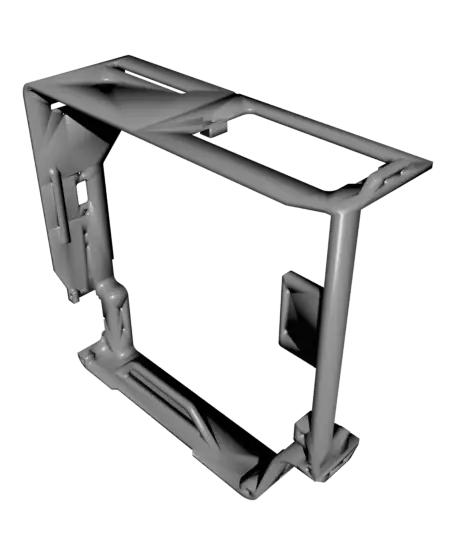
Weyland Yutani CyberDeck
Welcome to my Aliens franchise inspired cyberdeck. I personally use it for working on my robots while on the go, but it's suitable for a variety of tasks.
Thangs entrega los archivos a usuarios con cuenta gratuita
Licencia
Revisa las condicionesPersonal Use Eridani Industries
El autor usa su propia licencia. Revisa sus condiciones en la página original antes de compartir, modificar o vender.
Al descargar aceptas respetar la licencia y dar crédito a Eridani I.
Archivos (21)
- Right_Front_A.stl STL · 458 KB
- Right_Front_B.stl STL · 222 KB
- Right_Rear_Panel.stl STL · 203 KB
- Screen_Frame.stl STL · 272 KB
- Screen_Inner_Bezel.stl STL · 144 KB
- Speaker_Cover.stl STL · 824 KB
- Speaker_Retainer.stl STL · 98 KB
- Upper_Left_Front_A.stl STL · 73 KB
- Upper_Left_Front_B.stl STL · 774 KB
- Wifi_USB_Bracket.stl STL · 77 KB
- Batter_Holder_A.stl STL · 531 KB
- Batter_Holder_B.stl STL · 414 KB
- Frame_Left.stl STL · 929 KB
- Frame_Right.stl STL · 765 KB
- Joystick_Bracket.stl STL · 105 KB
- Joystick_Cover.stl STL · 832 KB
- Keyboard_Access_Cover.stl STL · 241 KB
- Keyboard_Retainer.stl STL · 52 KB
- LED_Bracket.stl STL · 71 KB
- Left_Rear_Panel.stl STL · 713 KB
- Lower_Left_Front.stl STL · 214 KB
- Categoría
- Herramientas
- Formatos
- STL
- Descargas
- 49
- Publicado
Sobre este modelo
Welcome to my Aliens franchise inspired cyberdeck. I personally use it for working on my robots while on the go, but it's suitable for a variety of tasks.
The front right panels are divided into smaller sections so you can easily modify and swap them out for different size parts. I used hot glue to attach the gel filter lense over the displays, and to hold the small displays in place. The main screen will probably have to be the same one, unless a different brand has the same spacing.
Ask me if you have any questions, and feel free to join the facebook support group! https://www.facebook.com/groups/1068717412483688
Parts List: Assorted M3 screws Raspberry Pi 4B (With Desktop OS) Raspberry Pifan: https://www.amazon.com/dp/B091L1XKL6?ref_=ppx_hzsearch_conn_dt_b_fed_asin_title_1 Raspberry Pi Pico microcontroller (For Joystick Control) Screen: Hosyond 7 inch ISP DSI https://www.amazon.com/dp/B0D3QB7X4Z?ref_=ppx_hzsearch_conn_dt_b_fed_asin_title_1&th=1 .96" OLED screen 8x8 LED matrix 4 digit 7 segment display (Various sizes fit) USB Wifi antenna 5W speakers amazon.com/dp/B075M7FHM1?ref=ppx_yo2ov_dt_b_fed_asin_title Keyboard/Mouse trackpad https://www.amazon.com/dp/B0797Q97FK?ref=ppx_yo2ov_dt_b_fed_asin_title Joystick 8 External GPIO ports 1 surface mount USB https://www.amazon.com/dp/B07C87FYLY?ref_=ppx_hzsearch_conn_dt_b_fed_asin_title_1&th=1 Red Display Filter (Glue on backside of display cutouts) amazon.com/dp/B08QJ4R7BX?ref=ppx_yo2ov_dt_b_fed_asin_title Toggle Switch https://www.amazon.com/dp/B07T6XJF1T?ref=ppx_yo2ov_dt_b_fed_asin_title&th=1
My Raspberry Pi Pins used: I2C Interface (OLED Display) These pins are fixed for I2C communication. They handle the data and the clock signal for your targeting screen.
GPIO 2 (Pin 3): SDA (Data)
GPIO 3 (Pin 5): SCL (Clock)
SPI Interface (MAX7219 LED Matrix) The matrix uses a high-speed serial interface. Note that "CE0" tells the Pi which specific SPI device it's talking to.
GPIO 10 (Pin 19): MOSI (Data)
GPIO 11 (Pin 23): SCLK (Clock)
GPIO 8 (Pin 24): CE0 (Chip Enable/Load)
Direct GPIO (TM1637 7-Segment Display) Unlike the others, this display uses "bit-banging" on standard digital pins.
GPIO 17 (Pin 11): CLK (Clock)
GPIO 27 (Pin 13): DIO (Data Input/Output)
Descripción original del autor, publicada en Thangs.



