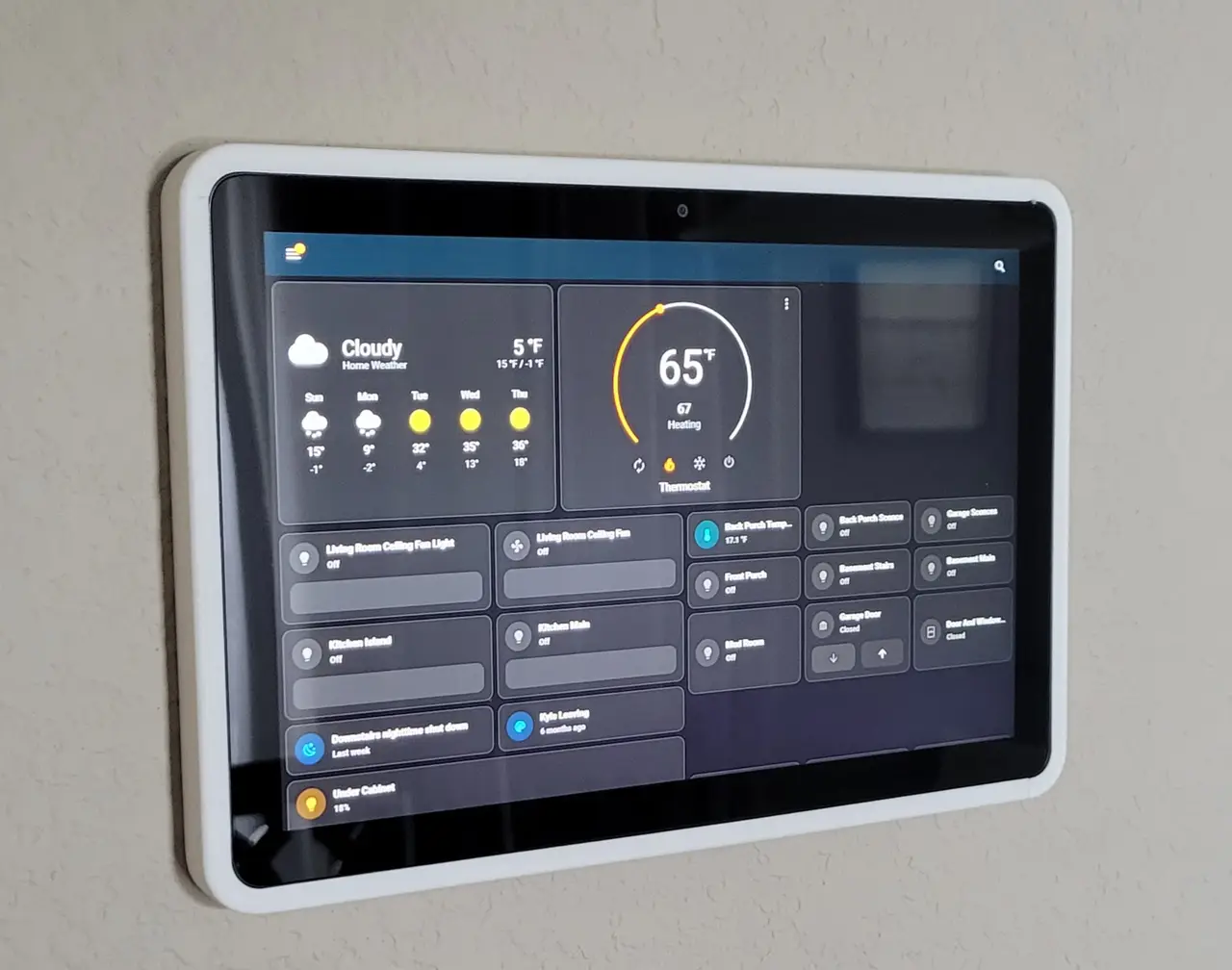
Wall Mount for Fire Tablet HD 10, 13thGen (2023) and 11th Gen (2021)
por RonanWarrior en Printables
A slim profile wall mount for a Amazon Fire HD 10 tablet so it can be used as a home automation dashboard.
Licencia
Uso comercial permitidoCC BY-SA 4.0 — Atribución, compartir igual
Puedes usarlo y modificarlo dando crédito; las versiones modificadas deben compartirse con la misma licencia.
Al descargar aceptas respetar la licencia y dar crédito a RonanWarrior.
Archivos (34)
- Fire HD10 13thgen Wallmount - Part B - Large Printers- v47.stl STL · 1,1 MB
- Fire HD10 13thgen Wallmount - Part A - Button holes - Large Printers- v47.stl STL · 371 KB
- Fire HD10 13thgen Wallmount - Buttons - v47.stl STL · 129 KB
- Fire HD10 13thgen Wallmount - Buttons - Large Printers- v47.3mf 3MF · 300 KB
- Fire HD10 13thgen Wallmount - Buttons - Large Printers- v47.f3d F3D · 2,0 MB
- Fire HD10 13thgen Wallmount - Buttons - v47.stl STL · 129 KB
- Fire HD10 13thgen Wallmount -TEST Print - Part A - Reset Pinhole - v47.stl STL · 226 KB
- Fire HD10 13thgen Wallmount -TEST Print - Part A - Button holes - v47.stl STL · 235 KB
- Fire HD10 13thgen Wallmount -TEST Print - Part B - v47.stl STL · 125 KB
- Fire HD10 13thgen Wallmount - Part B - Large Printers- v47.stl STL · 1,1 MB
- Fire HD10 13thgen Wallmount - Part A - Reset Pinhole - Large Printers- v47.stl STL · 367 KB
- Fire HD10 13thgen Wallmount - Reset Pin Hole - Large Printers- v47.3mf 3MF · 273 KB
- Fire HD10 13thgen Wallmount - Reset Pinhole - Large Printers- v47.f3d F3D · 2,0 MB
- Fire HD10 13thgen Wallmount - Buttons - v47.stl STL · 129 KB
- Fire HD10 13thgen Wallmount - Part A - Button holes - Medium Printers- v47.stl STL · 531 KB
- Fire HD10 13thgen Wallmount - Part B - Medium Printers- v47.stl STL · 977 KB
- Fire HD10 13thgen Wallmount - Buttons - Medium Printers- v47.f3d F3D · 2,0 MB
- Fire HD10 13thgen Wallmount - Part A - Reset Pinhole - Medium Printers- v47.stl STL · 527 KB
- Fire HD10 13thgen Wallmount - Part B - Medium Printers- v47.stl STL · 977 KB
- Fire HD10 13thgen Wallmount - Reset Pinhole - Medium Printers- v47.f3d F3D · 2,0 MB
- Fire HD10 11thgen Wallmount - Part A - Large Printers- v47.stl STL · 328 KB
- Fire HD10 11thgen Wallmount - Part B - Large Printers- v47.stl STL · 1,1 MB
- Fire HD10 11thgen Wallmount - Part A - Medium Printers- v47.stl STL · 440 KB
- Fire HD10 11thgen Wallmount - Part B - Medium Printers- v47.stl STL · 954 KB
- Fire HD10 11thgen Wall Mount Three part version - Small Printers v23.3mf 3MF · 70 KB
- Fire HD10 11thgen Wall Mount 3Parts - A or C- Small Printers v23.stl STL · 148 KB
- Fire HD10 11thgen Wall Mount 3Parts - B - Small Printers v23.stl STL · 129 KB
- Fire HD10 11thgen Wall Mount Test Prints - v23.3mf 3MF · 77 KB
- Fire HD10 11thgen Wall Mount Test Print Part A - v23.stl STL · 130 KB
- Fire HD10 11thgen Wall Mount Test Print Part B - v23.stl STL · 35 KB
- Fire HD10 13thgen Wallmount - Buttons - Part A and button- v47_0.15mm_PLA_MK3S_2h9m.gcode GCODE · 3,7 MB
- Fire HD10 13thgen Wallmount -Part B - v47_0.15mm_PLA_MK3S_10h31m.gcode GCODE · 15,3 MB
- Fire 10HD Gen11-2021- Wall Mount 2Parts - A - Large Printers v23_0.15mm_PLA_MK3S_1h57m.gcode GCODE · 3,0 MB
- Fire 10HD Gen11-2021- Wall Mount 2Parts - B - Large Printers v23_0.15mm_PLA_MK3S_10h15m.gcode GCODE · 14,3 MB
- Categoría
- Hogar
- Formatos
- STL, 3MF, F3D, GCODE
- Descargas
- 3,880
- Publicado
Sobre este modelo
Good News everyone! Now there is a version that is compatible with the 13thGen (2023) Fire HD 10 tablet. Not only that but now there is a new feature/option for physical buttons on the side of the mount for the power and volume buttons,13thgen only for now. I will be adding the stl's for the small printers after I get some testing done in the next week. Intro A slim profile wall mount for a Amazon Fire HD 10 tablet so it can be used as a home automation dashboard. I designed this around using a slim right angle USB C cable to charge the tablet. This way the side bezels of the wall mount can be about 6mm wide all they way around the screen. USB C Cable - So the “Best” cable, at least quality wise, that I design this wall mount to handle. https://www.etsy.com/listing/771904711/smart-home-mount-slim-usb-power-cable , it was around $19 with shipping. - I have also used the 20cm Version of cable from AliExpress https://www.aliexpress.us/item/3256801766430373.html, it was around $7.12 with shipping. There is no really warranty from mfg. - There are other cable on AliExpress but I have not test them yet, so use are you own risk for now. https://www.aliexpress.us/item/3256806000084383.html the “straight-bend 0.2m”version should also work. I have order one to test out myself but have not gotten it yet. Its currently $7.69 with shipping. Again there is no really warranty from mfg.
Printing The two part version "Large" main body is able to fit on a Prusa MK3, but the “door” will need to be printed separately. For mine I have printed it with a “Matte White Pla” from Overture as I did not want it to be glossy at the end. After printing I did use very high grit sand paper to smooth the sides and to get rid of layer lines. But sanding is not necessary for the mount to work. Test Prints I have included a file for a testing a partial main mount body so you can test slicing setting without having to print the entire thing. The most difficult part to print right are the tabs on the door that clip into the main body. The dovetail joint is the next "annoying" part to get right. I recommend a 0.15 layer height. Also depending on your printer you may need to adjust the orientation. To get the full sized part to fit, so when testing the partial parts, make sure they are in the same orientation that the full size parts will be in. I have included my 3mf file that I used to generate the final gcode I used. There are some modifiers for number of top layers and infill but that was mainly to limit amount of plastic used, but still keep the edges/bezels strong, and not strictly necessary for a good print. My personal setup For my setup I was able to run an POE Cat-5 cable to behind the wall where the tablet was going to be mounted. So then using a Calon Low Voltage Old Work Bracket (from a big box home center), I was able to mount the tablet to the wall and have a space to put the POE to UBS adapter. There is a small hole on the “door" so a small basic paper clip can be used to press the tablet power button incase of an needing a reboot. I then followed some tutorials online to get the tablet setup with Fully Kiosk Browser and Home assistant to get a functioning local only dashboard to start controlling smart stuff throughout the house. So now the tablet is always on, charged and I have not needed to take it out of the mount for now the last 6 months. I am now working on getting another one all set up for a different part of the house. Honestly hardest part always seem to be how to get power to the back off the mount cleanly and without making to many holes in the walls.
Change Log –- Update 7-21-2024 -- Revamped the model so its a bit more parametric and configurable, which means its now compatible with the 13th gen 2023 Fire HD10 this version now has holes for the microphone as well as holes for the speakers. Added text to the 11thgen and 13 gen models so when printed the parts are easier to identify Added new files - Large printer - Button version for the 13th gen - v47 - Large printer - Pinhole reset (original style) for 13 gen -v47 - Medium printer - Button version for the 13th gen -v47 - Medium printer - Pinhole reset (original style) for 13 gen -v47 - Test prints for 13th gen files - v47 - Large printer - (original style) for 11th gen -v47 - now with “11th gen” text - now with speaker and microphone holes
- Medium printer - (original style) for 11th gen -v47- now with “11th gen” text - now with speaker and microphone holes
-- Update 7-20-2024-- Changed Model Description and added additional links to other slim/flat angle usb c cables --Update 2-2-2023-- Now there are version for Small, Medium, and Large Printer beds Small: Three Part version that should fit on a Prusa Mini. Medium: Two Part version with split in parts adjusted so the larger Part B will fit on an Ender 3 bed Large: Two Part, the original version that fits on a Prusa MK3, the split is right at the corner to reduce an visible lines on the bezel Test Parts: These test parts are so you can test different slicer setting and Filaments without having to print out full parts. This way you can test out the critical features, such as the interlock back and the locking “spring” tab.
Descripción original del autor, publicada en Printables.