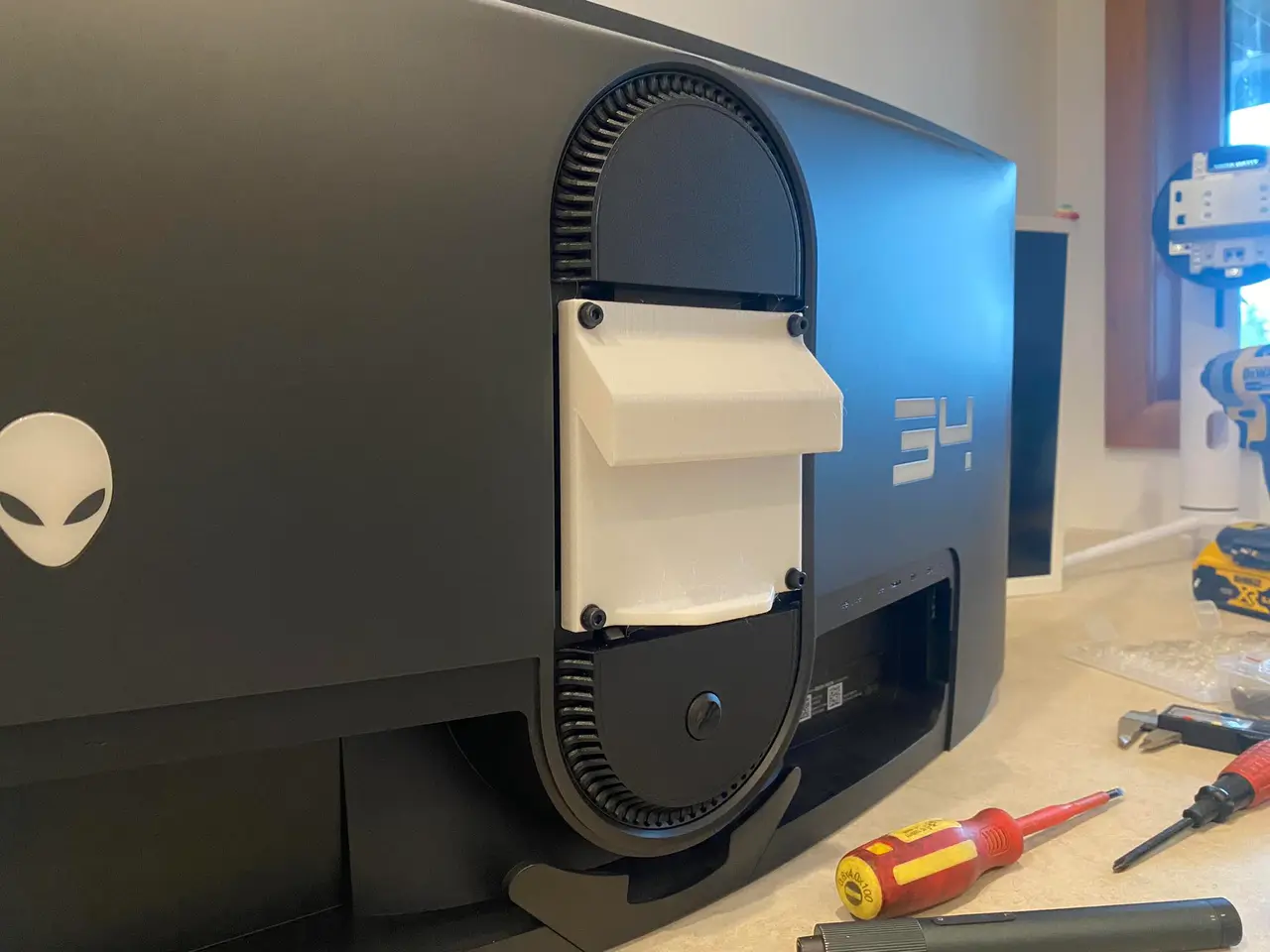
VESA 100x100 Low Profile French Cleat Wall Mount
por Morris Lazootin en Printables
French cleat wall mount for a PC monitor with 100x100 VESA mounting pattern.
Licencia
Solo uso personalCC BY-NC 4.0 — Atribución, no comercial
Puedes imprimirlo y modificarlo para uso personal dando crédito. No se permite vender las impresiones.
Al descargar aceptas respetar la licencia y dar crédito a Morris Lazootin.
Archivos (9)
- 100MM VESA BLOCK - MONITOR - BEVELED EDGES.stl STL · 40 KB
- VESA 45 DEG MOUNTING RAIL 200MM.stl STL · 60 KB
- 5mm spacer.stl STL · 40 KB
- 10mm spacer.stl STL · 53 KB
- French Cleat 100mm Vesa Wall Mount v3.step STEP · 80 KB
- French Cleat 100mm Vesa Wall Mount v2.3mf 3MF · 63 KB
- French Cleat 100mm Vesa Wall Mount v2.f3d F3D · 277 KB
- French Cleat 100mm Vesa Wall Mount v2.obj OBJ · 195 KB
- 100MM VESA BLOCK - MONITOR - BEVELED EDGES - 3.5DEG DOWNTILT.stl STL · 45 KB
- Categoría
- Hogar
- Formatos
- STL, STEP, 3MF, F3D, OBJ
- Descargas
- 1,568
- Publicado
Sobre este modelo
Are you feeling overwhelmed by your monitor taking up too much space on your desk? It's time to take a stand and reclaim your workspace with this French cleat, low profile monitor wall mount. This mount is designed to be both strong and space-saving, providing maximum support for your monitor while taking up minimal desk real estate. The easy-to-use French cleat system allows you to effortlessly adjust and remove your monitor without any risk of it falling to the ground at a rate of 9.8m/s/s. So don't let your desk be a battleground between you and your monitor. Upgrade to this smart and stylish wall mount and enjoy a clutter-free workspace! Designed to be printed with my Bambu X1 Carbon 0.8mm with three perimeters and 15% infill - if you're using a 0.4mm nozzle, I highly recommend at least five perimeters, to be safe. All printed angles are 45 degrees or greater, no supports required. You will likely need longer bolts than the ones included in the back of your monitor - generally speaking they are M4. I printed in generic PLA, but if you're a perfectionist, you should probably print in PETG in case the PLA gets soft with heat. Can easily handle my Alienware DWF QD-OLED 6.27 kg (13.82 lbs.) - As of December 2023 (six months), there is no noticable sag or any changes to this mount, printed in PLA.
- It's February 2026 and the monitor is still on the wall (touch wood).
Features: 100x100 VESA mount block Print vertically, with one side of the cleat flat with your print-bed, so that the perimeters bare the force of the strain, and not your layer adhesion. (See image for reference) - 10mm thick mounting plate
- 100x100 bolt spacing
- 20mm french cleat (45 degrees)
- Filleted corners on cleat
- 45 degree chamfers on backplate to ensure clearance on back of monitor
- 4.5mm bolt holes
- 20mm spacer on bottom of block, to keep your monitor vertical (note: this part touches your wall, and might mark your surface if you slide the monitor side to side)
Wall Rail Print flat on your print-bed, with screw-holes facing down (either way will work) When attaching this rail to the wall, I highly recommend making sure that at least one of the screws is in a wall stud - then use a plasterboard wall anchor for one of the other screws. - 200mm wide to allow for positioning depending on stud location
- 20mm tall to sit flush inside the mount block
- 5x 4.5mm screw holes, positioned 33mm apart.
- 45 degree chamfer up to 14.5mm diameter to allow for screw head to sit flush
- Stop blocks on each end of rail to stop your monitor from sliding off
- Filleted corners on cleat
- Note: the pictured wall rail is different from the included STL - the newer version removes the curved stops on each end of the rail, so that the rail can be printed in any orientation.
Spacers I've included 5mm and 10mm spacers (with 4.5mm bolt hole) in case your VESA mounting points are too “deep” inside your monitor. Tilt I've included a mount with a 3.5 degree tilt, as one of my screens had it's VESA mount points at a silly angle. Edit it yourself I've attached a whole bunch of exported files from Fusion360. I don't know which one you guys can use, so please take all of them.
Descripción original del autor, publicada en Printables.