
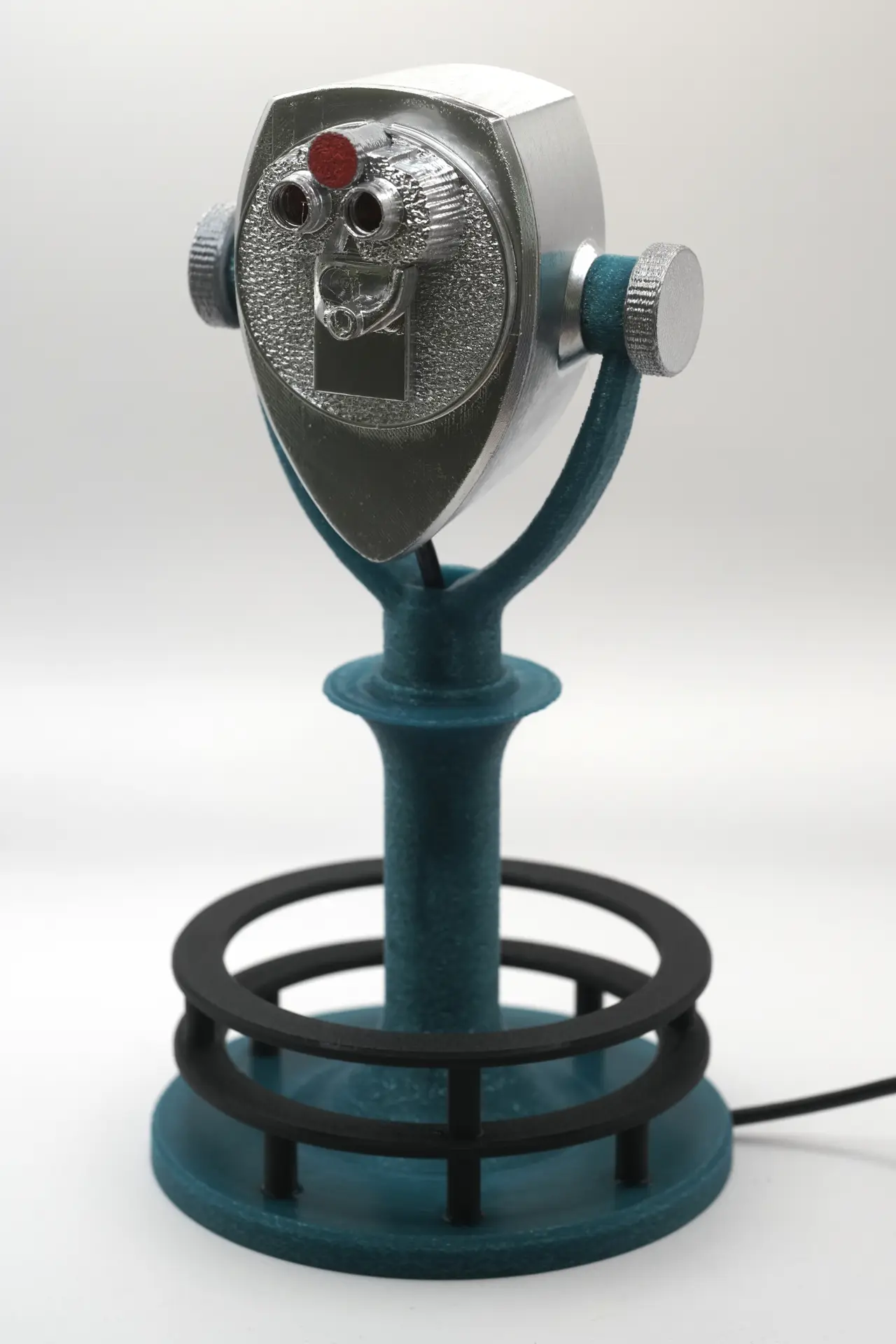
USB KISS Viewer
por ProfHankD en Printables
USB version of Kentucky's Interchangeable lens Small Sensor camera in a mini Viewer accepts Sony E/FE mount lenses
Licencia
Uso comercial permitidoPuedes imprimirlo, modificarlo y venderlo dando crédito al autor.
Al descargar aceptas respetar la licencia y dar crédito a ProfHankD.
Archivos (10)
- Categoría
- Tecnología
- Formatos
- STL
- Descargas
- 0
- Publicado
Sobre este modelo
USB KISS Viewer is a version of Kentucky's Interchangeable lens Small Sensor camera in a mini Viewer designed to re-house an unmodified industrial/board CS-mount USB UVC camera such as this ELP model. The basic shape suggests the classic look of a Tower Optical Binocular Viewer, and the unit has a pair of viewing holes that can be used for approximate aiming, but the unit is actually just a mount for a USB UVC camera. The neat trick here is that not only can you use it with the CS-mount lens your camera came with, but an adapter to CS mount allows you to use just about any manual lens. Because USB UVC cameras tend to use physically small sensors, even a "fast fifty" normal lens will produce a fairly extreme telephoto view -- a lot like the view you'd get through an actual Tower Optical Viewer. Although CS mount should be able to use just about any manual lenses due to its short flange focus distance, there don't seem to be commercial adapters for various lens mounts to a CS body. Fortunately, you can 3D print your own. The only one I found out there as a free 3D-printable design was M42 CS-Mount Adapter by Labfruits, but I've managed to create a workable design for an adapter accepting Sony E/FE mount lenses or adapters. It was not an easy adapter to design, and it is a bit touchy to print, but it works. My adapter is freely available as Locking Sony E/FE Lens To CS Mount Body Adapter. In fact, if you just want to mount arbitrary lenses on a USB UVC CS-mount webcam, you can just print that and ignore the USB KISS Viewer... Although a lot of information is posted here, the complete overview of KISS Viewer is posted as an Instructable: KISS Viewer: Kentucky's Interchangeable-lens Small Sensor camera in a mini Viewer. Any additional info will be posted at https://aggregate.org/DIT/KISS. This version is an extremely easy build, although there are a lot of parts to 3D print. This Printables posting is where you get the latest part STLs to 3D print. Printing Like KISS Viewer, the assembled USB KISS Viewer would fit in a cylinder 260mm tall with a diameter of 144mm -- which is fairly large for a 3D-printed object. All parts are designed to be printable without supports using a typical FDM printer with a 0.4 mm nozzle. Each part is in a file named with the prefix "usbviewer_" and numbered like the parts of the original KISS Viewer. In fact, the only parts that are different are parts 2 and 3 (or 11 and 12). Although most parts should be strong enough using default print settings, parts 3 (or 11 and 12), 6, 8, and 9 are potentially prone to breaking at layer interfaces. Printing those parts with thicker walls or stronger infill wouldn't hurt, and enabling infill combination in your slicer can significantly help avoid cracking at layer boundaries while also reducing print time. To most closely match the look of a Tower Optical Viewer, I recommend printing parts 1, 2, 6, a second 6, and 7 using Silk Metallic Silver PLA. Parts 3, 4, and 5 should all be the same material, with good choices including Black PLA, Dark Green PLA, and Silk Metallic Silver PLA. Parts 11 and 12 are essentially an alternative to part 3 that has been broken into two pieces that screw together for those with printers that can't handle anything over 120mm tall. Part 6a and a second part 6a basically are rectangular cores to go inside the part 6 prints and can be printed in any material. Because these cores are printed in a different orientation, inserting (and gluing) them into the part 6 pieces greatly increases the strength of those parts, which is important because they provide the clamping force to keep a mounted lens from drooping. Note that here we don't have a Part 8 because the E/FE mount is simply the CS-mount adapter described above. There also isn't any Part 9 or Part 10, because they were specific to the use of an ESP32-CAM boardlet as the imaging engine. Note that you can get an even shinier chrome look by painting printed parts with silver paint rather than using Silk Metallic Silver PLA. Unlike the original KISS Viewer, there isn't any place where paint would be likely to interfere with part functionality, so feel free to paint parts -- as I did for the unit shown in the photos. Assembly None of the 3D printed parts should require significant postprocessing, but some assembly is required: - If you printed part 11 and 12, you can screw (and optionally glue) those parts together to create what is effectively your part 3.
- Part 4 should be glued into the indentations in part 3 and given time for the glue to set. Alternatively, the parts can be welded together using a soldering iron. Note that the part 4 ring has a large enough internal diameter to easily pass over the top of part 3.
- Part 5 should be glued into the indentations in part 4 and given time for the glue to set. Alternatively, the parts can be welded with a soldering iron. Note that the part 5 ring has a large enough internal diameter to easily pass over the top of part 3.
- Both pairs of parts 6 and 6a need to have the rectangular 6a parts glued into the slot in part 6 as a stiffener. The better the glue bond, the stronger these parts will be; I used cyanoacrylate glue.
- Mount part 2 within the fork of part 3 using the 6+6a screws. Don't overtighten -- we know you are stronger than the 3D-printed screws. ;-)
- It is now time to mount your USB UVC camera in Part 2. Slide it in with the CS mount protruding through the circular hole. Note that, if your camera is wider or taller than 44mm, you will need to modify the Part 2 design to make it fit. Snake the USB cable through the hole in the bottom of Part 2 and through Part 3. Use hot glue to keep both the USB UVC camera and its cable locked in place.
- Mount a lens on the unit. This can be the default CS-mount lens your camera probably came with or it can be almost any manual lens by using my free design for a Locking Sony E/FE Lens To CS Mount Body Adapter.
- The final step of assembly is mounting the viewer-side cover, part 1, on part 2. The cover is deliberately held by a single screw, part 7, so that it can easily swing out of the way to access the inside of part 2 -- although you'll almost never need to do that with USB KISS Viewer.
User Guide Start by plugging it in. That should be trivially easy if you're using a computer, but perhaps a little harder if you want to use USB KISS Viewer with a tablet or smartphone because they might not be able to supply enough power for your USB UVC Camera. If that's the case, you need an appropriate power supply and an OTG (On The Go) cable that will let your tablet or smartphone be a USB Host while power for the device comes from whatever power source you connect to the other lead in the cable -- typically either a USB charger or a rechargeable USB battery. Once you've got it plugged in, you just need an application that can grab images from a USB UVC device. There are many such applications, from guvcview to Zoom. However, you need to know that the USB UVC (Universal Video Camera) specification only standardizes how the camera describes its features and the control protocol; individual devices can present a multitude of different options, and UVC software is not required to support all of them. For example, the cheese program does pretty well displaying a video feed from any UVC camera, but it doesn't offer the user many of the options a camera might say it offers. In contrast, guvcview exposes most/all options, and that allows it to produce better images than cheese using the same camera under very similar circumstances. For example, guvcview allows manual setting of shutter speed with my camera, but cheese doesn't. Enjoy!
Descripción original del autor, publicada en Printables.



