Universal Screw Knob Maker (OpenSCAD)
por SteveS42 en Printables
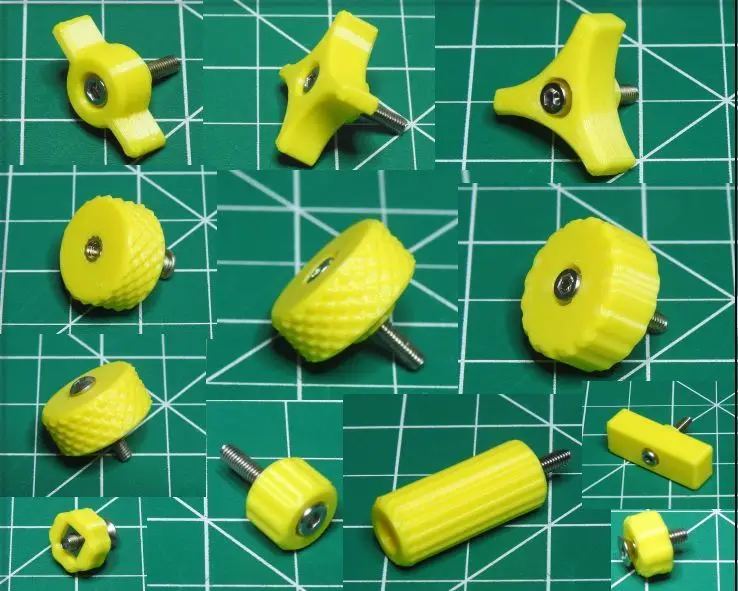
Create a custom knob, of any size, with any style grip, for any size screw, with any style head, and any style nut.
Licencia
Solo uso personalCC BY-NC-SA 4.0 — Atribución, no comercial, compartir igual
Uso personal dando crédito; sin fines comerciales y las modificaciones con la misma licencia.
Al descargar aceptas respetar la licencia y dar crédito a SteveS42.
Archivos (11)
- M3 3-Lobe.stl STL · 147 KB
- M3 4-Lobe.stl STL · 195 KB
- M3 Countersunk, Square Nut.stl STL · 140 KB
- M3 Insert 3x6x5.stl STL · 548 KB
- M3 Knurl.stl STL · 573 KB
- M3 Ribbed.stl STL · 491 KB
- M3 T handle.stl STL · 155 KB
- M3 Tall.stl STL · 129 KB
- Universal Screw Knob.scad SCAD · 17 KB
- Quick Start Guide OpenSCAD.pdf PDF · 2,4 MB
- Universal Screw Knob.json.txt TXT · 10 KB
- Categoría
- Repuestos
- Formatos
- STL, SCAD, PDF, TXT
- Descargas
- 1,950
- Publicado
Sobre este modelo
Design I found many knob designs, but none that were very flexible. I looked at the comments and suggestions of several of them and decided to create a customizable design that should satisfy just about everybody. Using the Customizer The settings in the Customizer may seem somewhat overwhelming at first, so here is an explanation: Screw/Bolt Thread Details - Thread Diameter - The measured diameter of the threads.
- Thread Clearance - The total space you want around the threads on all sides.
- Thread Length - This is only for your visual reference. The length from the head to the end.
Head Details - Head Style - Round (Socket Cap, Pan, Round, etc.)
- Countersunk
- Hex
- Head Diameter - The measured diameter of the (round) head.
- For hex, it is from point to point - not from flat to flat.
- Head Hex Across Flats - If you don't know or can't easily measure the distance from point to point, you may enter the easily measured distance from flat to flat and the program will calculate the diameter.
- If you enter a value here, and the style is Hex, the Head Diameter will be calculated with it.
- If you leave this at zero, the Head Diameter will be what you entered.
- Head Clearance - The total space you want around the head on all sides.
- Head Height - The height of the space you want for the head.
- Note: If you set this to an amount less than the actual measurement, the head will stick up above the knob. You may enter zero for a round or hex head to be completely exposed above the knob.
- Countersunk Angle - If the style is Countersunk, the program will calculate the Head Height using this angle.
- These are the most common countersink angles: 60°, 82°, 90°, 100°, 110°, or 120°.
- Metric mostly uses 90°. Imperial mostly uses 82°.
-
Nut Details - Nut Style - Hex
- Square
- Round (for threaded inserts).
- Nut Diameter - This is the measured diameter from point to point - not from flat to flat.
- Nut Hex Across Flats - If you don't know or can't easily measure the distance from point to point, you may enter the easily measured distance from flat to flat and the program will calculate the diameter.
- If you enter a value here, and the style is Hex, the Nut Diameter will be calculated with it.
- If you leave this at zero, the Nut Diameter will be what you entered.
- Nut Square Across Flats - If you don't know or can't easily measure the distance from point to point, you may enter the easily measured distance from flat to flat and the program will calculate the diameter.
- If you enter a value here, and the style is Square, the Nut Diameter will be calculated with it.
- If you leave this at zero, the Nut Diameter will be what you entered.
- Nut Clearance - The total space you want around the nut on all sides.
- Nut Height - The height of the space you want for the nut.
Descripción original del autor, publicada en Printables.