Universal 3D-Printable Spring Latch Mechanism (No Supports, Fully Modular)
por Iker Libano | KNIN Custom en Printables
A fully 3D-printable spring latch you can import into any model. Universal, reliable, support-free, and easy to integrat
Licencia
Uso comercial permitidoPuedes imprimirlo, modificarlo y venderlo sin pedir permiso ni dar crédito.
Al descargar aceptas respetar la licencia y dar crédito a Iker Libano | KNIN Custom.
Archivos (24)
- BIG_Latch_Housing_STEP.step STEP · 895 KB
- SMALL_Latch_Housing_STEP.step STEP · 898 KB
- BIG_SpringButton_AutoSnap.stl STL · 70 KB
- BIG_SpringButton_FingerPress_3mm6mm.stl STL · 61 KB
- BIG_SpringButton_Flat_3mm6mm.stl STL · 54 KB
- BIG_SpringButton_Flat_3mm6mm.stl STL · 54 KB
- SMALL_SpringButton_AutoSnap.stl STL · 70 KB
- SMALL_SpringButton_FingerPress_3mm6mm.stl STL · 80 KB
- SMALL_SpringButton_Flat_3mm6mm.stl STL · 61 KB
- SMALL_SpringButton_Flat_3mm6mm.stl STL · 61 KB
- BIG_ExampleLid_WithLatch.stl STL · 462 KB
- BIG_ExampleBox_WithLatch.stl STL · 60 KB
- SMALL_ExampleLid_WithLatch.stl STL · 576 KB
- SMALL_ExampleBox_WithLatch.stl STL · 92 KB
- BIG_ExampleLid_Empty.stl STL · 26 KB
- BIG_ExampleBox_Empty.stl STL · 55 KB
- SMALL_ExampleLid_Empty.stl STL · 32 KB
- SMALL_ExampleBox_Empty.stl STL · 87 KB
- BIG_Buttons_STEP.step STEP · 374 KB
- BIG_Example_Box_With_Latch_STEP.step STEP · 1,9 MB
- BIG_Example_Box_Empty_STEP.step STEP · 129 KB
- SMALL_Buttons_STEP.step STEP · 398 KB
- SMALL_Example_Box_With_Latch_STEP.step STEP · 2,1 MB
- SMALL_Example_Box_Empty_STEP.step STEP · 128 KB
- Categoría
- Repuestos
- Formatos
- STEP, STL
- Descargas
- 3,710
- Publicado
Sobre este modelo
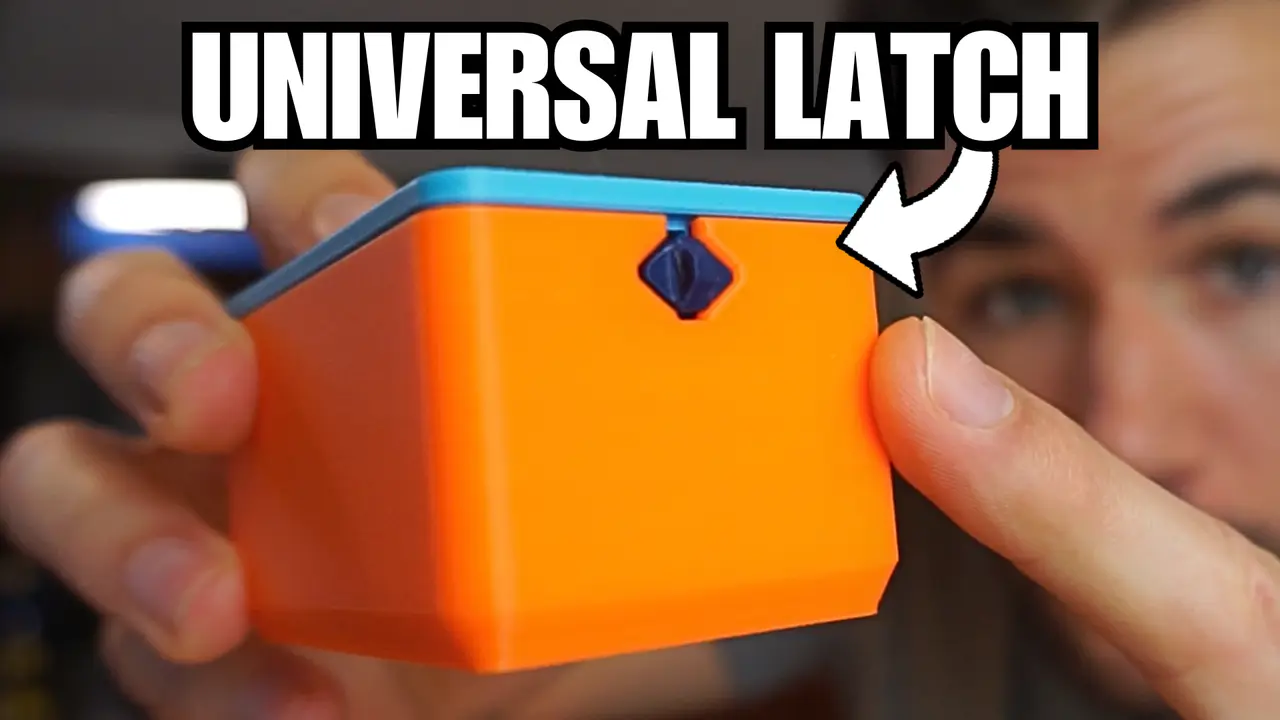
🌟 Universal 3D-Printable Spring Latch Mechanism A reliable, support-free, fully modular system for connecting 3D-printed parts. Import it. Place it. Combine. Done. 🎥 YouTube Tutorial
A complete breakdown of how the spring works, how to integrate it, and how to modify the button. This project provides a universal latch mechanism you can embed into any 3D model—boxes, lids, enclosures, drawers, panels, tools, anything that needs a clean, reliable click-to-close & press-to-open system. No screws, no inserts, no tolerances headaches, no fragile snap-fits. Just a simple spring + housing + button, all printed on any machine with zero supports. 🔧 How the Mechanism Works The system is made of three elements: 1 Spring Button (the dark blue part) - Fully 3D-printed spring, 1.2 mm thick, extremely durable.
- Works in the optimal orientation for layer strength → very hard to break.
- Two side heads lock into the housing so the spring cannot escape.
- Interchangeable button styles depending on how often you want to open the mechanism.
2 Latch Housing (the light blue part) - You import this STEP into your CAD software (Fusion recommended).
- Align it where you want the latch → combine → finished.
- Includes internal geometry to hold the spring securely.
- Designed with 45° printable walls so the cavity prints perfectly without supports.
3 Outer Cut Guide (the red bar inside the housing STEP) - This defines the exact opening the button needs on the outer wall of your model.
- Simply extrude-cut using this guide → hide/delete → export your STL.
🚀 Why This Mechanism Matters After printing dozens of snap-fits, I realized something: there is no standardized, reliable way to connect 3D-printed parts with a clean, reusable latch. Snap-fits break. Tolerances vary. Orientation matters too much. ✔ New Auto-Snap Button variant that installs itself without pressing the spring manually. So I designed a mechanism that is: ✔ Universally embeddable in any CAD model ✔ Totally support-free ✔ Material-independent (PLA, PETG, ABS all work) ✔ Durable — spring works along the layer lines ✔ Interchangeable — buttons and springs can be swapped ✔ Parametric-friendly — available as STEP ✔ Professional & clean — no exposed weak geometry My goal is to make this a standard connector for the 3D printing community. Take it, modify it, use it in your own projects! 🧩 Included Button Types You now get 4 fully compatible spring-button variants: • Base Button (3 mm / 3 mm) Reference spring with minimal ends for designing custom button heads. • Flat Button (3 mm inside / 6 mm outside) Stays flush with the surface. Ideal for designs that shouldn’t open accidentally. • Finger-Press Button (6 mm + grip protrusion) Best for boxes or enclosures that need to be opened frequently. • Auto-Snap Button (self-closing) 🆕 This button is printed with a built-in angled geometry that automatically snaps into position during assembly. You don’t need to press the spring to install it—the head slides in by itself and locks automatically. To remove it, you still press the small inner head and slide it out. Perfect for fast assembly or modular projects. 📦 Included Files Mechanism (STEP files) - Latch_Housing_STEP.step
- Buttons_STEP.step
- Example_Box_Empty_STEP.step
- Example_Box_With_Latch_STEP.step
Spring Buttons (STL) - SpringButton_Reference_3mm3mm.stl
- SpringButton_Flat_3mm6mm.stl
- SpringButton_FingerPress_3mm6mm.stl
- SpringButton_AutoSnap.stl 🆕
Example Box (STL) - ExampleBox_Empty.stl
- ExampleBox_WithLatch.stl
- ExampleLid_Empty.stl
- ExampleLid_WithLatch.stl
🛠 How to Integrate the Mechanism in Fusion 360 - Import the Latch Housing STEP.
- Place it where you want your latch.
- Modify → Combineto embed it into your model.
- Extrude-cut the outer wall to create the button opening using the red profile inside the Latch Housing.
- Hide/delete guide & housing.
- Export your STL.
- Print → Insert button → done.
Descripción original del autor, publicada en Printables.