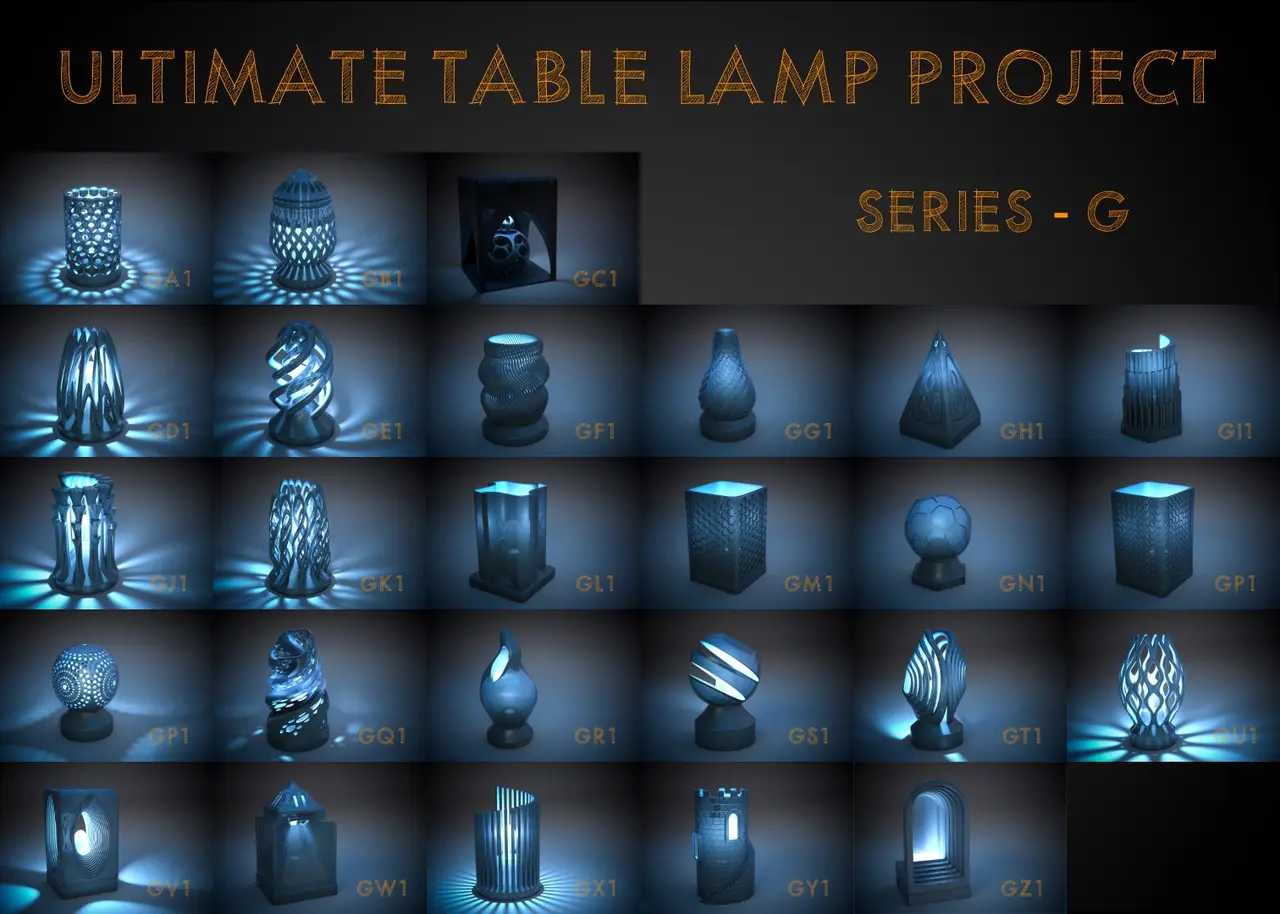
Ultimate Table Lamp Project - Mood Light - Series G
por SteedMaker en Printables
A series of table lamp designs.
Licencia
Solo uso personalCC BY-NC-ND 4.0 — Atribución, no comercial, sin derivadas
Solo para uso personal, sin modificarlo y dando crédito. No se permite vender ni redistribuir cambios.
Al descargar aceptas respetar la licencia y dar crédito a SteedMaker.
Archivos (27)
- Lamp GA_1.stl STL · 124,8 MB
- Lamp GB_1.stl STL · 174,9 MB
- Lamp GC_1.stl STL · 209,4 MB
- Lamp GD_1.stl STL · 163,6 MB
- Lamp GE_1.stl STL · 112,7 MB
- Lamp GF_1.stl STL · 231,7 MB
- Lamp GG_1.stl STL · 196,9 MB
- Lamp GH_1.stl STL · 205,8 MB
- Lamp GI_1.stl STL · 112,8 MB
- Lamp GJ_1.stl STL · 124,8 MB
- Lamp GK_1.stl STL · 78,9 MB
- Lamp GL_1.stl STL · 140,4 MB
- Lamp GM_1.stl STL · 162,1 MB
- Lamp GN_1.stl STL · 161,8 MB
- Lamp GO_1.stl STL · 208,0 MB
- Lamp GP_1.stl STL · 231,7 MB
- Lamp GQ_1.stl STL · 92,3 MB
- Lamp GR_1.stl STL · 137,0 MB
- Lamp GS_1.stl STL · 156,8 MB
- Lamp GT_1.stl STL · 124,6 MB
- Lamp GU_1.stl STL · 112,6 MB
- Lamp GV_1.stl STL · 148,3 MB
- Lamp GW_1.stl STL · 191,6 MB
- Lamp GX_1.stl STL · 130,5 MB
- Lamp GY_1.stl STL · 179,1 MB
- Lamp GZ_1.stl STL · 166,0 MB
- Light Cord Bracket.stl STL · 3,4 MB
- Categoría
- Hogar
- Formatos
- STL
- Descargas
- 550
- Publicado
Sobre este modelo
Intro I was looking at salt lamps, and those inspired me to design table mood lamps. I have always enjoyed creating artistic, modern, organic, and geometric shapes. However, most of those creations were merely for artistic or aesthetic purposes and lacked practical functionality. Directing my creativity for the purpose of lamps was a way to combine function with artistic structure. With that purpose in mind, I created numerous lamp designs using a standard lamp template that uses standard salt lamp fixtures. The photo below is one example. Example Print - Lamp BA-1 Links to Series I have created several project series with numerous design options in each. Here are the links to the other series: - Series A
- Series B
- Series C
- Series D
- Series E
- Series F
- Series G (this one)
- Series H
These models were NOT created with any use of AI. Components Light Fixtures The lamps in this project are designed for salt lamp fixtures. Here are two example fixtures that should work (one with just an on-off switch and another with a dimmer switch): - Himalayan Light Bulb Outlet Salt Light Cord Replacement
- Salt Lamp Cord with Dimmer Control
Light Bulbs The light bulbs for the fixtures are generally purchased separately from the light fixtures. The standard bulb size is E12. I wanted the lights to be quite bright, so I went with the 60W version. If you elect the dimmable fixture, make sure the bulbs are also dimmable. Cord Holder Bracket There is a cord holder bracket file included that should be printed out to act as a retainer. The lamps are designed with a hole for the light bulb and a bracket opening (rectangular cutout) in the bottom to slide in the light fixture springs. Once the light fixture (with the lightbulb) is in place, you can thread the cord into the light fixture bracket hole. Then slide the bracket up into the bracket opening in the printed lamp - you can wedge it up at an angle if necessary. This stays in place with friction. This bracket will help stabilize the light bulb and fixture and keep it upright. Do not permanently glue the bracket; otherwise, you won't be able to replace the light bulb when it goes bad. Print Size Specifications - These prints require a large build area.
- The lamps are designed to be printed 150mm wide; there are a few designs that exceed this in terms of their length. You might get away with reducing the overall size of the model by 10 mm (140 mm), but any further reduction and the bulb will not fit through the bottom opening. If the design has a large top opening, then you could probably get away with reducing the size by 20 mm and then installing the bulb from the top.
- The height varies with the model, but most are between 200 and 250 mm tall. You can get away with reducing or increasing the vertical height of the model by a significant amount to accommodate a shorter or taller build area.
- If you have a fairly large print area, but it is still too small to accommodate resizing, send me a message indicating which lamp model you want to print out (e.g., Lamp AB-1), specify your printer's build volume, and I will see what I can do.
Printing the Lamp: Cord Holder Bracket: You can either print the cord holder bracket with the lamp if there is room on your build plate, or print it separately. Note: The bracket may not work with the top-down designed lamps - probably not enough room after you put in the light fixture. However, it should hold in place, but if you have concerns, you could tape the fixture in place. Supports Most of the lamps were designed to print without supports. Verify this by scrolling through the sliced version in your slicing program. Controlling Transparency The lamp's transparency level and amount of light emitted from the lamp will depend on numerous factors: - transparency of the resin or filament
- thickness of lamp walls - and that is different for every lamp design
- printing with hollow walls
- use of infill
- the wattage of the bulb
Every setup and model will be different, so one can either use a small sample file of similar thickness to test transparency or use a guestimation approach and go for the final print. Some models have thick walls, others have thin walls,s so you can control that by hollowing the model and setting the wall thickness in your slicing program. Using more or less infill in the hollowed-out walls will also affect transparency levels. Many of the models will print fine without infill or internal supports, even hollowed out; others will need it - determine if your model needs supports by previewing the layers with your slicing program. FDM Printing Considerations: - Consider printing the lamp with infill so that the large size of the base doesn't cause the print to start lifting off the build plate.
Resin Printing Considerations: - Hollow the print file. The printed example lamp (photo above) was done with my resin printer (Peopoly Prime printer), but it started to fail because the base became too heavy. It just barely worked, and I had to use epoxy glue to fill a gap. In your slicing program, after you hollow the base area, you can use your slicing program to drill at least two holes (5 mm) in the back of the base to reduce suction and for post-print cleaning. Depending on the internal structure of the model, you may need infill or internal supports to support any internal horizontal structures (just a couple of the models have this problem).
- You should also drill holes (5 mm) wherever there will be considerable suction. For instance, most models need holes at the base of the sloping light fixture inside the lamp design when there is a solid inner wall that will cause suction between the outer wall and the coneshaped structure that supports the light fixture.
- A cool feature is to gradually add transparent resin as it prints, so that the base is not transparent, but by adding transparent resin over time, you can create a nice graduated look to the transparency. Getting this right can be tricky; determining how much opaque resin to start with and then how much transparent resin to add over time is best done by guestimation.
- After the print is done, take it off the build plate (wash as appropriate). Generally, I don't wash unless I have hollow areas that need washing out,
- I then brush the outside with a thin layer of resin. I put the print in the curing station (on a silicon mat), then I check for drips after 15 minutes, and then UV-cure the print. This process creates a smooth, shiny result, with no need for any other post-processing.
Post Processing Suggestions - To create a highly shiny, smooth result, brush the final print with quick-setting hobby epoxy in a nondust environment and then cover with a clean container so that dust doesn't settle on the epoxy.
- If you hollow the print but want to give it more weight for added stability, you could consider drilling a hole (either post-processing or in your slicing program) in the back of the base and filling the hollow with quick-setting epoxy hobby resin. If you use an FDM printer and use infill. The infill pattern you select will determine if you can fill it with epoxy resin. You might be able to use a physical drill to provide a way for the resin to pass through the infill pattern - depending on the pattern.
Installing the Light Fixture
Conclusion: I hope you enjoy these lamp designs and share your lamp makes with the community. Updates: I fixed the geometry on some of the models (Oct 18, 2026) (GA_1, GH_1, GK_1, GN_1, GQ_1).
Descripción original del autor, publicada en Printables.