
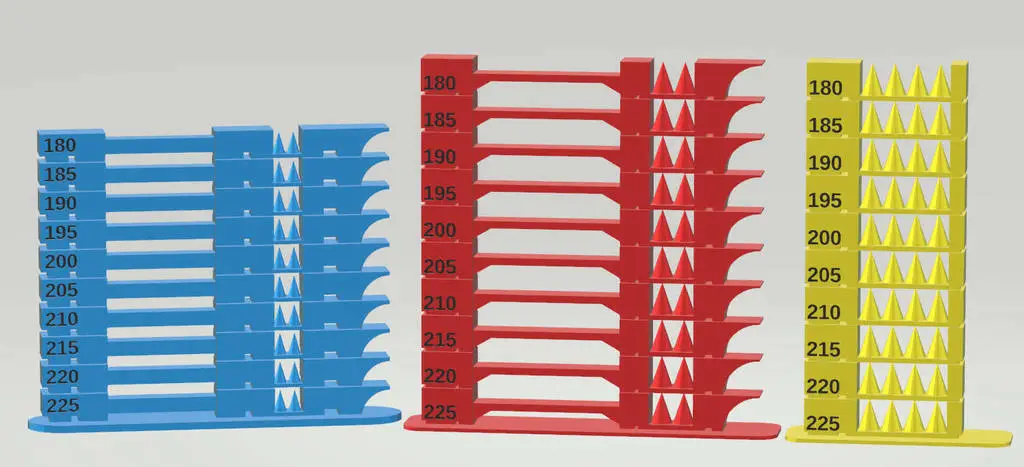
Ultimate Customizable Temperature Tower
por josephclarke333 en Cults3D
Introduction
Cults3D entrega los archivos a usuarios con cuenta gratuita
Licencia
Uso comercial permitidoPuedes imprimirlo, modificarlo y venderlo dando crédito al autor.
Al descargar aceptas respetar la licencia y dar crédito a josephclarke333.
Archivos (11)
- Automatic_Temperature_Change_Script.zip ZIP
- Compact_ABS_250-205.stl STL
- Compact_PETG_265-220.stl STL
- Compact_PLA_225-180.stl STL
- Customizable_Temperature_Tower.scad SCAD
- Standard_ABS_250-205.stl STL
- Standard_PETG_265-220.stl STL
- Standard_PLA_225-180.stl STL
- Stringing_Only_ABS_250-205.stl STL
- Stringing_Only_PETG_265-220.stl STL
- Stringing_Only_PLA_225-180.stl STL
- Categoría
- Herramientas
- Formatos
- ZIP, STL, SCAD
- Descargas
- 4,900
- Publicado
Sobre este modelo
Introduction
Project Goals
I decided to design this temperature tower as when I test new filaments I sometimes only want to test for stringing issues but sometimes all I want to know is what temperature is best for overhangs and there was no temperature tower where I was able to disable the elements I didn't want. I also use an older version of cura making adding temperature changes a pain so I wanted some way to just have it done automatically with no special slicer setting. When I set out to design this tower I wanted it to fulfill the flowing criteria:
* All basic settings are fully customizable
* Different elements of the tower (eg. bridging test, stringing test) are able to be disabled
* Each element of the tower can be fully customized (for example adding lots of thin cones to really test for stringing issues)
* The overhang test can have set angle "steps" which allows you to more easily see at which angle you start to encounter issues
* The bridge from the bridging test can be made really long as most temperature towers have short bridges which print fine at nearly any temperature on most of my printers
* Be able to make a really small tower that prints fast with only the temperatures and tests that you want to test for
* Look 1good
Summary
I feel I've managed to implement most of these goals so far and I'm eager to see what features/improvements others want so that I can make this the most adaptable, easy to use temperature tower on thingiverse.
The Tower
Introduction And Presets
I've designed the tower to be as customizable as possible but I've also included some presets in the download as follows
* Standard - Standard settings in the customizer, about 4 hours print time.
* Compact - Customized settings to speed up print time as much as possible without sacrificing test quality, about 1 hours 45 mins print time
* Stringing - Extensive stringing test with 4 cones to really test for stringing issues, every other test was disabled, about 2 hours 15 mins print time.
* Minimal - Tests for a limited set of temperatures in 10C increments as well as reducing other tests as much as possible which still keeping useful results, good for a quick and nasty test of a new type/brand of filament. About 40 mins print time
I'm happy to add more presets to the temperature change script as well as the download if people find other settings more useful
Basic Settings List
Levels - The ammount of levels in the tower
tempIncrement - How many degrees to go up each level
startTemp - Which temperature to use for the first level
tempOrder - Whether the temperature goes up or down from the startTemp (Ascending means the temperature goes up by tempIncrement each level)
baseType - What style of base to put on the tower
levelDepth - How deep (or thick) the tower will be
levelHeight - How high each level of the tower will be
baseMargin - How big the base will be (How many mm margin will be on the base). As the automatic temperature script doesn't currently support rafts increasing this number can give an extra big base if you have trouble with warping
enableTemperature, enableBridge, enableStringing, enableOverhang - Whether of not to include the given component in the tower
Descripción original del autor, publicada en Cults3D.



