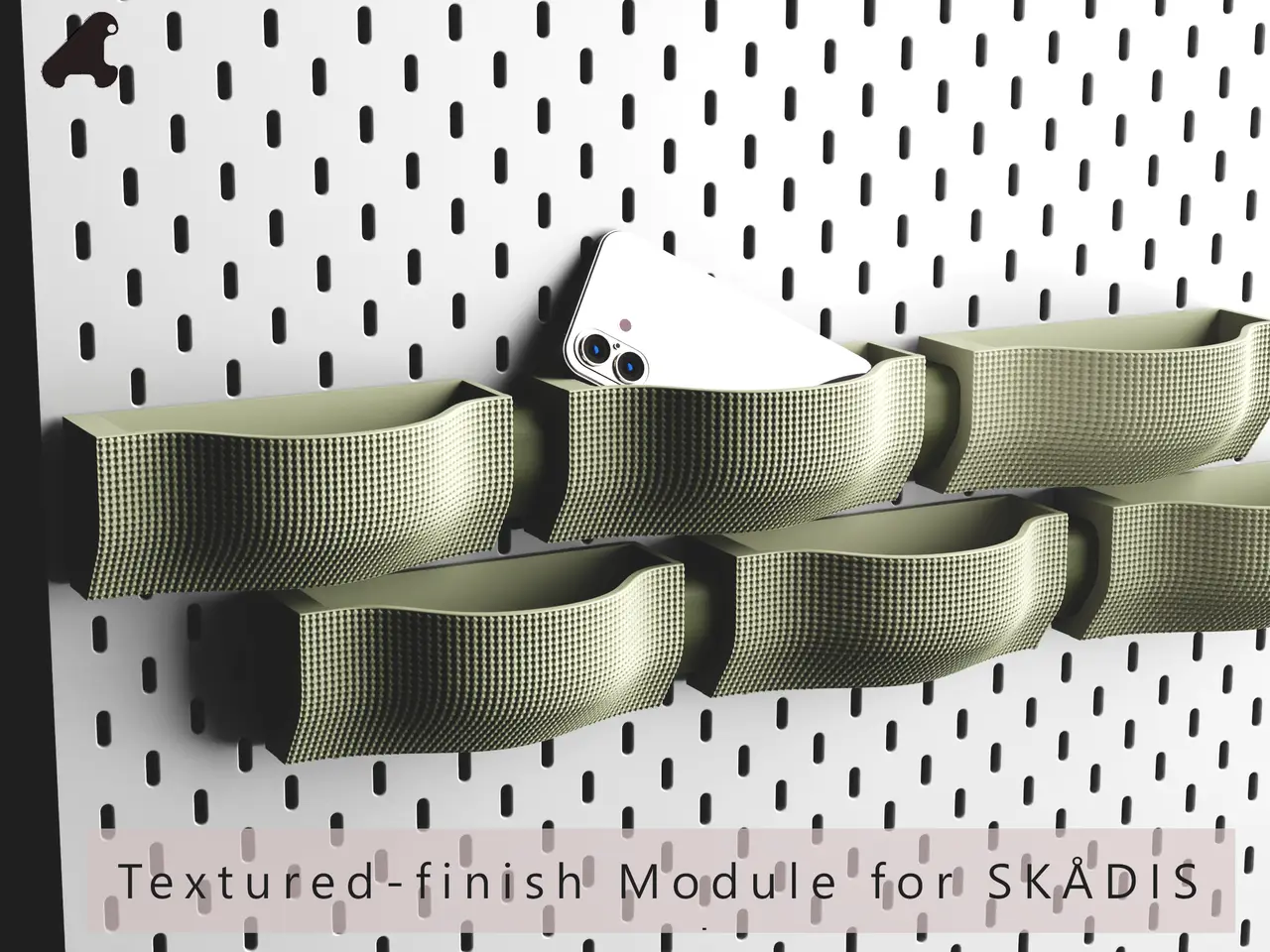
Textured-finish module for SKÅDIS panels (no support)
por Tomishape en Printables
On closer inspection, it’s quite a technical challenge to create a fastening system that will stand the test of time ...
Licencia
Solo uso personalCC BY-NC 4.0 — Atribución, no comercial
Puedes imprimirlo y modificarlo para uso personal dando crédito. No se permite vender las impresiones.
Al descargar aceptas respetar la licencia y dar crédito a Tomishape.
Archivos (5)
- Categoría
- Organización
- Formatos
- STL, 3MF
- Descargas
- 74
- Publicado
Sobre este modelo
UPDATE: 10/07/2026 Thanks to Joël, who spotted the following issue: “There seems to be a problem with the STL file for the left-hand fastener: although both sides appear flat, the default print side is not flat but, I think, has a one-layer overhang. However, the large part printed without any problems! I’ll post an update if the print works.” The “Left-hand fastener.STL” and “.3mf” files have been corrected and updated. There was indeed a one-layer offset that did not appear in the slicing software. Textured-finish module for SKÅDIS panels (no support) Introduction I’m delighted to be taking part in this competition! I noticed that many of the entries were based on the SKÅDIS panel, so I decided to have a go at it myself. On closer inspection, it’s quite a technical challenge to create a mounting system that will stand the test of time, especially if you want to do it without a backing board (yes, purists are unbearable!). - Aesthetics
I wanted to create a module that could be repeated throughout the installation on the panel. This module is a container in which you can store your tools and supplies, or display decorative items, plants, small collectables… Its distinctive feature is its front: a rippled, textured shell with a high level of detail. When arranged in a staggered pattern, this is where it will really come into its own. A separate fastener, printed as a separate piece, slots into the left-hand end of the module. It serves two purposes: on the right, it holds the hooks that secure this end to the panel (the module has two more at its right-hand end, giving two fixing points, each with two hooks); on the left, it visually extends the module towards the next one, leaving a 2 mm gap (see the various renderings and cross-sections in the photos). - Technical specifications
• 2 parts to be printed in total: the module (which includes the hooks on the right) and the fastener (on the left) • Print both parts without a support structure • Internal dimensions: width 15.7 cm × depth varying from 3.8 to 7.8 cm × height 6.6 cm (the front is wavy, so the depth varies from one end to the other) • External dimensions: width 17.4 cm × depth 8.5 cm max × height 6.9 cm • Thickness of the module’s walls: 3.5 mm (excluding texture) Note: describing the parts is tedious, but the system is incredibly simple. - Assembly
Follow the cross-sections and views in the photos – it’s child’s play. - Printing
I recommend a 0.6 mm nozzle for the module and a layer height of 0.24 mm (to ensure the façade texture is reproduced accurately). Use a 0.4 mm nozzle for the fastener to ensure a precise fit. The hooks should be printed flat, with the layers oriented in the direction of the load, and the infill density increased in these areas to ensure a secure, long-lasting fix. To do this, apply a modifier to the left and right ends (this will increase the infill from 6% to 20%). I’ve also gone into detail about the settings and options, but perhaps you’re more of an expert than I am – I’m leaving it up to you. NOTE: ‘The presentation rendering is a computer-generated image, but the print was simulated in the slicer to ensure a satisfactory result. My extensive experience allows me to determine whether, by following my setting recommendations, the print will turn out well. You can find an image of the slicing simulation in the photos. I haven’t been printing for quite some time now; I’m focusing on modelling complex designs. If you have any questions, I’m fully available via the Printables messaging service.” Happy printing! PRINT SETTINGS: recommendations • MODULE: Parameter Recommended value - Nozzle 0.6 mm
- Layer height 0.24 mm
- 1st layer 0.35 mm
- Outer wall width 0.60 mm
- Inner wall width 0.64 mm
- Fill width 0.68 mm
- Number of walls 3
- Top 4 layers
- Bottom 4 layers
Infill : 6% – (modifier for 30 % infill densification on attachment areas,see slicing views in photos) Infill pattern Gyroid Outer speed 45 mm/s Inner speed 65 mm/s Infill 80 mm/s Travel 200 mm/s - Wall order for this model: Inner → Outer - Wall generator: Arachnid mode - Joint position: Rear Quality settings I would tick: ✅ Detect Thin Walls ✅ Arc fitting (if available) ✅ Monotonic Top ✅ Avoid crossing walls ✅ Wipe whilst retracting ✅ Enable Z-hop only during retracts • LEFT ATTACHMENT: Parameter Recommended value Nozzle 0.4 mm (rather than 0.6 for precise fit) Layer height 0.20 mm 1st layer 0.25 mm Outer wall width 0.40 mm Inner wall width 0.44 mm Fill width 0.50 mm Number of walls 3 Top 4 layers Bottom 4 layers Fill 20 per cent Fill pattern Gyroid FRANCAIS MISE À JOUR : 10/07/2026 Merci à Joël, qui a repéré le problème suivant : « Il semble y avoir un problème avec le fichier STL de la fixation gauche : bien que les deux côtés paraissent plats, le côté d’impression par défaut n’est pas plat mais présente, je pense, un surplomb d’une couche. La grande pièce s’est toutefois imprimée sans aucun problème ! Je posterai une mise à jour si l’impression fonctionne. » Les fichiers « Left-hand fastener.STL » et « .3mf » ont été corrigés et mis à jour. Il y avait en effet un décalage d’une couche qui n’apparaissait pas dans le logiciel de découpage. Présentation
Content de participer à ce concours ! J'ai vu que beaucoup de projets étaient dédiés au panneau SKÅDIS, alors je m'y suis intéressé. En y regardant de plus près, c'est très technique de faire un système d'attaches assez robuste dans le temps, surtout si on veut le faire sans support (oui, les puristes sont insupportables !). - Esthétique Je voulais créer un module qui puisse être répété dans l'installation sur le panneau. Ce module est un contenant dans lequel vous pouvez ranger vos outils et fournitures, ou exposer des objets décoratifs, plantes, petits objets de collection...
Sa particularité est sa façade : une coque ondulée et texturée avec un haut niveau de détails. Installé en quinconce, c'est là qu'il produira tout son effet. Une attache indépendante, imprimée à part, s'emboîte à l'extrémité gauche du module. Elle remplit deux rôles : à droite, elle porte les crochets qui fixent cette extrémité au panneau (le module en a deux autres à son extrémité droite, soit deux points de fixation avec deux crochets chacun) ; à gauche, elle prolonge visuellement le module vers le suivant, en laissant 2 mm de jeu (voir les divers rendus et coupes dans les photos). - Caractéristiques techniques
- 2 pièces à imprimer au total : le module (qui inclut les crochets de droite) et l'attache (côté gauche)
- Impression sans support des 2 pièces
- Dimensions intérieures : largeur 15,7 cm × profondeur variable de 3,8 à 7,8 cm × hauteur 6,6 cm (la façade ondule, donc la profondeur varie d'un bout à l'autre)
- Dimensions extérieures : largeur 17,4 cm × profondeur 8,5 cm max × hauteur 6,9 cm
- Épaisseur des parois du module : 3,5 mm (hors texture)
Nota : décrire les pièces est fastidieux, mais le système est hyper simple. - Montage Laissez-vous guider par les coupes et vues dans les photos, c'est un jeu d'enfant.
- Impression Je recommande une buse de 0,6 mm pour le module et une hauteur de couche de 0,24 mm (pour une bonne restitution de la texture de la façade). Une buse de 0.4 mm pour l’attache pour la précision d’emboîtement.
Les crochets s'impriment à plat, couches orientées dans le sens de l'effort, et le remplissage est densifié sur ces zones pour une fixation solide dans le temps. Ajoutez pour cela un modificateur sur les extrémités gauche et droite (le remplissage passe alors de 6 à 20 %). J'ai aussi détaillé les réglages et options, mais peut-être êtes-vous plus expert que moi, je vous fais confiance. NOTA : « Le rendu de présentation est une image de synthèse, mais l'impression a été simulée au slicer pour garantir un résultat satisfaisant. Mes nombreuses réalisations me permettent de définir si, en utilisant mes conseils de réglages, l'impression sera convaincante. Vous pouvez trouver une image de la simulation du tranchage dans les photos. Depuis pas mal de temps je ne fais plus d’impression, je me concentre sur la modélisation de modèles complexes. Si vous avez des questions je suis entièrement disponible dans la messagerie de Printables.» Bon print ! ----------------------------- REGLAGES d’IMPRESSION : recommandations - MODULE :
Paramètre
Valeur recommandée
Buse 0,6 mm
Hauteur de couche 0,24 mm
1ère couche 0,35 mm
Largeur mur externe 0,60 mm
Descripción original del autor, publicada en Printables.