
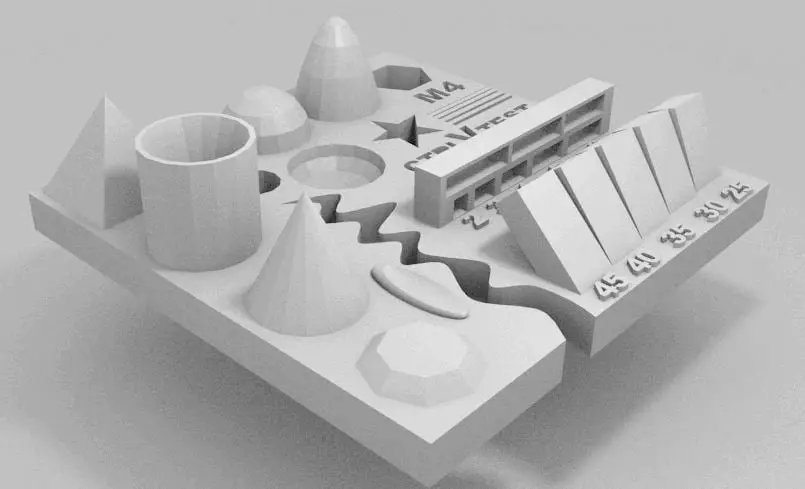
Test your 3D printer!
por ctrlV en Thingiverse
check out the new version 2 http://www.thingiverse.com/thing:1019228 version 3 http://www.thingiverse.com/thing:1363023 more infos in our forum http://www.whoote.com This is a hard to print testfile! often you don't know if your printer is ready for complex files. with this file you have an easy...
Licencia
Uso comercial permitidoCC BY-ND 4.0 — Atribución, sin derivadas
Puedes imprimirlo y compartirlo sin cambios dando crédito; no se permite distribuir versiones modificadas.
Al descargar aceptas respetar la licencia y dar crédito a ctrlV.
Archivos (1)
- Categoría
- Para tu impresora
- Formatos
- STL
- Descargas
- 130,349
- Publicado
Sobre este modelo
check out the new version 2 http://www.thingiverse.com/thing:1019228 version 3 http://www.thingiverse.com/thing:1363023 more infos in our forum http://www.whoote.com This is a hard to print testfile! often you don't know if your printer is ready for complex files. with this file you have an easy option to check problematic printing/slicing stuff. does your printer challenge this ultimative part? check it out and get (almost) instant results. these test are included in this tiny file: - size: the object is 4x50x50mm (baseplate) - hole size: 3 holes (3/4/5mm) - Nut size: M4 Nut should fit perfectly - fine details: pyramide, cone, all numbers - rounded print: wave, half sphere - minimum distance between walls: 0.1/0.2/0.3/0.4/0.5mm - overhang: 25°/30°/35°/40°/45° - bridge print: 2/3/4/5/6/7/8/9mm - surface: all the flat parts
there could be a lot of things go wrong, here the most common ones - your printbed is not leveled (should be better than layerheigth you're printing, e.g use a Micrometre) - your axis (Y/X/Z) clearence (with higher speed you also get problems with the moving mass) - your slicer and configuration (every slicer handles things different and could contain bugs) - retract settings (not correctly set you will see blobs or holes on every retract position) - to high temperature (small details will get overheated) - to reach this time, your printer should run between 60-200mm/s, infill as fast as possible. not every printer works in this range, so try to figure out where you're printer limit is. - text is hard to read > use a smaller nozzle/other slicer
Descripción original del autor, publicada en Thingiverse.



