Sweet shop advent calendar
This is the advent calendar I made for my son. It’s inspired by one my grandad made for me when I was little, with a few updates of my own.
Thangs entrega los archivos a usuarios con cuenta gratuita
Licencia
Solo uso personalSin licencia indicada
El autor no indicó una licencia: todos los derechos le pertenecen. Úsalo solo para imprimir en casa y consulta al autor para cualquier otro uso.
Al descargar aceptas respetar la licencia y dar crédito a Adam J.
Archivos (50)
- Awening.stl STL · 14,5 MB
- Base.stl STL · 142,1 MB
- BoxInner.stl STL · 16 KB
- BoxOuter.stl STL · 1 KB
- CandyCane.stl STL · 1,2 MB
- Colum.stl STL · 134,3 MB
- flexbatterAAx2.stl STL · 308 KB
- Handle.stl STL · 826 KB
- Lollypop.stl STL · 461 KB
- NamePlate.stl STL · 145,7 MB
- OpeningTrim.stl STL · 17 KB
- Ornimental.stl STL · 14,6 MB
- Peppermint.stl STL · 2,3 MB
- Pillar.stl STL · 61 KB
- Pin.stl STL · 42 KB
- PrintSettings.3mf 3MF · 140,9 MB
- Slider.stl STL · 140 KB
- SweetJarBase.stl STL · 1,2 MB
- SweetJarDecor.stl STL · 2,9 MB
- SweetJarLid.stl STL · 13,1 MB
- SweetJarPlate.stl STL · 364 KB
- Top.stl STL · 14,0 MB
- TowerCore.stl STL · 119 KB
- Wearth.stl STL · 18,0 MB
- Window.stl STL · 16 KB
- 19.png PNG
- Tower.blend BLEND
- 1.png PNG
- 2.png PNG
- 3.png PNG
- 4.png PNG
- 5.png PNG
- 6.png PNG
- 7.png PNG
- 8.png PNG
- 9.png PNG
- 10.png PNG
- 11.png PNG
- 12.png PNG
- 13.png PNG
- 14.png PNG
- 15.png PNG
- 16.png PNG
- 17.png PNG
- 18.png PNG
- 20.png PNG
- 21.png PNG
- 22.png PNG
- 23.png PNG
- 24.png PNG
- Categoría
- Figuras y arte
- Formatos
- STL, 3MF, PNG, BLEND
- Descargas
- 3
- Publicado
Sobre este modelo
This is the advent calendar I made for my son. It’s inspired by one my grandad made for me when I was little, with a few updates of my own. The basic idea is two columns of boxes: you take a box out from the bottom, and the others drop down. There are 24 boxes, one for each day leading up to Christmas.
Printing Everything was printed on my Creality Hi using PLA. I tried to match the filament colours to the colours I wanted for each part, which worked for most of the build. The main exception was the tower, which I printed in two parts, glued together, sanded and painted the shade of green I wanted. I don’t have a complete guide to the settings for every part, sorry! For most of them, I used the default settings with supports enabled. I’m sure others could find ways to make the printing easier than I did. One important detail: the main tower has internal channels for the lighting wires. Use support blockers in these channels. Trust me—you’ll never get the supports out if they print inside them!
Painting I’m definitely not the best at painting, but I’m happy with how it turned out. For most of the painted details, I used ordinary acrylic paint directly on the PLA. Ideally, you’d use a suitable primer first to help the paint stick. However, I’d spent so long finding the right filament colours that I didn’t want to cover them up, so I painted the details directly onto the printed parts. So far, it seems to be holding up well, although it might need a few touch-ups after a couple of Christmases.
For the main tower, I used spray paint after joining and sanding the two sections. The gold parts also use spray paint, although for many of the smaller details I applied a little decanted paint with a brush. This gave me more control, and I was happy with the finish.
Boxes and stickers There are 24 boxes in three colours: eight red, eight green and eight cream. The numbers and Christmas designs on the boxes are stickers, which I had professionally printed on clear vinyl by Diginate. This lets the colour of each box show through around the design. I’ve included both the original GIMP file and the exported images used to make the stickers, so you can use the designs as they are or edit them yourself. Each sticker design is 3.5 cm wide × 7 cm long. You can find all the stick images here https://drive.google.com/drive/folders/1Sl1MHRYssPt9XSdG6BwLq9upXejBT_zn?usp=drive_link
Window For the window, I used clear UV resin to create a frosted effect. I placed the window frame on baking paper, filled the openings with resin and cured it. The baking paper isn’t perfectly smooth, so the resin picks up its texture and gives the window that frosted look. If you’d rather avoid resin, you can buy frosted acetate or Perspex sheets and cut them to size. The sweets in the main window are all 3D printed and painted. Behind them, I added an image printed on my inkjet printer to give the shop window some depth. That image is included with the files.
Sweet jars The sweet jars on the sides are some of the more complicated parts. The top, bottom and back of each jar are printed separately. I bought some Perspex tubing from Amazon, cut it to size, filled it with Christmas glass beads and sealed the top and bottom. All the Amazon links are at the bottom of this post. The tube has an outside diameter of 20 mm and an inside diameter of 17 mm, and came in a 305 mm length. I didn’t measure the final cut lengths—I held the tube against the assembled parts, marked where it needed cutting and cut it to fit. I also added lights, which I think really improve the finished look. The top of each jar has space for an LED. I made resin discs to fit inside that gap and diffuse the light, but you could use the frosted sheets mentioned above instead.
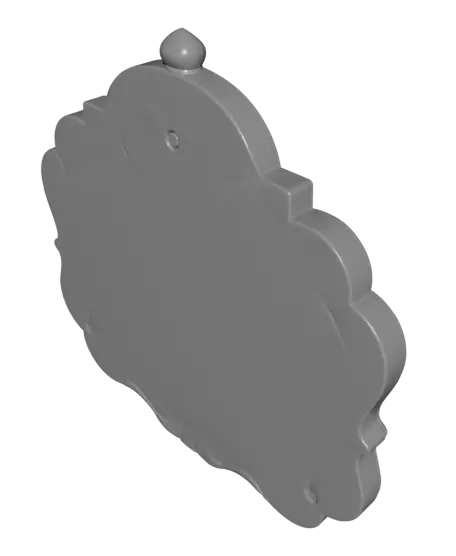
Name plate I’ve included a blank name plate with the base files, so you can paint your own lettering if you’d like. I’ve also included the original Blender file if you want to add raised text. You can also add raised lettering in your slicer if it has a text or embossing tool.
Slider I spent a lot of time on this part. Honestly, it still needs some work, but it does what I wanted it to do. You may need to sand the grooves a little to get it sliding smoothly. On my printer, I also found that printing the slider at 95% scale helped, although yours may need a different adjustment. Getting the tolerances right took some trial and error—probably partly a skill issue on my side! For the pin, I tried several designs because I wanted everything to be 3D printed, but I couldn’t get it strong enough. In the end, I used heat-set threaded inserts and threaded rod. This let me print a cover for the exposed metal while keeping the strength of the metal underneath. The inserts and threaded rod are both M3. Make sure the inserts you buy also fit the holes in the printed parts, as M3 refers to the internal thread size and the outside dimensions can vary.
Electronics I’m by no means an expert at electronics, but the setup for this is fairly simple. There are five LEDs in total, each with its own 68 Ω resistor connected in series with it. These five LED-and-resistor pairs are wired in parallel, with a toggle switch at the base to turn everything on and off. I used inexpensive yellow LEDs rated at 20 mA, with a forward voltage of 1.9–2.1 V. The power comes from two AA batteries connected in series, giving about 3 V. Each resistor limits the current flowing through its LED. Don’t connect these LEDs directly to the battery pack without the resistors, as too much current can burn them out—I learned that the hard way!
Battery holder The battery holder is the one part I didn’t design myself. Full credit goes to the creator of this excellent design: https://www.thingiverse.com/thing:456900
Amazon links UV Resin Kit - https://link.amazon/B03tuo8X9 UV torch/flashlight - https://link.amazon/B0avyIbH4 Super Glue - https://link.amazon/B0aaqBZ3X Resistors - https://link.amazon/B09bOz7bj Wire - https://link.amazon/B0je3lVJV Red filament - https://link.amazon/B05pCaEfW Green filament - https://link.amazon/B08CWQIEz Cream filament - https://link.amazon/B0gZhsqYR Sandpaper - https://link.amazon/B07bJzHZT Threaded Rod - https://link.amazon/B06wg9VKP Perspex tube - https://link.amazon/B0dPc5ozB Thread inserts - https://link.amazon/B09lcyVKj Christmas beads - https://link.amazon/B0fXyqyRa Green spray paint - https://link.amazon/B03ymewRS Gold spray paint - https://link.amazon/B0hvYqs4e Acrylic paint - https://link.amazon/B03Fx0VGD
Descripción original del autor, publicada en Thangs.