Staal3D MIDI Controller
por Peter Hansen en MyMiniFactory
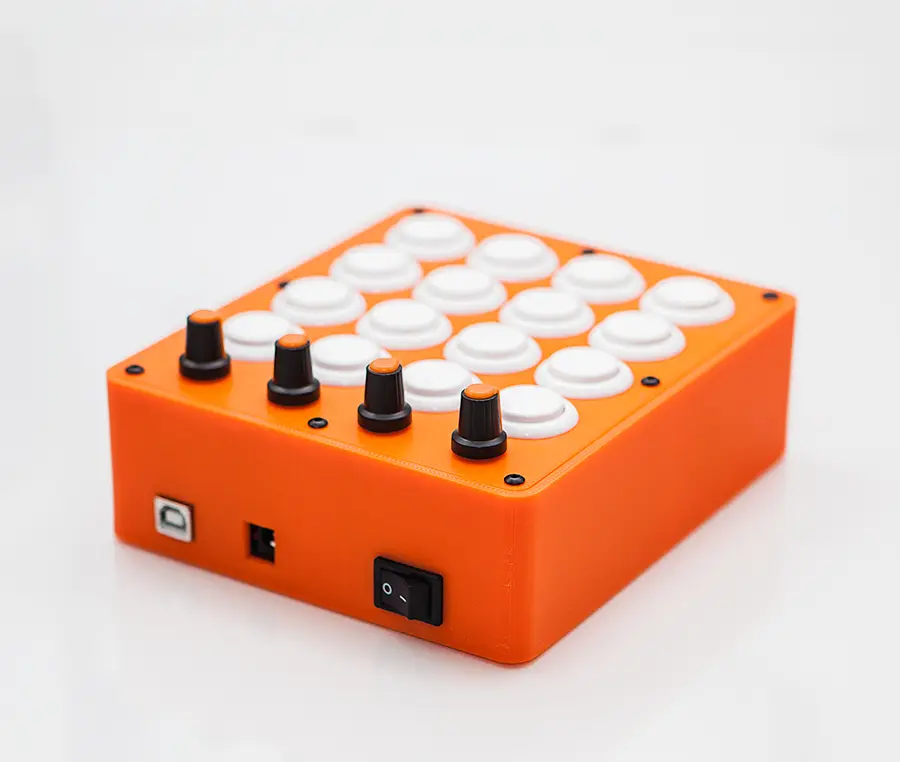
MIDI Controller for various DAW and music programs. This is a MIDI Fighter styled unit and is really fun to play with. Has been tested it in Ableton Live, Reason, Garage Band, and Traktor. Works like a charm. MIDI Map it to what ever you want. It has 4 Analog and 16 Digital output.
MyMiniFactory entrega los archivos a usuarios con cuenta gratuita
Licencia
Solo uso personalMyMiniFactory - Credit - Remix - Noncommercial
Licencia de MyMiniFactory: puedes imprimirlo y remezclarlo dando crédito, sin fines comerciales.
Al descargar aceptas respetar la licencia y dar crédito a Peter Hansen.
Archivos (2)
- Staal3D Midi Controller Case.stl STL
- Staal3D Midi Controller Top Plate.stl STL
- Categoría
- Educación
- Formatos
- STL
- Descargas
- 1,209
- Publicado
Sobre este modelo
MIDI Controller for various DAW and music programs. This is a MIDI Fighter styled unit and is really fun to play with. Has been tested it in Ableton Live, Reason, Garage Band, and Traktor. Works like a charm. MIDI Map it to what ever you want. It has 4 Analog and 16 Digital output.
Hardware you need to make one:
On/off switch size 12.9mmx19.4mm - 16 Sanwa 24mm Arcade buttons (or clones) - 4 Knobs size: 15mm x 17mm (KN-11/WS) - 4 10k potentiometers - 8 4-6mm M3 button head screws - Arduino Mega (mounting screws or glue gun) - Dupont wires for the arduino - Wires for the buttons and potentiometers
For the software use the MocoLufa boot loader and you are able to program the Arduino again without needing to flash the boot loader. This is what the ON/OFF switch is for. READ THE MocoLUFA instructions on the link. And as a bonus the Arduino shows up and work as a normal Native USB MIDI device without the need for a emulator such as hairless MIDI etc.
https://github.com/kuwatay/mocolufa
How to DFU on Mac: https://www.youtube.com/watch?v=pHOSCIRoJG8
The Arduino sketch is provided by Gustavo Silveira
The Musico Nerd: https://www.youtube.com/channel/UCyqCwyBJ98fR-CPoyXUxY5w Watch his youtube channel for a lot of info about making MIDI controllers with the Arduino.
Link to the sketch file: https://www.dropbox.com/s/kgv656eeefdujr4/Staal3D-Midi-Controller.zip?dl=0
Change the Sketch as you need. Be aware of Digital Pin 13, it can make some really funky unwanted triggering. It has been disabled in the sketch.
This should be very easy to make, so I have not provided the diagram for it since this is really basic knowledge wiring it up and maybe you dont want to use the same Digital Pins as I do. The Mega has more than enough analog and digital pints for this controller.
Printed in 3DE Premium Flame Orange MAX PLA
Tom Nguyen has made a port and new code for my midi controller. Go have a look here. I haven't testet it my self, but he writes it's possible to make one with a Arduino UNO. The original project uses a Arduino MEGA.
https://github.com/4dvn/Midi-Fighter-16?fbclid=IwAR0-oJjyCVi5W6443PNuVFYeAHCT37sJyCmWmoUUIePfp1ZrG3Co_U9z2b0
Descripción original del autor, publicada en MyMiniFactory.