
Spectophotometer DIY
por Francisco Bischoff en Thingiverse
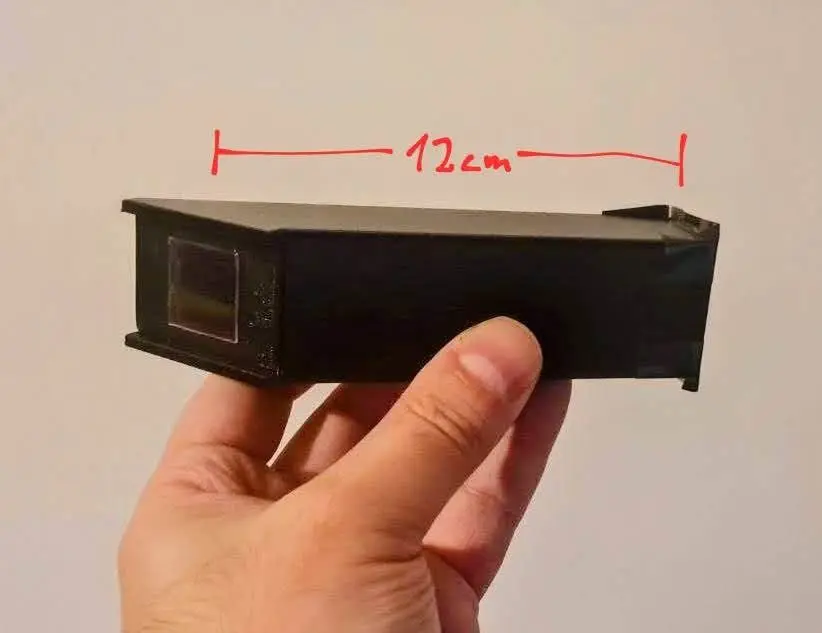
This is a simple homemade spectrophotometer, designed to fit onto a Logitech C920 webcam, but it can be used with any camera that allows manual adjustments of parameters such as white balance, focus, exposure, gain, etc. The 3D-printed parts—which I printed in black PETG for convenience—must, at...
Licencia
Uso comercial permitidoCC BY-SA 4.0 — Atribución, compartir igual
Puedes usarlo y modificarlo dando crédito; las versiones modificadas deben compartirse con la misma licencia.
Al descargar aceptas respetar la licencia y dar crédito a Francisco Bischoff.
Archivos (3)
- Categoría
- Tecnología
- Formatos
- STL
- Descargas
- 3
- Publicado
Sobre este modelo
This is a simple homemade spectrophotometer, designed to fit onto a Logitech C920 webcam, but it can be used with any camera that allows manual adjustments of parameters such as white balance, focus, exposure, gain, etc. The 3D-printed parts—which I printed in black PETG for convenience—must, at the very least, form a dark chamber (painted with ultra-matte black paint or lined with telescope flocking paper) to prevent stray light and glare. Additionally, two more items are required: - A classic double-edge razor blade, snapped in half, to create a slit roughly 0.1 mm wide (the thickness of a sheet of A4 paper) by 5 mm long (follow the guide lines included on the 3D-printed lid). - A DVD cut into a 20 mm x 20 mm square. More details on the DVD below.
The DVD piece should be glued onto the square opening on the opposite side (the one angled at 45°), with its tracks facing the webcam. Next, attach this end directly onto the webcam so that the DVD sits close to the camera lens. The webcam focus should be set to 12 cm, which is the distance at which the light beam will be projected onto the DVD. Other webcam settings (I recommend downloading the CamProps utility, which makes this much easier): SettingValue Brightness128 Contrast128 Saturation128 Sharpness0 White Balance4000K Backlight Comp.0 Gain0 Zoom100 Focus~55 (corresponds to 12 cm for me) ExposureStart at -4 Low Light CompensationDisabled Once you connect the webcam in a dark room, shine a pure white LED flashlight through the slit so that the light beam follows the internal path directly onto the DVD. A colored band similar to the one shown in the photos above will appear on the webcam feed. Remember, this is a DIY setup. If you notice any stray light or glare, adjust the flashlight's angle or slide the webcam slightly to the left or right until the entire color spectrum is clearly visible. Start by tuning the exposure so that none of the color channels become clipped or over-saturated. Then, check whether fine-tuning the focus sharpens the spectral lines. Afterward, establish a standardized method for cropping the image before uploading it to the spectral analysis tool linked here: Epectral Analyzer (in portuguese) Preparing the DVD You will need a blank DVD. It contains microscopic tracks with spacing well-suited for this application. Inspect the outer edge of the DVD; you will see a subtle seam separating its two plastic layers: the layer containing the tracks and the layer containing the reflective metallic coating (and the label). Use a sharp blade to gently pry the two layers apart until they begin to separate naturally. Switch to a plastic card (like a credit card) to complete the separation without scratching the DVD surface. Most of the metallic film will stay attached to the labeled half (which can be discarded). If any metal flakes remain on the track layer, use adhesive tape to lift them off. You do not need to clean the entire disc—only a scratch-free 20 mm x 20 mm section is required. You can gently clean the inner face of this layer (where the tracks and the purple organic dye layer are located) using isopropyl alcohol (IPA), which dissolves the dye. Never scrub the surface. Allow it to air-dry. Pay close attention to track orientation. While DVD tracks are circular, on a 20 mm x 20 mm piece they can be treated as effectively parallel. When gluing the DVD piece to the chamber, ensure the track lines run vertically (matching the orientation of the entrance slit).
Descripción original del autor, publicada en Thingiverse.



