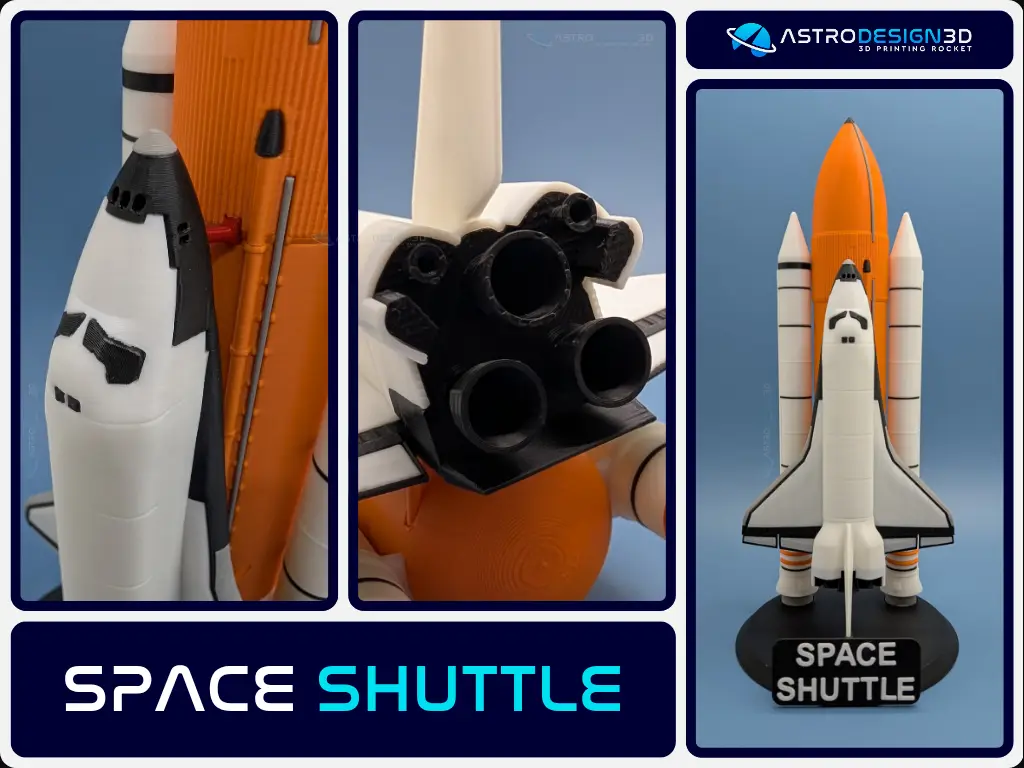
Space Shuttle
por Kmobrain en MakerWorld
I'm looking to improve the publication of my models on makerworld, if you like or dislike my models and if you have 5 minutes to lose, can you please fill out this form.
MakerWorld entrega los archivos a usuarios con cuenta gratuita
Licencia
Solo uso personalStandard Digital File License
Licencia estándar de archivos digitales: solo uso personal. No se permite compartir, revender ni subir el archivo a otros sitios, ni vender las impresiones.
Al descargar aceptas respetar la licencia y dar crédito a Kmobrain.
Archivos (37)
- Cut Fuselage.zip ZIP · 8,6 MB
- Full Fuselage.zip ZIP · 7,4 MB
- Fuselage.zip ZIP · 8,1 MB
- O_AFT_Black_x1.3mf 3MF · 37 KB
- O_AFT_White_x1.3mf 3MF · 540 KB
- O_Engine_Black_x1.3mf 3MF · 2,8 MB
- O_Fuselage_White_x1.3mf 3MF · 369 KB
- O_Jonction_Fuselage_x1.3mf 3MF · 2 KB
- O_Nose_Grey_x1.3mf 3MF · 715 KB
- O_Window_L_Black_x1.3mf 3MF · 50 KB
- O_Window_R_Black_x1.3mf 3MF · 52 KB
- O_Window_Top_L_Black_x1.3mf 3MF · 25 KB
- O_Window_Top_R_Black_x1.3mf 3MF · 23 KB
- O_Wing_L_Grey_x1.3mf 3MF · 347 KB
- O_Wing_L_White_x1.3mf 3MF · 340 KB
- O_Wing_R_Grey_x1.3mf 3MF · 347 KB
- O_Wing_R_White_x1.3mf 3MF · 340 KB
- ET_Cable_Bot_Grey_x1.3mf 3MF · 25 KB
- ET_Cable_Top_Grey_x1.3mf 3MF · 64 KB
- ET_Hat_Black_x1.3mf 3MF · 70 KB
- ET_Jonction_Tank_Orange_x1.3mf 3MF · 2 KB
- ET_Pipe_Top_Black_x1.3mf 3MF · 257 KB
- ET_Support_Shuttle_Bot_Orange_x1.3mf 3MF · 117 KB
- ET_Support_Shuttle_Top_Red_x1.3mf 3MF · 33 KB
- ET_Tank_Bot_Orange_x1.3mf 3MF · 303 KB
- ET_Tank_Top_Orange_x1.3mf 3MF · 569 KB
- SRB_Big_Circle_Black_x1.3mf 3MF · 12 KB
- SRB_Circle_Black_x14.3mf 3MF · 25 KB
- SRB_Circle_Orange_x6.3mf 3MF · 30 KB
- SRB_Cone_L_White_x1.3mf 3MF · 44 KB
- SRB_Engine_Grey_x2.3mf 3MF · 440 KB
- SRB_Jonction_Bot_White_x2.3mf 3MF · 2 KB
- SRB_Jonction_Top_White_x2.3mf 3MF · 2 KB
- SRB_Tank_L_White_x1.3mf 3MF · 178 KB
- SRB_Tank_R_White_x1.3mf 3MF · 180 KB
- Cut_Name.zip ZIP · 297 KB
- Full_Name.zip ZIP · 210 KB
- Categoría
- Educación
- Formatos
- ZIP, 3MF
- Descargas
- 7,009
- Publicado
Sobre este modelo
I'm looking to improve the publication of my models on makerworld, if you like or dislike my models and if you have 5 minutes to lose, can you please fill out this form.
Warning: Printing the orbiter is complicated; please configure your printer and clean your build plate before printing. If you are unable to print with the main profile, try adding more supports or try the alternative version of the profile. Boost MeIf you can, please feel free to boost my model so that more models will arrive! 5...4...3...2...1...0...Liftoff! !!MembershipIf you like my 3D models and want to take part in this journey into space, subscribe today! Your support is essential to help me expand our collection!UPDATES:
- 14/01/2025 - Added booster profile for the A1 Mini: SRB - Solid Propellant Booster (A1 Mini)
The Space Shuttle "Space Transportation System, STS" model is a highly detailed 1:200 scale reproduction of NASA's historic reusable vehicle that first flew in 1981 for 135 flights. The model consists of several separately printed parts, which are easy to print and assemble.
The finished model dimensions are approximately 28cm high and 18cm wide for the Space Shuttle. Impression There are 80 pieces to print ,the total printing time for the entire model is approximately 13 hours. Choosing your Print Profil. There are several print profiles available, but I've separated them by "Block" for greater clarity in print selection.
- Space Shuttle - Orbiter : the space shuttle orbiter (The shuttle)
- SRB : The booster, “Solid Rocket Booster”
- ET : The external reservoir (the big orange tank)
- Stand : Stand for the space Shuttle
Assembly and Printing Guide You can use the assembly guide to help you assemble the Space shuttle.
- Guide to instructables : Assembling and printing guide
Option
- Horizontal stand for the orbiter
Tips Post Printing
- You may need to sand the junction areas between the parts for a smoother finish.
- Additionally, I recommend using glue for better strength and durability.
For non-users of print profiles Settings
- For infill, 10% is sufficient for a decorative object, and you can also use PrusaSlicer's "Lightning" infill settings.
- For some parts the supports will be necessary, see the Assembly and Printing Guide.
- If some parts are loose or don't fit, you can change the scale by +/- 1% in the slicer to get a better fit.
Printing
- For a better final result, I recommend printing the Jonction_Block last so that you can adjust their size according to your print and have a better fit during assembly.
Descripción original del autor, publicada en MakerWorld.