
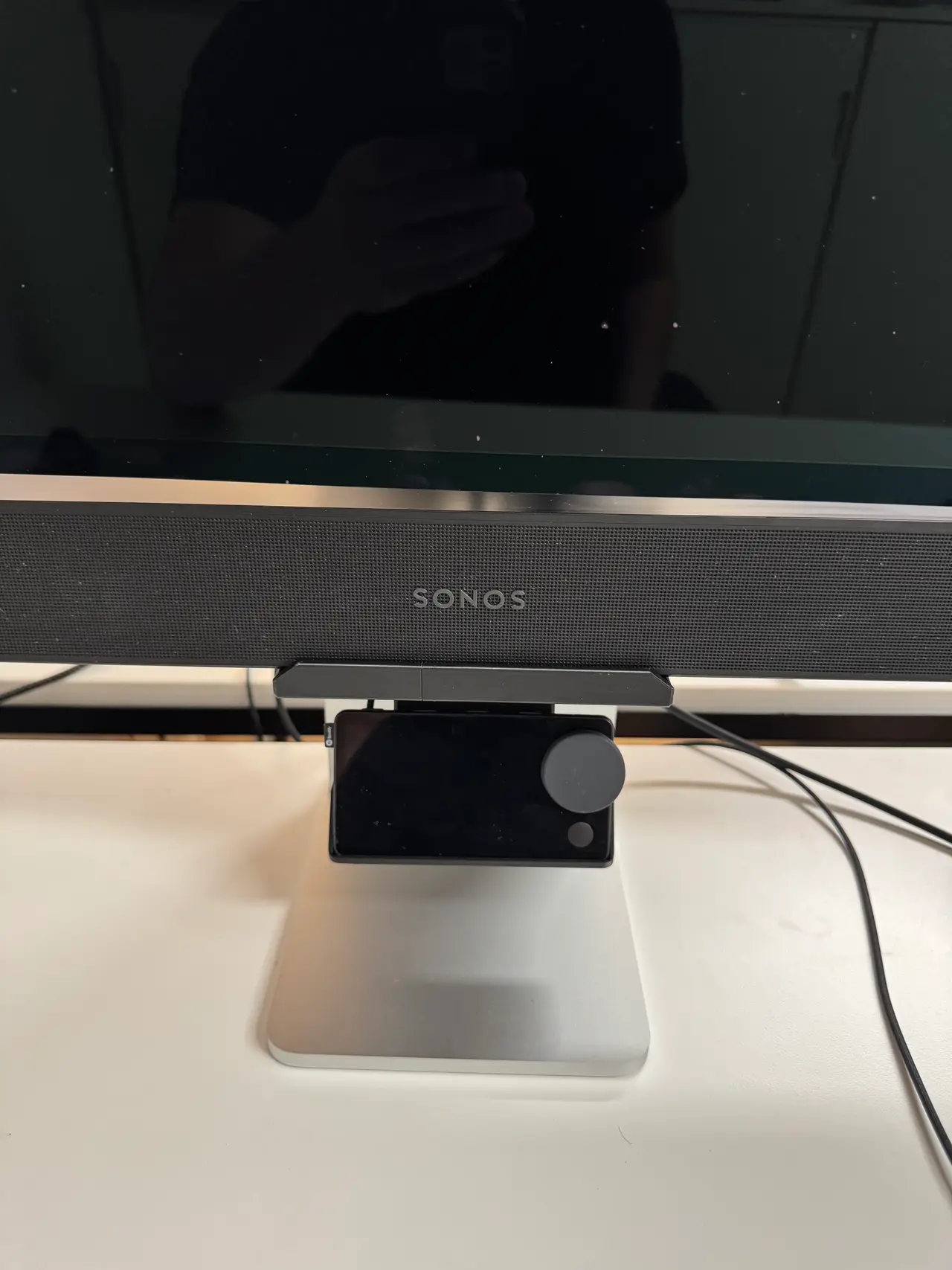
Sonos Beam Mount for Apple Studio Display (height-adjustable stand)
por Benjamin Schneider en Printables
Screwless Sonos Beam shelf that hooks into the Apple Studio Display stand. Cable routing, optional Car Thing holder.
Licencia
Uso comercial permitidoPuedes imprimirlo, modificarlo y venderlo dando crédito al autor.
Al descargar aceptas respetar la licencia y dar crédito a Benjamin Schneider.
Archivos (9)
- sonos-beam-bracket-groove.3mf 3MF · 116 KB
- sonos-beam-bracket-groove.stl STL · 466 KB
- sonos-beam-bracket.stl STL · 328 KB
- sonos-beam-bracket.3mf 3MF · 75 KB
- beam-mount.scad SCAD · 42 KB
- car-thing-holder.stl STL · 191 KB
- dovetail-key-40mm.stl STL · 20 KB
- sonos-beam-fit-test.3mf 3MF · 77 KB
- sonos-beam-fit-test.stl STL · 314 KB
- Categoría
- Tecnología
- Formatos
- 3MF, STL, SCAD
- Descargas
- 0
- Publicado
Sobre este modelo
Sonos Beam Mount for Apple Studio Display (height-adjustable stand) A one-piece bracket that hooks into the cable slot of the Apple Studio Display's tilt- and height-adjustable stand and holds a Sonos Beam (Gen 1) right below the display. No screws, no glue, nothing to drill: the hook clamps onto the stand arm, a brace rests against the arm below it, and the Beam simply sits on the shelf. Optional: a version with a dovetail groove under the shelf for add-ons, such as the included holder for the Spotify Car Thing, or your own designs. Features - Hook mount: a tongue and lip reach through the slot in the stand arm and clamp onto the 10 mm wall. A collar sits in the slot's front chamfer and centers the bracket.
- Cable routing: the Beam's HDMI and power cables go straight back through an 18.5 mm wide cable slot in the hook and out behind the stand. The round Sonos power plug (18 mm) fits through.
- Add-on groove (optional): the groove version has a dovetail groove on the underside of the brace. Add-ons slide in from the left and can be moved sideways. A Car Thing holder and a plain dovetail key for your own add-ons are included. With the default height, a tunnel guides a USB-C cable from the groove into the cable slot.
- Customizable in OpenSCAD: height, groove and support tower (see below).
Fits - Apple Studio Display with the tilt- and height-adjustable stand. I only had this stand; other stands are not checked.
- Sonos Beam Gen 1 (651 × 66 × 101 mm). I haven't checked the Gen 2.
- Spotify Car Thing (with the groove version and the holder).
All slot dimensions were measured on my stand with printed gauges: slot width 41.2 mm at the narrowest point, 10 mm wall, 8.2 mm deep front chamfer. If your print is too tight or too loose, print the fit test first (see below). Also needed: a 90° HDMI angle adapter. To connect the HDMI cable to the Beam without problems, you need a 90° HDMI adapter (male to female), for example this one on Amazon. Height – please read With the default settings shelf_drop = 0), the top of the Beam ends up about 210 mm above the desk. The bottom edge of the display sits at about 215 mm when it's in its highest position, so the display can no longer be lowered with the Beam in place. If you want to keep some of the height adjustment, lower the shelf with shelf_drop in the Customizer. Each mm lower gives the display 1 mm more travel: shelf_drop Top of Beam above desk Display travel left Car Thing holder USB tunnel
0 210 mm 0 mm yes yes (groove version)
10 200 mm 10 mm yes no
20 190 mm 20 mm yes no
30 180 mm 30 mm yes no
37 173 mm 37 mm yes (max.) no
60 150 mm 60 mm no (only without groove) no
Files File What it is
sonos-beam-bracket.3mf / .stl Bracket (default), without groove. 3MF = PrusaSlicer project (Core One, PETG), ready to slice. STL already in print orientation.
sonos-beam-bracket-groove.3mf / .stl Bracket with the add-on groove (open on the left, closed on the right)
sonos-beam-fit-test.3mf / .stl Short piece with only the hook, to check the fit in your slot
car-thing-holder.stl Car Thing holder, for the groove version
dovetail-key-40mm.stl Plain 40 mm dovetail key, as a starting point for your own add-ons
beam-mount.scad OpenSCAD source for your own variants
All ready-made files use shelf_drop = 0. Printing Bracket and fit test - Print lying on its side, in the orientation of the files.
- Material: PETG. Settings: 0.2 mm layers, 5 perimeters, 30 % gyroid, no brim.
- Supports only under the hook. The 3MF projects already contain a support enforcer there, and all other supports are off. If you use the STL in another slicer, add supports from the build plate under the hook only.
- Approximate print time on a Prusa Core One with a 0.4 HF nozzle: bracket 9 h / 295 g, groove version 10.5 h / 311 g, fit test 1 h 50 min / 46 g.
- A thin layer of adhesive (e.g. 3DLac) on the plate helps keep the tall part in place.
Car Thing holder and dovetail key - Print them as in the file (holder standing, key on its base plate), no supports.
Installation - Remove the Beam and unplug the cables.
- Thread the plugs through the cable slot from behind. The round Sonos power plug goes first. Pull them out through the window at the front of the bracket.
- Lift the bracket about 18 mm, push the hook through the slot in the stand arm from the front and lower it. The lip slides down behind the arm and clamps onto it.
Descripción original del autor, publicada en Printables.



