
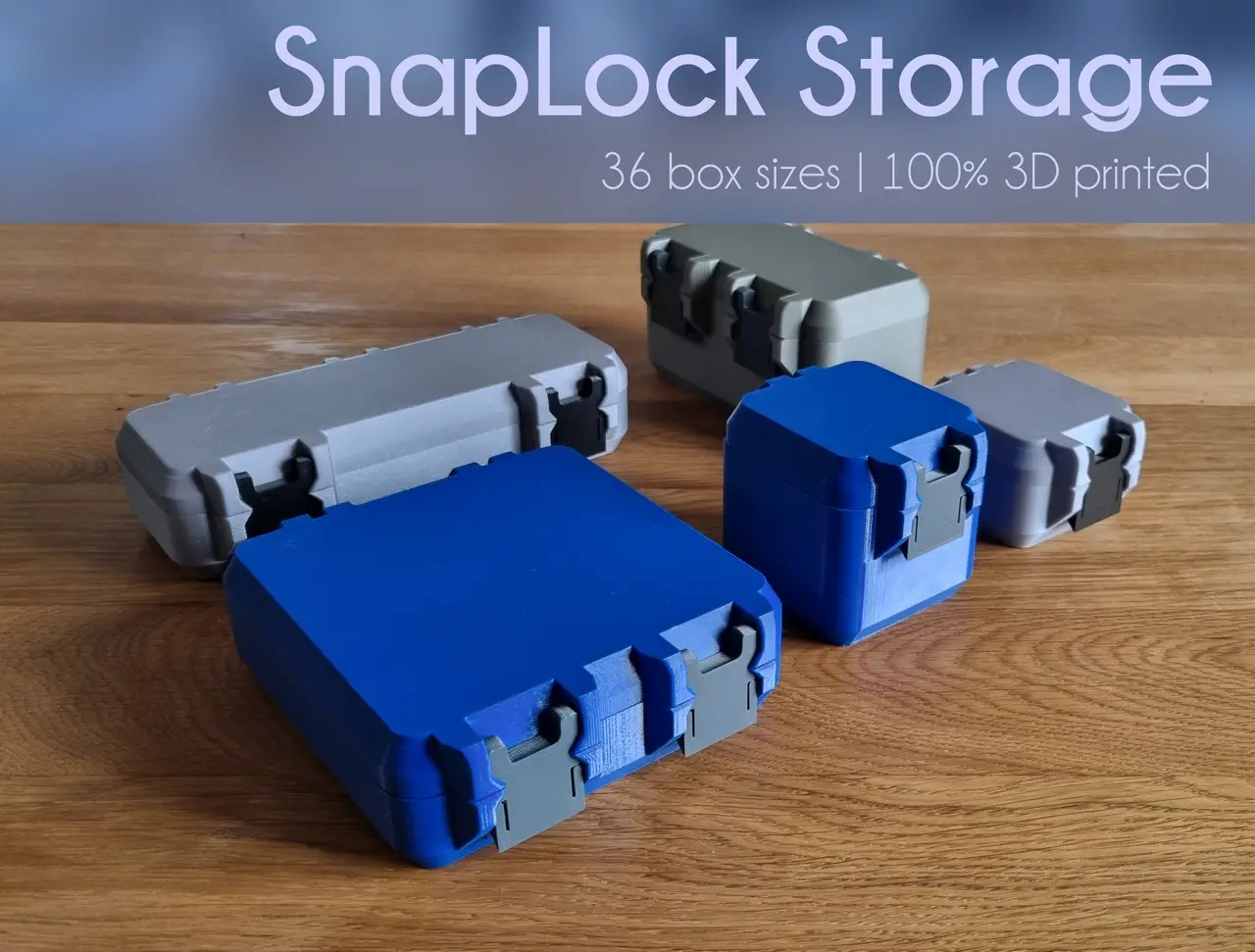
SnapLock Storage Boxes
por Hugo en MakerWorld
SnapLock Version 3 now available : Here. SnapLock Version 2 now available : here
MakerWorld entrega los archivos a usuarios con cuenta gratuita
Licencia
Solo uso personalMakerWorld Exclusive License
Licencia exclusiva de la plataforma: uso personal, no se permite compartir el archivo ni vender las impresiones.
Al descargar aceptas respetar la licencia y dar crédito a Hugo.
Archivos (46)
- Box_bottom_60_60_25.STL STL · 148 KB
- Box_bottom_60_60_50.STL STL · 139 KB
- Box_bottom_60_60_75.STL STL · 134 KB
- Box_bottom_60_60_100.STL STL · 134 KB
- Box_bottom_120_60_25.STL STL · 212 KB
- Box_bottom_120_60_50.STL STL · 208 KB
- Box_bottom_120_60_75.STL STL · 204 KB
- Box_bottom_120_60_100.STL STL · 193 KB
- Box_bottom_120_120_25.STL STL · 200 KB
- Box_bottom_120_120_50.STL STL · 196 KB
- Box_bottom_120_120_75.STL STL · 189 KB
- Box_bottom_120_120_100.STL STL · 178 KB
- Box_bottom_180_60_25.STL STL · 191 KB
- Box_bottom_180_60_50.STL STL · 188 KB
- Box_bottom_180_60_75.STL STL · 187 KB
- Box_bottom_180_60_100.STL STL · 179 KB
- Box_bottom_180_120_25.STL STL · 188 KB
- Box_bottom_180_120_50.STL STL · 173 KB
- Box_bottom_180_120_75.STL STL · 172 KB
- Box_bottom_180_120_100.STL STL · 172 KB
- Box_bottom_180_180_25.STL STL · 171 KB
- Box_bottom_180_180_50.STL STL · 170 KB
- Box_bottom_180_180_75.STL STL · 170 KB
- Box_bottom_180_180_100.STL STL · 171 KB
- Box_bottom_240_60_25.STL STL · 172 KB
- Box_bottom_240_60_50.STL STL · 172 KB
- Box_bottom_240_60_75.STL STL · 172 KB
- Box_bottom_240_60_100.STL STL · 162 KB
- Box_bottom_240_120_25.STL STL · 171 KB
- Box_bottom_240_120_50.STL STL · 171 KB
- Box_bottom_240_120_75.STL STL · 171 KB
- Box_bottom_240_120_100.STL STL · 170 KB
- Box_bottom_240_180_25.STL STL · 170 KB
- Box_bottom_240_180_50.STL STL · 170 KB
- Box_bottom_240_180_75.STL STL · 169 KB
- Box_bottom_240_180_100.STL STL · 169 KB
- Box_top_60_60.STL STL · 231 KB
- Box_top_120_60.STL STL · 330 KB
- Box_top_180_60.STL STL · 279 KB
- Box_top_240_60.STL STL · 268 KB
- Box_top_120_120.STL STL · 294 KB
- Box_top_180_120.STL STL · 271 KB
- Box_top_240_120.STL STL · 267 KB
- Box_top_180_180.STL STL · 267 KB
- Box_top_240_180.STL STL · 265 KB
- Box_clip.STL STL · 370 KB
- Categoría
- Herramientas
- Formatos
- STL
- Descargas
- 49,676
- Publicado
Sobre este modelo
SnapLock Version 3 now available : Here
SnapLock Version 2 now available : here NEW : parametric with Fusion 360 and STEP files available here
I enjoy printing my own storage boxes, but I don't like to add extra hardware like screws. That's why I designed these boxes. I developed a completely new closing mechanism utilizing the natural elasticity of the plastic for a satisfying snap-close. Filaments used in the pictures : Link
- FormFutura Refill PETG Signal Blue
- FormFutura Refill PETG Iron Grey
How to choose your size :
There are 36 different sizes available to accommodate your needs, with dimensions specified in the name of each STL file. The three numbers correspond to the inside dimensions of the box, the first one is the width, the second is the length and the third is the depth. For example, the "Box_bottom_60_60_50" describes the box with inside dimensions of 60mm x 60mm x 50mm :
The top has only two dimensions (width and length), which should correspond to the first two numbers of the bottom. For example, the "Box_top_60_60" will match the following bottoms :
- “Box_bottom_60_60_25”
- “Box_bottom_60_60_50”
- “Box_bottom_60_60_75”
- “Box_bottom_60_60_100”
The "Box_clip" is necessary for each box. The narrowest boxes will require one, while all the other boxes will require two.
All the STL files are already oriented for optimal printing. I recommend PETG and infill of 15% or more.
Assembly :
The top and bottom snap fit together. To assemble them, just press them onto a table like this :
It is important to assemble them with this specific orientation as a groove will aid in snapping them into place. I find it easier to assemble one of the two hinges first with a twisting motion, and then press the second hinge as described above.
Then insert the clips with a twisting motion like this :
When they are instaled, they are very sturdy and will hold the box closed as long as they are in place. Just make sure to install them with the right orientation to ensure easy box opening. The face that was on the print bed should be facing outward :
Enjoy :)
Descripción original del autor, publicada en MakerWorld.



