Sliding Latch Tackle Book
por William Leu en Thingiverse
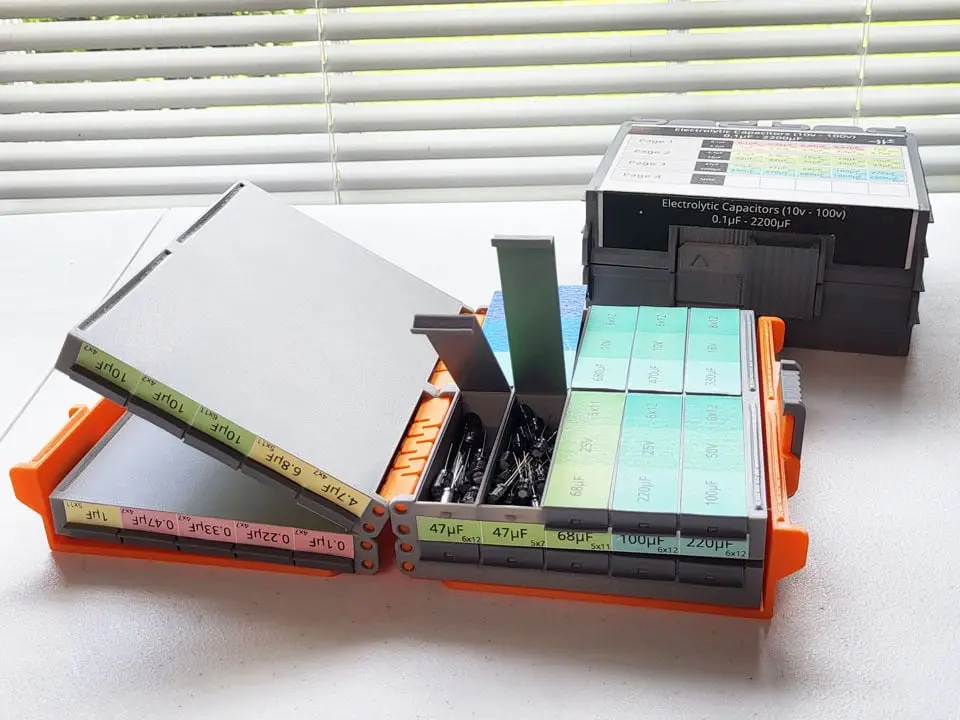
Part sliding latch case, part tackle box set, part book. Demo and assembly example at https://youtu.be/heP6LNbu-CE. It has 4 pages of tackle box trays, each with 10 compartments, each with a storage volume of 70x14x19mm. Each tray is book-bound, and a latching case keeps the entire book closed when.
Licencia
Uso comercial permitidoPuedes imprimirlo, modificarlo y venderlo dando crédito al autor.
Al descargar aceptas respetar la licencia y dar crédito a William Leu.
Archivos (15)
- Tacklebook_Long_2x5_BookCover_A.stl STL · 209 KB
- Tacklebook_Long_2x5_BookCover_B.stl STL · 203 KB
- Tacklebook_Long_2x5_Page.stl STL · 227 KB
- Tacklebook_Long_Lid.stl STL · 20 KB
- Tacklebook_Long_Spine.stl STL · 41 KB
- Tacklebook_SlideLatch_Original.stl STL · 66 KB
- Tacklebook_SlideLatch_ExtraTol.2mm.stl STL · 66 KB
- Tacklebook_SlideLatch_ExtraTol.4mm.stl STL · 66 KB
- TackleBookSimple_Long_2x5_Page.stl STL · 216 KB
- TackleboxTray_Long_1x2.stl STL · 30 KB
- TackleboxTray_Long_2x5.stl STL · 152 KB
- TackleBookLabels.svg.zip ZIP · 17 KB
- EmptyLabels.pdf PDF · 21 KB
- CapacitorDemoLabels.pdf PDF · 103 KB
- PartsContainer_16.blend BLEND · 3,9 MB
- Categoría
- Organización
- Formatos
- STL, ZIP, PDF, BLEND
- Descargas (todas las plataformas)
- 521
- Publicado
También en
Sobre este modelo
Part sliding latch case, part tackle box set, part book. Demo and assembly example at https://youtu.be/heP6LNbu-CE. It has 4 pages of tackle box trays, each with 10 compartments, each with a storage volume of 70x14x19mm. Each tray is book-bound, and a latching case keeps the entire book closed when not in use. The latch style is inspired by the kind used for long-shank drill bit sets. The case exposes the sides of the book so the compartment fronts are visible, allowing you to see the labels while the case is closed. The lids push-fit into the box and use a living-hinge design. Decent for holding a large collection of small electronics parts (if you ignore the fact that ordinary 3D-printed boxes don't have ESD protection - but then again, neither do normal acrylic and polyethylene containers). I first made this for a set of electrolytic capacitors. Blank labels, and my example labels are provided (meant just as an example and not for use; no promises they don't have errors). I only needed 3 pages, so I left the fourth blank for miscellaneous parts. The terms "(book) cover", "case", and "jacket" (applies more for the Blender source file) are used interchangeably. Warnings This thing requires assembly and is very labor-intensive. Mainly because of the work needed to install all the lids (40 of them). There is a smaller test model TackleboxTray_Long_1x2.stl that can be printed as a small-scale test of the work and difficulty of installing the lids. Variations This design includes a few variations. After this section, the rest of this page will assume you're building the tackle book with the case. - Test- The model TackleboxTray_Long_1x2.st is a simple small-arrayed tray. While it can be used for storage, its main purpose is to give a low-cost sample of how the larger trays and books will work.
- Tackle Box Tray- The model TackleboxTray_Long_2x5 is a simple version that has the common 2x5 arraying, but cannot be book-bound.
- Simple TackleBook- The model TackleBookSimple_Long_2x5_Page is a simple page version that has the common 2x5 arraying and can be book-bound. But it is not compatible with the case because it lacks the indexing features to keep the case and latch stable when closed. Without the case, this also means books with this model can have any number of pages instead of exactly 4.
3D Printing All parts can be PLA or PETG (or any other hard plastic). But it's recommended to use PETG for the hinges. All parts are already aligned so that the right side is lying on the bed. No supports or brims are needed unless mentioned for individual parts. - Tacklebook_Long_2x5_BookCover_A.stl- x1 - The bottom cover of the case. - Supports required for the overhang of the floating cylinders in the back (hinge pins) and the overhung part in the front where the latch will slide (the latch rail). Do not add more support than needed. Do not add supports to small overhang areas in the region if they will print fine from bridges. See image attached to project for reference.
- Tacklebook_Long_2x5_BookCover_B.stl- x1 - The top cover of the case. - Supports required for the overhang of the floating cylinders in the back (hinge pins) and the overhung part in the front where the latch will slide (the latch rail). Do not add more support than needed. Do not add supports to small overhang areas in the region if they will print fine from bridges. See image attached to project for reference.
- Tacklebook_Long_2x5_Page.stl- x4 - The tackle box trays in page form.
- Tacklebook_Long_Lid.stl- x40 - If not making the bona fide tackle book, it's x1 lid per compartment, or x10 lids per 2x5 tray. - The compartment lids. - The lids move using a living hinge design. PETG is recommended over PLA to get the most cycles (i.e., the most back-and-forth movement before the lids eventually break at the hinge). - This may get knocked down during print; print with a brim to keep it stable. Do not print with a brim if you don't have to.
- Tacklebook_Long_Spine.stl- x6 - If not making the bona fide tackle book, it's x2 per pair of pages that need to be bound together. - Hinges to bind two pages together.
- Tacklebook_SlideLatch_*.stl- x1 - Only 1 variation needs to be printed. Currently, the ExtraTol.4mm is recommended. As the name suggests, it adds 0.4mm of extra height tolerance to make it easier to slide. - The latch to hold the case closed.
2D Printing Example labels are provided as multi-page PDFs, along with the SVG source file. The SVG file includes construction drawings and extra printable content outside the page (SVGs don't support multi-page). Print them on label paper or sticker paper. In the demo video, I used matte vinyl label paper because I ran out of glossy vinyl. For final versions, it's best to use the more expensive glossy vinyl for a better-quality look. Assembly - Deburr the hinge pins (the small cylinders on the back) where the supports were broken off. - Deburr the latch rail (the front part of the covers that was supported). - Push all the lids into the slots in the pages. - Make sure they are inserted the correct way so the ends interlock with the front of the compartments. When pushing in, it's recommended to not bend the living hinges until the lids are fully inserted. Push straight down without bending the lid forwards or backward. - It helps to shimmy (jiggle) the lid side to side when pushing it in. - You will probably hear some creaking, followed by a loud snap when the notch finally reaches the hole (inside the slot) it's designed to fit into. - When a lid is fully inserted, you can then make the first bend on the living hinges, to bend them forward and snap the compartment shut.
- Connect the covers to a page.- Note that there are indexing features on the pages and the inside of the covers that can interlock with each other. Use these to determine the correct orientation of these parts relative to each other. - Align a page and cover to interlock. - Flex the hinge pins on the cover to fit them into the female hinge parts of the pages. Do not bend them far enough to permanently deform them. Make sure all 4 of them are fitted. - Do this for both pages.
- Connect all the pages together.- Note that there are indexing features opposite the spine where pages can interlock with each other. Use these to determine the correct orientation of the parts relative to each other. - The pages connected to covers should be at the ends of the final stack. - Flex the spine hinges as needed to fit them in, and then straighten them out once they are fitted. Do not bend the spine hinges so much as to permanently deform them.
- Insert the slide into the rail of Cover A. There's a specific, tricky diagonal angle to use. See attached project image for reference. Use force if needed. - Exercise the joints and the slide. Test the slide; if it's way too tight, remove it and consider using one designed with more tolerance - may require modifying the stl if the ones provided still need more tolerance. If it can move with some effort, it may just need to break in and will loosen over time.
For the labels, - Print and cut out the pages. There should be:- 1 page that has labels for both covers. - 2 pages that have labels for the front of the compartments and for individual lids.
- For the cover labels, the bottom label should be marked as the bottom. The covers have debossed marks showing exactly where to place the labels. - Place the front compartment labels on the front, below where the front of the lids rest when they're closed. Open to lids when placing the label to get access. - Place the individual lid labels.
Source File Some source files are included, but not supported. Sorry, but I don't have the capacity to take requests or fix anything but the most egregious issues. You can leave requests in the comments, and someone else may help 🤞. The Blender source file is included. It uses Blender 5.2. It's not a convenient or parametric file. I renamed and organized stuff, but left my in-progress junk in there - it's mostly shared in case anyone is curious what my end-result workflow looks like. If you want to make modifications, you're arguably better off modifying the STLs directly. The labels SVG is included. This is simply the capacitor sample I made for myself, so keep in mind they're not blanks. Originally designed in Inkscape. Keep in mind that what you see on the SVG page's letter document (the active 8.5" x 11" contents for printing) isn't everything in the SVG file. Extra constructions and lid labels are off to the side because SVGs don't support multiple pages. The PDFs are made by using the Windows PDF export printer to print single pages from Inkscape, then combining them into multiple pages with PDFtk Pro. Known Issues This thing definitely isn't perfect, but it's considered finished. It's a prototype that's good enough for my personal needs that I designed it for. This section lists known issues; mostly for closure, since this isn't a TODO list (at least ATM): - A jig might be possible to help place the lids in (maybe with the help of a mallet). - A jig could be made to help place the labels. - When the cover is closed, the opposite side from the slide opens up a little bit (may be unavoidable without switching the latch mechanism). - The sliding latch could always use more work with better interference and smoother sliding. - The back of the covers is a little tighter than the front, causing the cover to buckle up a bit. - The back of the lid labels probably go too far back; if they don't pinch into the hinge, they can be lifted up. - If the downward force to close the lids isn't aligned well downwards, snapping the lids closed can be a little difficult. - Indexing features sometimes need a little finessing to interlock correctly.
Descripción original del autor, publicada en Thingiverse.