
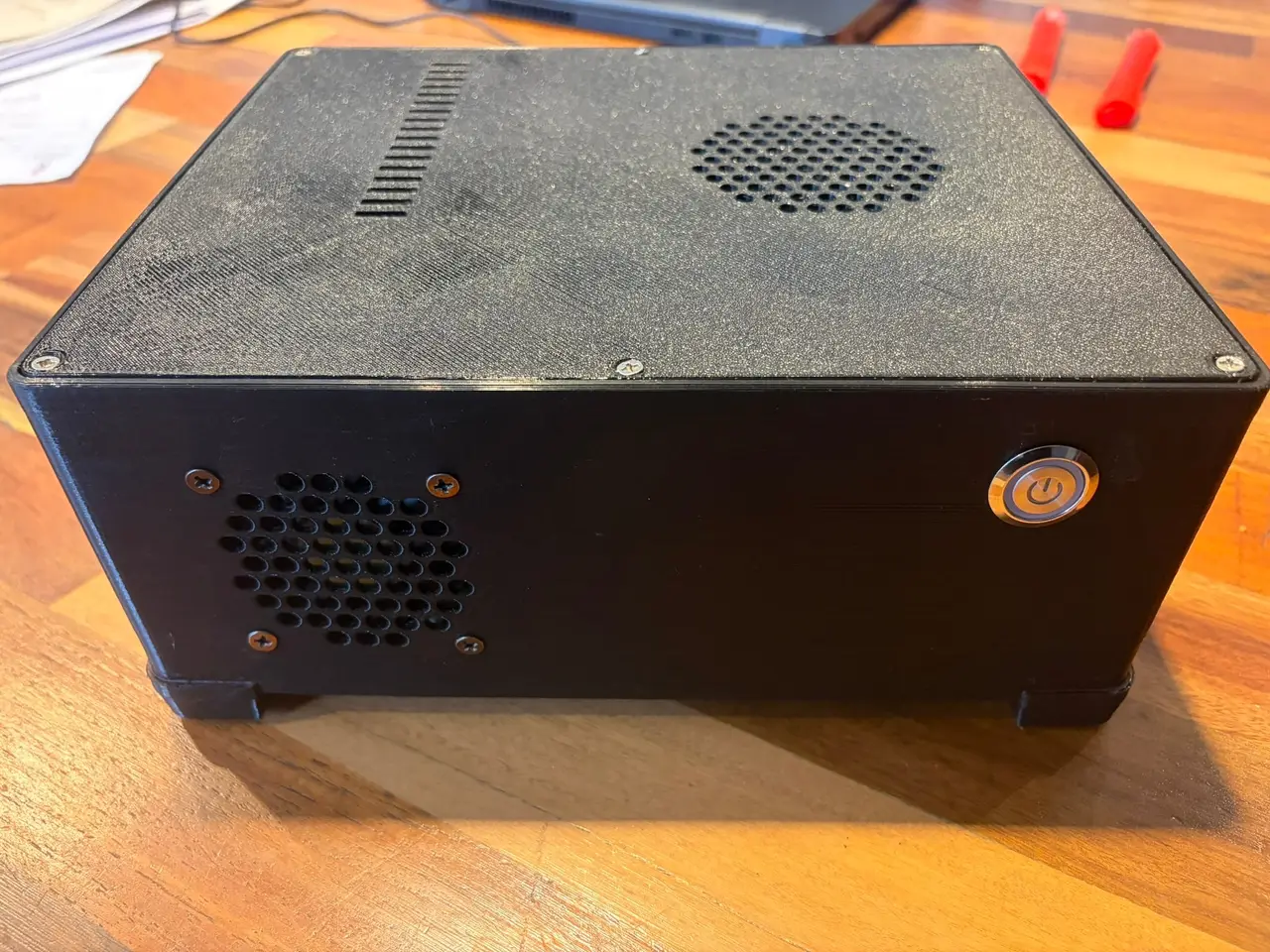
Simple m-ATX (micro atx) PC Case with PICO PSU
por Andrés Borga en Thingiverse
Gabinete mATX compacto — ASRock A55M-VS + GT 710 LP + pico PSU [ES] Versión en español · [EN] English version below [ES] Descripción Gabinete de escritorio impreso en 3D (PETG) para una mother micro-ATX de 224 × 173 mm, con placa de video low profile, fuente pico PSU con ladrillo externo de 12 V y..
Licencia
Uso comercial permitidoCC BY-SA 4.0 — Atribución, compartir igual
Puedes usarlo y modificarlo dando crédito; las versiones modificadas deben compartirse con la misma licencia.
Al descargar aceptas respetar la licencia y dar crédito a Andrés Borga.
Archivos (9)
- Categoría
- Para tu impresora
- Formatos
- STL, PY
- Descargas
- 12
- Publicado
Sobre este modelo
Gabinete mATX compacto — ASRock A55M-VS + GT 710 LP + pico PSU [ES] Versión en español · [EN] English version below [ES] Descripción Gabinete de escritorio impreso en 3D (PETG) para una mother micro-ATX de 224 × 173 mm, con placa de video low profile, fuente pico PSU con ladrillo externo de 12 V y SSD de 2,5". La salida de video va en una placa modular que baja junto con la tarjeta, como un bracket real. También hay una placa ciega para armarlo sin placa de video. Incluye el script paramétrico de Blender. Medidas exteriores: 248 × 208 × 96 mm, más 10 mm de patas. [ES] Hardware para el que está pensado - Mother ASRock A55M-VS (FM1, 224 × 173 mm, 6 agujeros de fijación) + APU A8-3870K con cooler stock - Placa de video MSI GT 710 1GD3H LP V1 (DVI + HDMI en la placa, VGA con cable en su propia línea) - Pico PSU 180 W + fuente externa de 12 V (entrada por jack de panel M8) - SSD de 2,5" pegado a la pared lateral (cinta doble faz) - Cooler frontal de 60 mm, botón de encendido de 19 mm pulsador con LED
[ES] Fotos En las imagenes está el primer prototipo, armado e impreso en PETG negro. Esa versión tenía rejillas de agujeros hexagonales y la pared trasera fija con los recortes de video. Además se le agregó un segundo disco y las patas van pegadas con epoxi. Los STL publicados son la versión 2: - rejillas de aros (más abiertas y sin silbido) - placa de video modular, con placa ciega - patas atornilladas - aristas inferiores sin bisel - standoffs en un esqueleto aparte
[ES] Archivos STLCantidadNotas 01_base.stl1Abierta hacia arriba, tal como está 02_tapa.stl1Cara exterior contra la cama 03_placa_gt710_lp.stl1Placa de conectores para la GT 710 LP 04_placa_ciega.stl1Placa lisa, para armar sin placa de video 05_pata_izq_x2.stl2 06_pata_der_x2.stl2 07_soportes_mother.stl1Esqueleto con los 6 standoffs; se pega al piso [ES] Impresión (PETG) - Capa de 0,2 mm; 6 perímetros en la base (paredes macizas) y 3 en el resto; relleno 20 %. - Sin soportes. Brim de 5–8 mm en la base. - Cama a 85 °C en la primera capa y 80 °C después; boquilla a 235–240 °C. - Ventilador de capa al 0 % en las primeras 3 capas y al 30–40 % después. Evitá las corrientes de aire. - La base necesita una cama de al menos 250 × 210 mm. - Limpiá la cama con detergente o alcohol isopropílico. No uses alcohol sanitizante: tiene glicerina.
[ES] Materiales - 16 insertos térmicos M3: 6 en el esqueleto de standoffs, 6 en la tapa y 4 en las patas - Epoxi de dos componentes, para pegar el esqueleto al piso - Tornillos M3:- 6 × M3 × 6 para la mother - 6 × M3 × 8 cabeza fresada para la tapa - 4 × M3 × 8 cabeza fresada para las patas
- Cooler de 60 × 60 mm (de 25 mm o slim) + 4 tornillos - Botón pulsador de 19 mm (sin retención), jack DC de panel M8 y cinta VHB para el SSD
[ES] Armado - Colocá los insertos con el soldador a ~220 °C antes de pegar nada: el calor ablanda el epoxi. - Atornillá las patas desde adentro. La cabeza fresada queda al ras del piso. - Ubicá el esqueleto de standoffs usando la mother como plantilla: - Atornillá el esqueleto a la mother y poné el I/O shield en la pared trasera. - Bajá la mother con el esqueleto hasta que los conectores entren en el shield. - Marcá los pies con lápiz y sacá todo. - Lijá el piso y los pies, y pegá con epoxi dentro de las marcas.
Como la mother hace de plantilla, la posición sale exacta aunque haya diferencias de impresión o de placa. Esperá 24 h y después atornillá la mother.
- Atornillá la placa de conectores a la placa de video con los tornillos hexagonales del DVI y del VGA. - Con la tapa sacada, bajá la placa de video con la placa de conectores puesta. La placa entra por las guías de la pared trasera mientras la tarjeta entra en el slot. - Conectá todo y cerrá la tapa con 6 tornillos.
Si usás otra mother u otra placa de video verificá que coincidan con tu hardware. Recién después imprimí la base. [EN] Description 3D-printed compact desktop case (PETG) for a 224 × 173 mm micro-ATX motherboard with a low-profile graphics card, a pico PSU powered by an external 12 V brick, and a 2.5" SSD. The video outputs go on a modular plate that slides down together with the card, like a real bracket. A blank plate is included for builds without a graphics card. The parametric Blender script is included. Outer dimensions: 248 × 208 × 96 mm, plus 10 mm feet. [EN] Target hardware - ASRock A55M-VS motherboard (FM1, 224 × 173 mm, 6 mounting holes) + A8-3870K APU with stock cooler - MSI GT 710 1GD3H LP V1 graphics card (DVI + HDMI on the card, VGA on a ribbon cable in its own row) - 180 W pico PSU + external 12 V power brick (M8 panel-mount DC jack) - 2.5" SSD attached to the side wall (double-sided tape) - 60 mm front fan, 19 mm momentary power button with LED
[EN] Photos Images shows the first prototype, printed in black PETG and fully assembled. That version had hex-hole grilles and a fixed rear wall with the video cutouts. It also got a second drive, and its feet are glued on with epoxy. The published STLs are version 2: - ring grilles (more open area, no fan whistle) - modular GPU plate, with a blank plate - screwed-on feet - no bevel on the bottom edges - standoffs on a separate skeleton
[EN] Files STLQtyNotes 01_base.stl1Open side up, as oriented 02_tapa.stl (lid)1Outer face on the bed 03_placa_gt710_lp.stl1Connector plate for the GT 710 LP 04_placa_ciega.stl1Blank plate, for builds without a graphics card 05_pata_izq_x2.stl (left foot)2 06_pata_der_x2.stl (right foot)2 07_soportes_mother.stl1Skeleton with the 6 standoffs; glued to the floor [EN] Printing (PETG) - 0.2 mm layers; 6 perimeters on the base (solid walls) and 3 on everything else; 20 % infill. - No supports. 5–8 mm brim on the base. - Bed at 85 °C for the first layer and 80 °C after that; nozzle at 235–240 °C. - Part cooling fan at 0 % for the first 3 layers and 30–40 % after that. Avoid drafts. - The base needs a bed of at least 250 × 210 mm. - Clean the bed with dish soap or isopropyl alcohol. Don't use hand-sanitizer alcohol: it contains glycerin.
[EN] Bill of materials - 16 M3 heat-set inserts: 6 in the standoff skeleton, 6 in the lid and 4 in the feet - Two-part epoxy, to glue the skeleton to the floor - M3 screws:- 6 × M3 × 6 for the motherboard - 6 × M3 × 8 countersunk for the lid - 4 × M3 × 8 countersunk for the feet
- 60 × 60 mm fan (25 mm or slim) + 4 screws - 19 mm momentary push button (non-latching), M8 panel-mount DC jack and VHB tape for the SSD
[EN] Assembly - Install the inserts with a soldering iron at ~220 °C before gluing anything, because the heat softens epoxy. - Screw the feet on from inside the case. The countersunk heads sit flush with the floor. - Position the standoff skeleton using the motherboard as a jig: - Screw the skeleton to the motherboard and fit the I/O shield into the rear wall. - Lower the motherboard with the skeleton attached until the ports seat in the shield. - Mark the feet with a pencil and remove everything. - Sand the floor and the feet, then glue them with epoxy inside the marks.
Because the board itself is the jig, the position comes out exact even with small print or board tolerances. Wait 24 h, then screw the motherboard down.
- Screw the connector plate to the graphics card using the DVI and VGA hex standoffs. - With the lid off, lower the card with the plate attached. The plate slides into the rear wall guides as the card seats in the slot. - Connect everything and close the lid with 6 screws.
If you use a different motherboard or graphics card, test pieces first and check that they match your hardware. Only then print the base.
Descripción original del autor, publicada en Thingiverse.



