
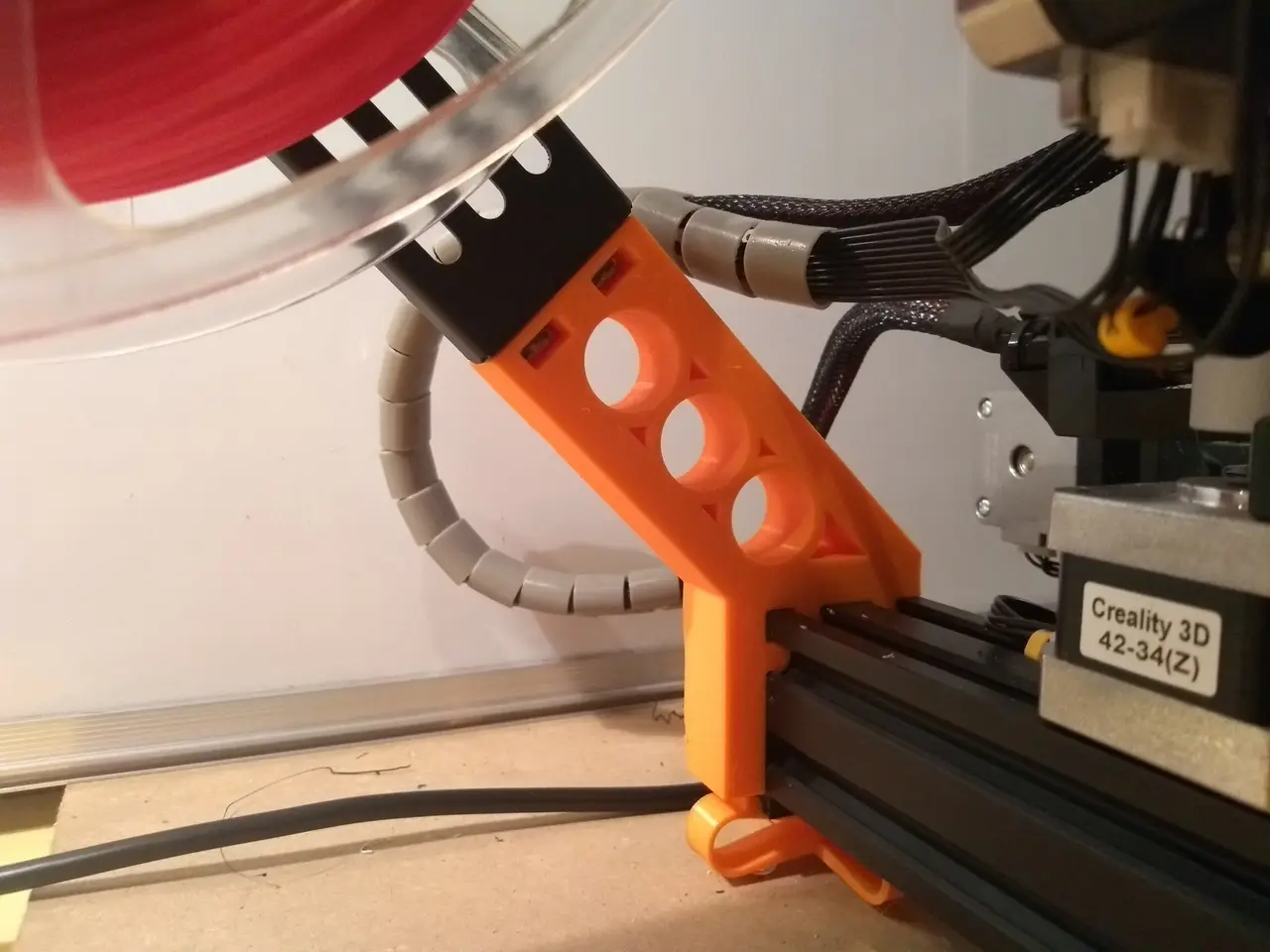
Side Spool Mount - Ender 3 (Pro) / Creality CR - Long & Extra Long
por Peter van Westen en Thingiverse
Forget This! Yes, that's right. I don't recommend this side spool mount any more! I made a new and much better one. I call it: The Rocket! Check it out! https://www.thingiverse.com/thing:4691695 Last update: 21 Dec 2020 This is my custom version of the Side Spool Mount. The mount is long enough for.
Licencia
Uso comercial permitidoPuedes imprimirlo, modificarlo y venderlo dando crédito al autor.
Al descargar aceptas respetar la licencia y dar crédito a Peter van Westen.
Archivos (8)
- Side_Spool_Mount_-_Ender_3_Pro_-_Long_-_4_Tabs.stl STL · 92 KB
- Side_Spool_Mount_-_Ender_3_Pro_-_Extra_Long_-_4_Tabs.stl STL · 111 KB
- Side_Spool_Mount_-_Ender_3_Pro_-_Long_-_3_Tabs_A.stl STL · 88 KB
- Side_Spool_Mount_-_Ender_3_Pro_-_Extra_Long_-_3_Tabs_A.stl STL · 106 KB
- Side_Spool_Mount_-_Ender_3_Pro_-_Long_-_3_Tabs_B.stl STL · 87 KB
- Side_Spool_Mount_-_Ender_3_Pro_-_Extra_Long_-_4_Tabs_B.stl STL · 106 KB
- Side_Spool_Mount_-_Ender_3_Pro_-_Long_-_Skrew_Holes.stl STL · 153 KB
- Side_Spool_Mount_-_Ender_3_Pro_-_Extra_Long_-_Skrew_Holes.stl STL · 154 KB
- Categoría
- Para tu impresora
- Formatos
- STL
- Descargas
- 44,679
- Publicado
Sobre este modelo
Forget This! Yes, that's right. I don't recommend this side spool mount any more! I made a new and much better one. I call it: The Rocket! Check it out! https://www.thingiverse.com/thing:4691695 Last update: 21 Dec 2020 This is my custom version of the Side Spool Mount. The mount is long enough for the spools to clear the Z-axis motor. So changing filament rolls shouldn't be an issue with this one. It is designed for the Ender 3 Pro. But should fit on the Ender 3 and Creality CR-10 too. This includes a Long version and an Extra Long version (2.3cm longer). There are 4 versions of the Long and Extra Long mounts (so 8 in total). 4 Tabs This has 4 tabs that slide into the v-slots. But depending on your print, it can be too tight to fit
3 Tabs A & B These have 3 tabs, which makes it easier to fit into the rail. Choose the version that fits your needs. Make sure the 'missing' tab is at the side, not the top.
Skrew Holes This has 2 tabs and 2 screw holes. This is the easiest to slide on to the rail and will offer the most sturdy fit. The M58 screws included with your printer are long enough. But I recommend using M510 screws.
INSTALLATION To install, just remove the back cap, slide it on to the bar, and place the cap back. It's a strong, tight fit. So you will have to use some force to get it on. TIP Tip: If you use this awesome Filament Holder (remix) by mjoaris https://www.thingiverse.com/thing:3209211 Place the original mount with the flat side to the front. This way you can screw the holder on vertically, like seen in the second photo. UPDATES [21-Dec-2020] Added reference to new and improved side spool mount: The Rocket! [2-May-2020] I added a few new versions. There are now 4 versions of the Long and Extra Long mounts. [27-Oct-2019] Improved the size and depth of the screw holes in the 2 versions with the extra screw holes. [12-Sept-2019] Added a new version of both the Long and Extra Long ones. Now with screw holes for a stronger screw/nut connection. [28-Apr-2019] Added an Extra Long version that is 2.3cm longer. This should be more than enough to clear bigger type filament rolls.
Descripción original del autor, publicada en Thingiverse.



