
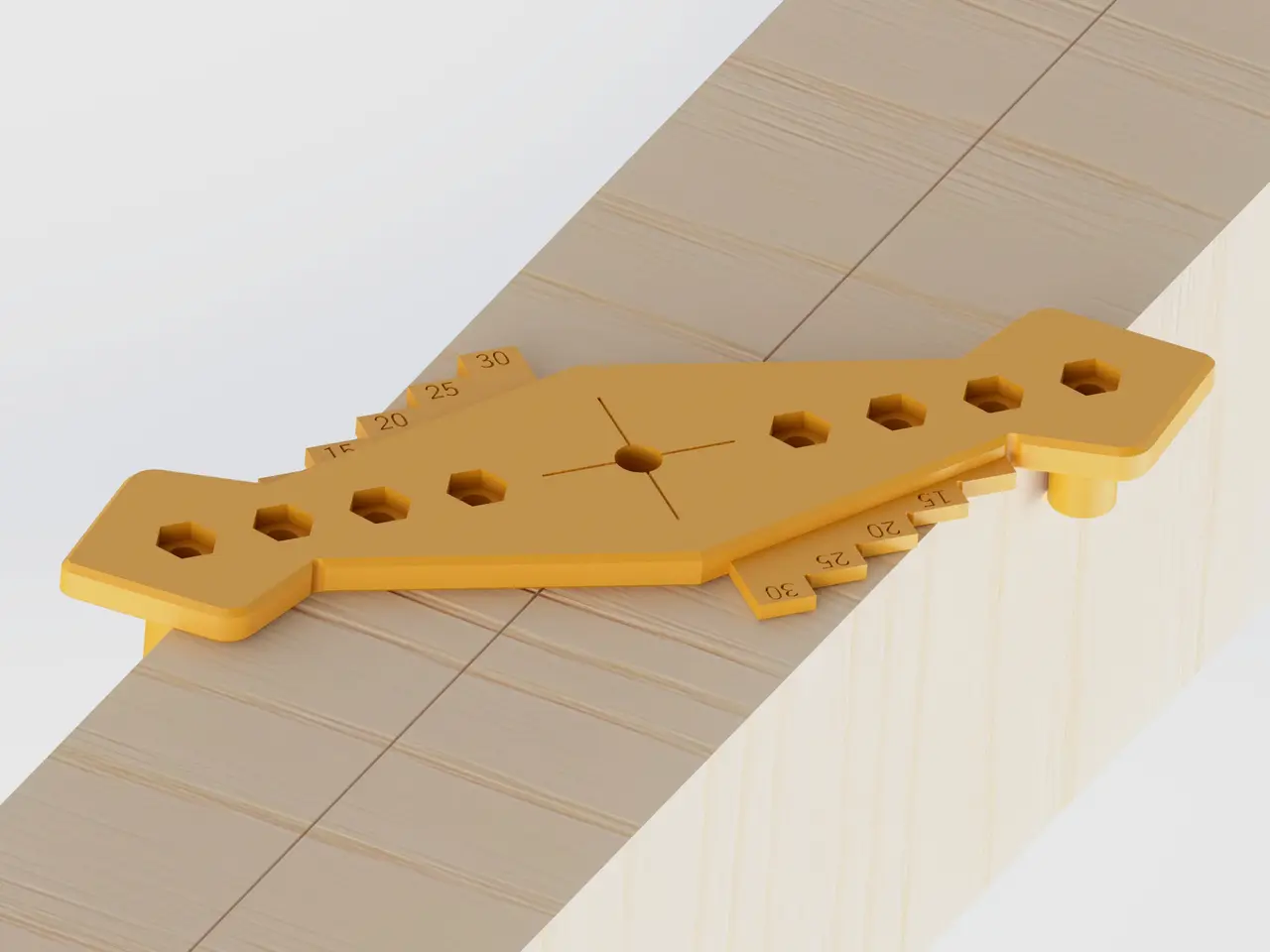
Self Centering Gauge
por Chris (Aero)Engineering Design en Printables
Device to get a centered marking, regardless of the width of the thing you want a centered marking on.
Licencia
Solo uso personalCC BY-NC-SA 4.0 — Atribución, no comercial, compartir igual
Uso personal dando crédito; sin fines comerciales y las modificaciones con la misma licencia.
Al descargar aceptas respetar la licencia y dar crédito a Chris (Aero)Engineering Design.
Archivos (23)
- Centering Gauge_Chamfered hole.3MF 3MF · 295 KB
- Centering Gauge_no hole.3MF 3MF · 269 KB
- Centering Gauge - Stopper.3MF 3MF · 25 KB
- Centering Gauge_7.5mm hole.3MF 3MF · 307 KB
- Centering Gauge_6mm hole.3MF 3MF · 308 KB
- Centering Gauge_6.5mm hole.3MF 3MF · 308 KB
- Centering Gauge_7mm hole.3MF 3MF · 307 KB
- Centering Gauge_8mm hole.3MF 3MF · 307 KB
- Centering Gauge_8.5mm hole.3MF 3MF · 307 KB
- Centering Gauge_9mm hole.3MF 3MF · 307 KB
- Centering Gauge_10mm hole.3MF 3MF · 308 KB
- Centering Gauge_onePart_Chamfered hole.3MF 3MF · 79 KB
- Centering Gauge_onePart_no hole.3MF 3MF · 79 KB
- Centering Gauge_onePart_6mm hole.3MF 3MF · 90 KB
- Centering Gauge_onePart_6.5mm hole.3MF 3MF · 91 KB
- Centering Gauge_onePart_7mm hole.3MF 3MF · 90 KB
- Centering Gauge_onePart_7.5mm hole.3MF 3MF · 91 KB
- Centering Gauge_onePart_8mm hole.3MF 3MF · 91 KB
- Centering Gauge_onePart_8.5mm hole.3MF 3MF · 91 KB
- Centering Gauge_onePart_9mm hole.3MF 3MF · 91 KB
- Centering Gauge_onePart_10mm hole.3MF 3MF · 91 KB
- Centering Gauge_7.5mm hole - one-part version.3mf 3MF · 101 KB
- Centering Gauge_7.5mm hole - standard version.3mf 3MF · 315 KB
- Categoría
- Herramientas
- Formatos
- 3MF
- Descargas
- 24,063
- Publicado
Sobre este modelo
Details This is a device to get a centered marking, regardless of the width of whatever you want to mark. It works by placing the stopper on either side of the beam, bar, etc. and twisting the device until both stoppers touch the sides. The geometry ensures that the marking hole is then centered between the stoppers. You can make the gap between the stoppers wider and smaller to accomodate a wider range of component widths. Make sure to place both stoppers at the same distance from the middle, otherwise it will not give you a centered marking.
I made several version of the gauge with different sized holes in the middle. Choose the version which best fits your pencil/marker. A hole much too wide will allow for too much wobble when marking and the line will be off center by a few millimeter. A good choice for different sizes of pencils will be the “chamfered hole” version, where the hole is just 2mm for the lead, but it's chamfered to the top to fit the rest of the pencil. I also made a version thats just one print. Choose this if you don't want to deal with the additional bolts required for the regular version or when you prefer it beeing one piece instead of three.
The gauge can also be used to get a marking along the edge of something at a distance of 15-30mm (in 5mm steps) from the edge. For this, place both stoppers on the same side, place a pencil or something similar at the distance of your choosing and slide along the edge. The distance marking plates also provide a larger support surface for the gauge in general. The edges might also be useful occasionally when measuring angles, so I incorporated commonly used angles into the design of the edges.
Printing and assembly I printed this model with a 30% cubic infill and 4 perimeters to ensure it doesn't deform while pressing it against a piece of wood or something. If you want to adjust the size of the model, choose the “one print” version with no distance markings on it and add the hole in the diameter you want afterwards in the slicer (in Prusa Slicer you can use negative volumes to do that, there are tutorials for it on Prusas website). An option to consider when printing this is also “Print external perimeter first”, as it is called in Prusa Slicer. This may also help with dimensional accuracy. But this also comes down to your personal printer and printing experiences, but it may be worth considering for a nice and accurate print. When your prints tend to warp use a brim on all parts. Otherwise it should be fine to just use on with the stoppers, as their contact area with the bed is quite small. Things you will need to print: 1 x Centering gauge 2 x Stoppers or 1 x One-part centering gauge Measure your pen or pencil if you want to use this for marking. Most likely the 7.5mm bore insert will be the best in this case. Make sure the pen is not loose, as this will make the marking unprecise.
Assembly To assemble you will need two M5x25 allen bolts for the stoppers (and fitting nuts of course).
About the model I made this version of my self-centering drill guide for people who just want to use this for getting nice centered marking. It's much thinner and requires consequently less filament tp print. Also the main part consists just of one piece with a hole in it instead of a system to fit different inserts for various drills, as with the drill guide.
Descripción original del autor, publicada en Printables.



