
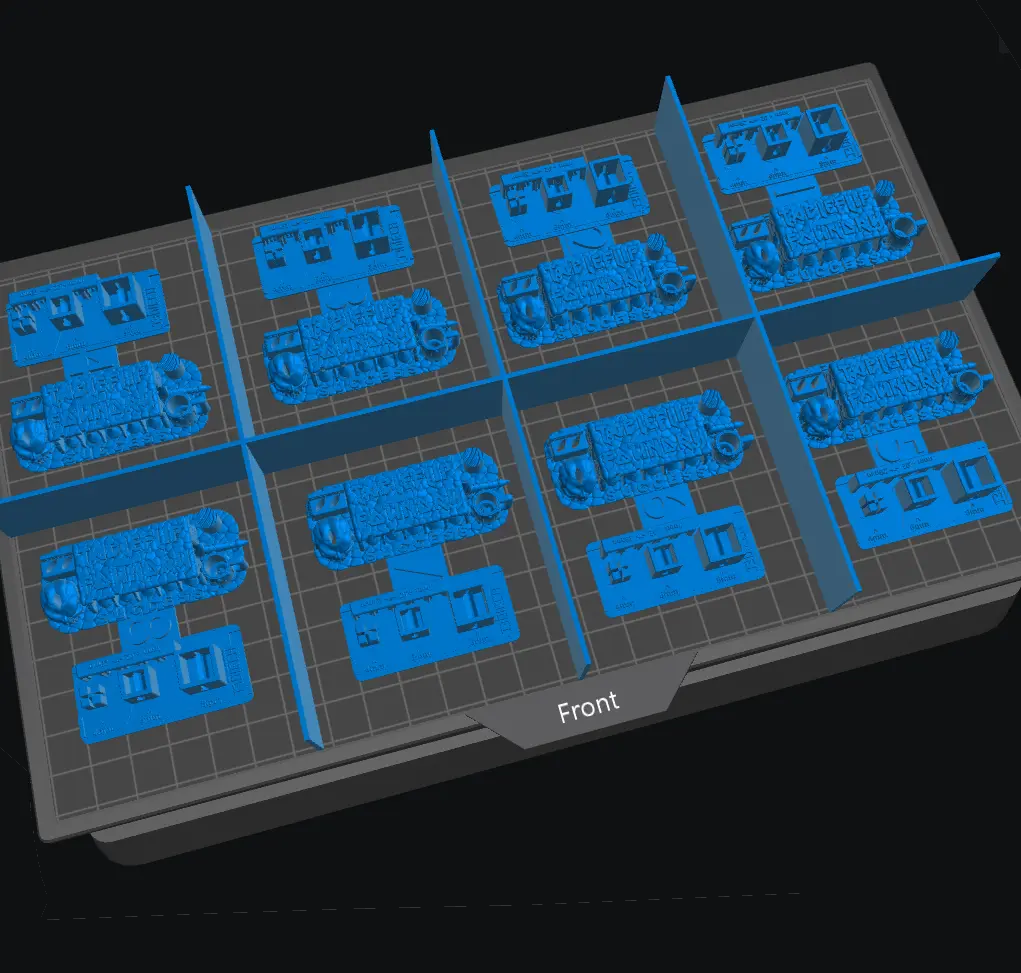
Saturn 4 Ultra - Resin Calibration Tool Gridlines
Guess who just got a Saturn 4 Ultra? This guy!
Cults3D entrega los archivos a usuarios con cuenta gratuita
Licencia
Solo uso personalLicencia de uso privado de Cults3D: puedes imprimirlo para ti. No se permite compartir el archivo ni vender las impresiones.
Al descargar aceptas respetar la licencia y dar crédito a lstar.
Archivos (6)
- 4 Test Gridlines - Labelled.stl STL
- 4 Test Gridlines.stl STL
- 6 Test Gridlines - Labelled.stl STL
- 6 Test Gridlines.stl STL
- 8 Test Gridlines - Labelled.stl STL
- 8 Test Gridlines.stl STL
- Categoría
- Tecnología
- Formatos
- STL
- Descargas
- 10,401
- Publicado
Sobre este modelo
Guess who just got a Saturn 4 Ultra? This guy!
The Saturn 4 Ultra has a built-in Resin Calibration tool that allows you to run multiple copies of any exposure test in a single print, by splitting your build plate into 4, 6, or 8 segments each with different exposure times.
This is a simple set of gridlines to help visualise those segments. Just import a gridline into your slicer, centre if necessary, and place your tests, and remember to remove the gridlines before printing!
Huh, I thought the Resin Calibration tool only let you print 4 copies...
Just click the grid button at the bottom-centre of the Resin Calibration screen to toggle between 4, 6, and 8 tests.
Segment Order
Segment 1 (with the longest exposure time) is the back-left section of the printer's screen - making it the back-right of the build plate in your slicer!
Segment 4/6/8 (with the shortest exposure time) is the front-right section of the printer's screen - making the front-left of the build plate in your slicer!
Note that the calibration tests featured in the demonstration screenshot are not included in this download. You are free to use the Boxes of Calibration, Cones of Calibration, or any other test of your choosing.
Descripción original del autor, publicada en Cults3D.



