
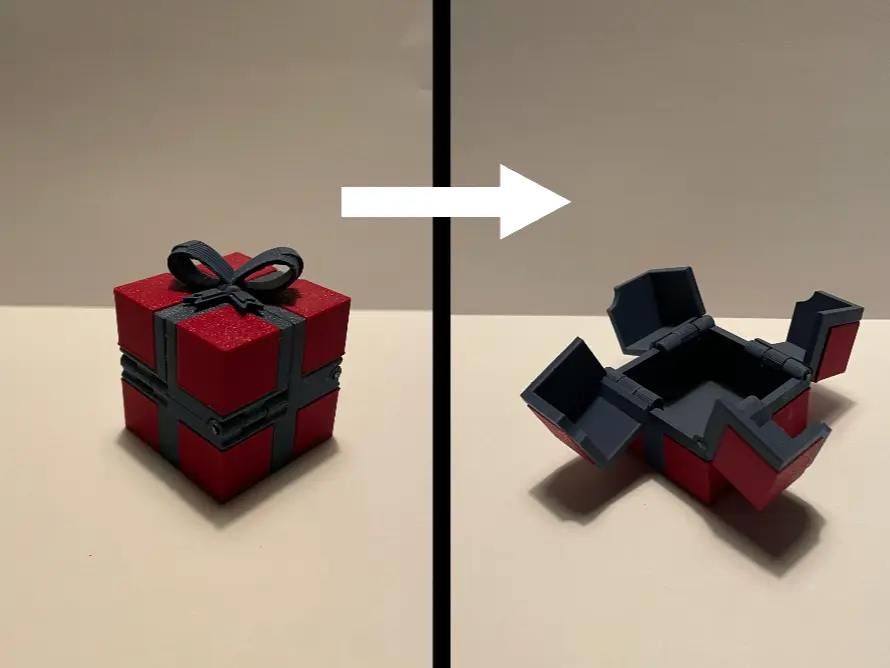
Satisfying Opening Gift Box (no AMS needed)
por 3d printing en MakerWorld
Satisfying Opening Present. The ultimate way to add a special touch to your gifts. 🎁
MakerWorld entrega los archivos a usuarios con cuenta gratuita
Licencia
Solo uso personalStandard Digital File License
Licencia estándar de archivos digitales: solo uso personal. No se permite compartir, revender ni subir el archivo a otros sitios, ni vender las impresiones.
Al descargar aceptas respetar la licencia y dar crédito a 3d printing.
Archivos (8)
- no ams present .stl STL · 881 KB
- no ams present 3mf.3mf 3MF · 770 KB
- side pannels STl.stl STL · 9 KB
- side pannels.3mf 3MF · 39 KB
- main body stl.stl STL · 3,0 MB
- main body.3mf 3MF · 740 KB
- bow STL.stl STL · 2,2 MB
- bow.3mf 3MF · 593 KB
- Categoría
- Herramientas
- Formatos
- STL, 3MF
- Descargas
- 15,848
- Publicado
Sobre este modelo
Satisfying Opening Present The ultimate way to add a special touch to your gifts. 🎁 This beautifully designed box measures 40mm x 40mm x 40mm and features a satisfying opening mechanism—simply pull the bow on top to reveal the contents inside. Assembled with filament hinge pins, it combines elegance and functionality in a compact package. Perfect for gifting jewellery, rings, or other small treasures, this present box not only holds your gift but enhances the experience of receiving it. Its unique design makes it a keepsake long after the gift has been unwrapped. ✨
no AMS or multicoloured printer needed quick to print perfect for Christmas Boost Meinstructions
- printing: Download files and print side panels and main body in different colours (main body will be the colour of the ribbon and bow)
- Remove Supports from Hinges: Carefully remove all support material, especially from inside the hinges, to ensure smooth movement.
- gluing the side panels: make sure the side panels are lined up with the will the correct part of the pain body (see pictures below) also ensure that the chamfered edge aligns with the chamfered edge of the main body (pictures below)
- Align Hinge Components: Position the middle hinge (on the corner piece) piece between the two outer hinge parts(on the main box), aligning them accurately.
- Prepare Filament Pin: Cut a piece of filament from your spool, matching the hinge colour, to serve as the hinge pin.
- Insert Filament into Hinge: Carefully insert the filament piece through the aligned hinge parts, ensuring it passes through all components smoothly.
- Trim Excess Filament: Using craft wire cutters, trim the filament flush with the hinge edges for a clean finish.
- Repeat for All Hinges: Repeat steps 3 through 6 for each hinge on the box.
- Test Box Operation: Open and close the box to check for smooth movement. - If the box doesn't operate smoothly, remove the filament hinge pin, straighten it, and reinsert.
- to remove filament pin there is a small hole at the other end of the hinge to poke it out. see image below
- Secure Filament (Optional): To prevent the filament from slipping out, apply a small amount of superglue to the ends of the filament after insertion.
All parts
corner side panels
main body corners
main body
all 4 corners
corner
chamfered edge of side panel
chamfered edge of corner
Descripción original del autor, publicada en MakerWorld.



