
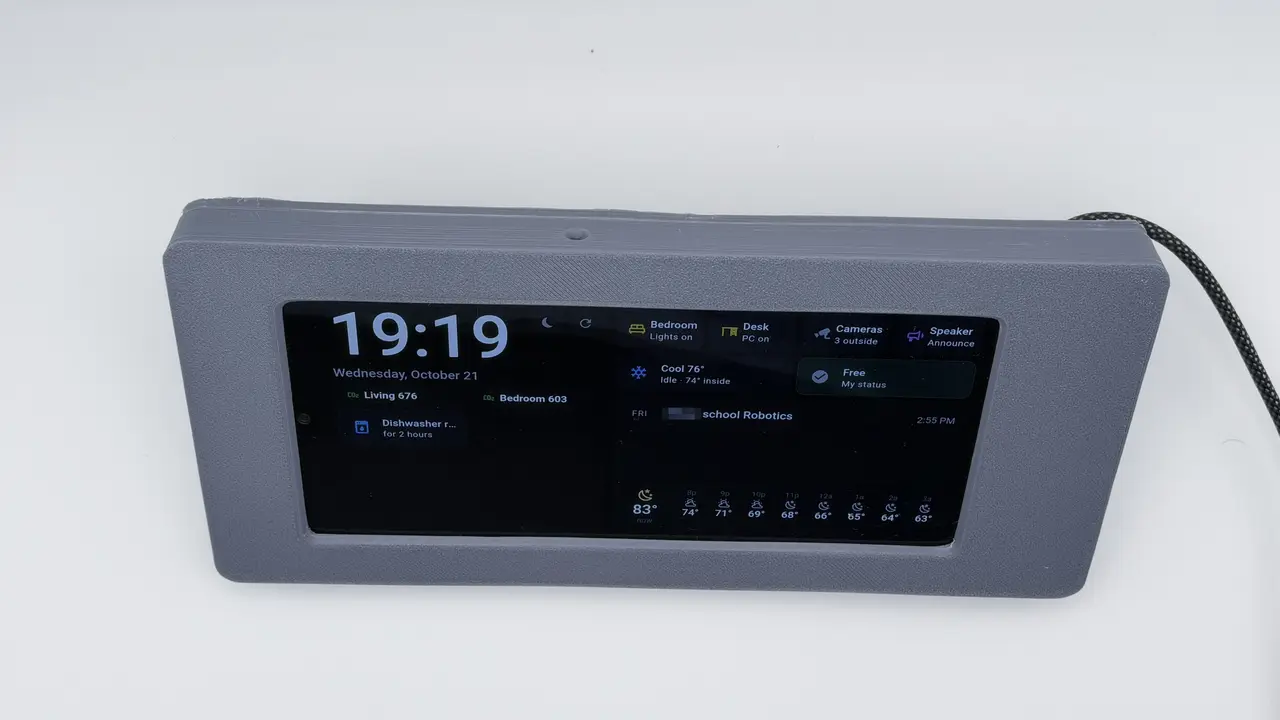
Samsung Galaxy A14 5G Desk Dashboard Enclosure – Home Assistant Kiosk
por Anish Kunisetty en Printables
Turns a Galaxy A14 5G into a sealed landscape desk dashboard for Home Assistant. Hidden 90° USB-C cable, 40° stand.
Licencia
Uso comercial permitidoPuedes imprimirlo, modificarlo y venderlo dando crédito al autor.
Al descargar aceptas respetar la licencia y dar crédito a Anish Kunisetty.
Archivos (4)
- Categoría
- Tecnología
- Formatos
- STL
- Descargas
- 0
- Publicado
Sobre este modelo
Turn an old or cheap Samsung Galaxy A14 5G (SM-A146U, 167.7 × 78 × 9.1 mm) into a dedicated desk dashboard for Home Assistant. The phone is sealed inside: the bezel shows only the screen, nothing on the front gives away that it's a phone, and it only opens by removing screws from the back. FEATURES - Landscape, 40° viewing angle, built-in stand (no extra parts) - Screen window ~152 × 66 mm; front camera stays uncovered (for Fully Kiosk motion / future voice) - Hidden 90° flat USB-C cable: plug sits in a pocket at the right end, ribbon exits the back - Paperclip hole for the power button, relief pocket so the case never presses the volume rocker - Speaker and mic slots, vent slots on the back - Cable strain relief: zip-tie anchor on the back + 2 zip-tie tunnels in the right leg, so a yank pulls the stand, not the phone's port - Counterbored screws sized for washers FILES 1. Bezel – print face down. 2. Back stand WITH pads – pads built in. Print lying on the rear edges of the three legs (already oriented). Use a brim. 3. Back stand WITHOUT pads – print flat, inner face down, legs up. Use this + the separate pads if you'd rather not print the version above. 4. Support pad (10 × 6 × 2.3 mm) – print 10, stick on the back plate inside (see placement image). They push the phone forward against the bezel; the rear-camera end is left clear. PRINT SETTINGS (tested in PLA+) - 0.2 mm layers, 3 walls, 15–20% infill - No supports needed - Brim recommended for the back stand HARDWARE - 6 × M3x6x5 brass heat-set inserts (into the bezel, from the back) - 6 × M3 × 8 mm screws (M3 × 10 also fits) + 6 washers up to 6.85 mm OD - Cable Right Angle 90 Degree USB C Type C https://www.aliexpress.us/item/3256811381750571.html - 2–3 small zip ties - Thin double-sided tape or CA glue (for the separate pads) ASSEMBLY 1. Install the 6 heat-set inserts in the bezel (~220–230 °C for PLA+), flush or slightly below the surface. 2. Plug the cable into the phone with the flat ribbon pointing toward the back of the phone. 3. Drop the phone face down into the bezel, camera end on the left. 4. Feed the ribbon through the slot in the back plate, place the back on, and fit the 6 screws with washers. 5. Route the cable down the back, zip-tie it at the anchor and through the leg tunnels. SOFTWARE TIPS - Fully Kiosk Browser (PLUS) in landscape, status/nav bars hidden, "Render in cutout area" off. - Turn on Samsung battery protection (charge limit 80%), since it's plugged in 24/7. - Watch the battery temperature in Home Assistant (Fully Kiosk integration), because the phone is enclosed. Measured from a real phone; check your model number (SM-A146U/B/P all share the 167.7 × 78 × 9.1 mm body).
Descripción original del autor, publicada en Printables.



