
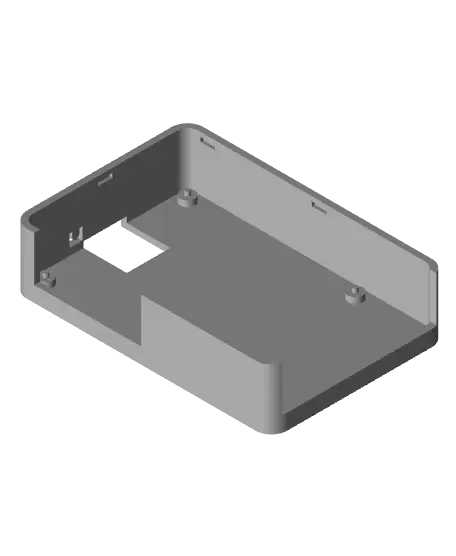
RPi 5 Case
This is a Raspberry Pi case I designed to be a snap fit and still be able to be taken apart easily. It is designed to be printed in 2 parts. I designed it to have a button on the case for the power button. I still haven't figured that part out so if you're having trouble with it fitting, try to cut
Thangs entrega los archivos a usuarios con cuenta gratuita
Licencia
Solo uso personalSin licencia indicada
El autor no indicó una licencia: todos los derechos le pertenecen. Úsalo solo para imprimir en casa y consulta al autor para cualquier otro uso.
Al descargar aceptas respetar la licencia y dar crédito a Ryan L.
Archivos (10)
- RPi 5 Case Bottom V2.stl STL · 319 KB
- RPi Case Bottom V3.stl STL · 319 KB
- RPi 5 Case Test 4.stl STL · 316 KB
- RPi 5 Case Bottom V3.stl STL · 319 KB
- RPi 5 Case Test 3.stl STL · 311 KB
- RPi 5 Case Test 2.stl STL · 311 KB
- RPi 5 Case Bottom.stl STL · 318 KB
- RPi 5 Case Lid.stl STL · 99 KB
- RPi Case Lid V2.stl STL · 101 KB
- RPi 5 Case Test.stl STL · 284 KB
- Categoría
- Tecnología
- Formatos
- STL
- Descargas
- 105
- Publicado
Sobre este modelo
This is a Raspberry Pi case I designed to be a snap fit and still be able to be taken apart easily. It is designed to be printed in 2 parts. I designed it to have a button on the case for the power button. I still haven't figured that part out so if you're having trouble with it fitting, try to cut the button off. This was printed on my MK3.9 with stock settings and no support. The only settings I changed are the temps for the filament and infill I set to 10%. You will need to orient the parts to fit your printer correctly. I didn't design it top up so they are on the side when you upload them into the slicer. I have also included my prototypes.
Update 3/25/24
I have updated the button as well as added another snap to help the llid to not want to twist out of place. The button still isn't perfect, for me it snapped off.
Descripción original del autor, publicada en Thangs.



