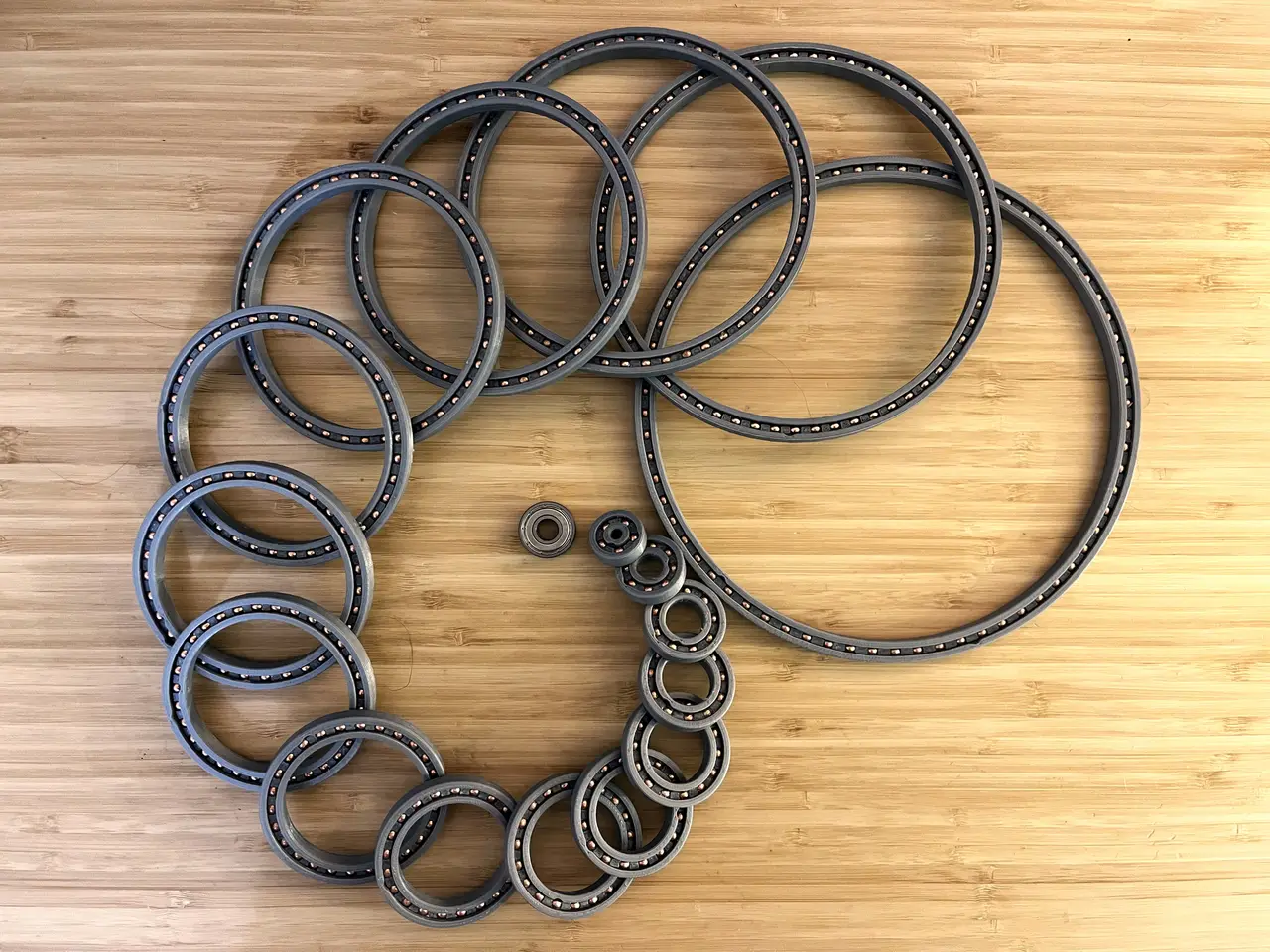
Rotary bearings 200mm---> 608Z
por Dangineering en Printables
Trying my hand at making a robot dog and needed some bearings, I made the model parametric and I have stls for ID:200->5
Licencia
Solo uso personalCC BY-NC 4.0 — Atribución, no comercial
Puedes imprimirlo y modificarlo para uso personal dando crédito. No se permite vender las impresiones.
Al descargar aceptas respetar la licencia y dar crédito a Dangineering.
Archivos (62)
- 608Z_ID8Casing.stl STL · 329 KB
- 608Z_ID8Retainer.stl STL · 317 KB
- ID5Casing.stl STL · 358 KB
- ID5Retainer.stl STL · 238 KB
- ID10Casing.stl STL · 330 KB
- ID10Retainer.stl STL · 323 KB
- ID15Casing.stl STL · 332 KB
- ID15Retainer.stl STL · 318 KB
- ID20Casing.stl STL · 335 KB
- ID20Retainer.stl STL · 376 KB
- ID25Casing.stl STL · 346 KB
- ID25Retainer.stl STL · 479 KB
- ID30Casing.stl STL · 349 KB
- ID30Retainer.stl STL · 541 KB
- ID35Casing.stl STL · 342 KB
- ID35Retainer.stl STL · 625 KB
- ID40Casing.stl STL · 347 KB
- ID40Retainer.stl STL · 691 KB
- ID50Casing.stl STL · 341 KB
- ID50Retainer.stl STL · 798 KB
- ID60Casing.stl STL · 354 KB
- ID60Retainer.stl STL · 945 KB
- ID70Casing.stl STL · 351 KB
- ID70Retainer.stl STL · 947 KB
- ID80Casing.stl STL · 347 KB
- ID80Retainer.stl STL · 1,1 MB
- ID90Casing.stl STL · 347 KB
- ID90CasingDual.stl STL · 695 KB
- ID90CasingTriple.stl STL · 1,0 MB
- ID90Retainer.stl STL · 1,1 MB
- ID100Casing.stl STL · 354 KB
- ID100Retainer.stl STL · 1,3 MB
- ID120Casing.stl STL · 353 KB
- ID120Retainer.stl STL · 1,5 MB
- ID140Casing.stl STL · 343 KB
- ID140Retainer.stl STL · 1,8 MB
- ID160Casing.stl STL · 338 KB
- ID160Retainer.stl STL · 1,6 MB
- ID180Casing.stl STL · 338 KB
- ID180CasingDual.stl STL · 676 KB
- ID180Retainer.stl STL · 1,9 MB
- Parametric Bearing File.sldprt SLDPRT · 360 KB
- 608Z_ID8.stp STP · 201 KB
- ID5.stp STP · 165 KB
- ID10.stp STP · 201 KB
- ID15.stp STP · 243 KB
- ID20.stp STP · 280 KB
- ID25.stp STP · 337 KB
- ID30.stp STP · 375 KB
- ID35.stp STP · 431 KB
- ID40.stp STP · 394 KB
- ID50.stp STP · 452 KB
- ID60.stp STP · 471 KB
- ID70.stp STP · 566 KB
- ID80.stp STP · 641 KB
- ID90.stp STP · 698 KB
- ID100.stp STP · 737 KB
- ID120.stp STP · 836 KB
- ID140.stp STP · 931 KB
- ID160.stp STP · 1,0 MB
- Categoría
- Repuestos
- Formatos
- STL, SLDPRT, STP
- Descargas
- 2,741
- Publicado
Sobre este modelo
Trying my hand at making a robot dog and needed a thin bearing for my cycloidal drive, but didn't want to break the bank in just bearings alone. Hence I decided to design one I could use with just some standard 4.5mm steel BBs. Print Settings Printer Brand: Prusa Printer: MK i3+ Rafts: No Supports: No Resolution: .28 (Any resolution will work) Infill: 25 Filament: eSun PLA + (PLA PRO) Slicer Settings: I have better luck with smoother rotation when I have the seam position set to random to avoid having a small bump at the seam location.
Notes Here are the sizes I have already made both STL & STEP files for: {ID=Inner Diameter (mm)} ID: 5, 8 (608Z), 10,15,20,25,30,35,40,50,60,70,80,90,100,120,140,160,180 in milli meters There are also two other ID90 files that are dual and triple layer thick. If you want to make any of these files multi layers thick then simply take the STL and import it into your solid modeling software of choice and mirror the part in either direction to make it as many rows thick as you want. There is a video linked above and here that demonstrates how to get custom sizes. If you want to get a very specific bearing size then download the solidworks file. Simply take the diameter that you want and then divide by 2 to get the radius and then add 4.125 to the radius and insert that into the equation titled "ID". The part will then update the reflect the new values. Then the ID of the model will be exactly what you desire. The retainer clip is also parametric and gets updated too, but if there are too many or too few of ball bearings inside then simple add or subtract from the circular pattern feature.
Here is a link to the BB's that I used: 4.5mmBB's Post-Printing BREAK IN I have not had problems with my Prusa, but on my Ender and with Cura the most important thing to do is to file down the seam on the surfaces that contact the bearings. This makes the largest difference. Finally make sure to add a lubricant. I use 100% silicone treadmill lubricant since you can get it cheap and it works well. IF YOU WANT TO ADD SILICONE GREASE: slather it on both sides of the bearing before placing the balls inside. If you just want to use silicone oil, you can place the oil in whenever you want.
Want a print-in-place option try these: https://www.printables.com/model/685515-print-in-place-bearings-100mm-608z-inner-diameter
Category: Robotics
Descripción original del autor, publicada en Printables.