
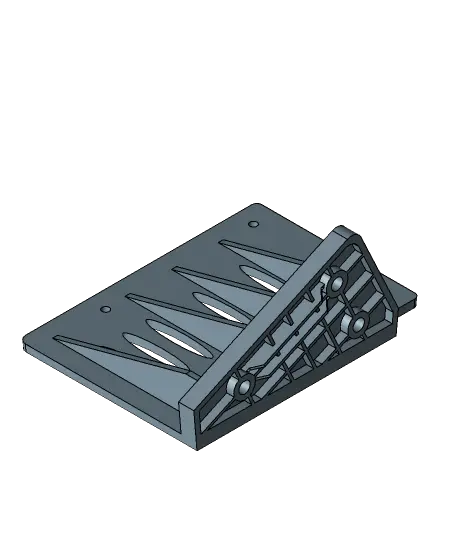
Raspberry Pi Case Hyperpixel 4 Ender3 S1 Pro
I bought an Ender 3 S1 Pro, and decided that the FW was not working for me, enough said.
Thangs entrega los archivos a usuarios con cuenta gratuita
Licencia
Solo uso personalSin licencia indicada
El autor no indicó una licencia: todos los derechos le pertenecen. Úsalo solo para imprimir en casa y consulta al autor para cualquier otro uso.
Al descargar aceptas respetar la licencia y dar crédito a UK_mookie.
Archivos (7)
- EnderS1Pro_pi_mount.stl STL · 762 KB
- EnderS1Pro_pi_mount.stp STP · 335 KB
- EnderS1Pro_case_lower.stl STL · 1,2 MB
- EnderS1Pro_case_lower.stp STP · 295 KB
- EnderS1Pro_case_upper.stl STL · 254 KB
- EnderS1Pro_case_upper.stp STP · 130 KB
- EnderS1Pro_Full_Case.stp STP · 783 KB
- Categoría
- Para tu impresora
- Formatos
- STL, STP
- Descargas
- 28
- Publicado
Sobre este modelo
I bought an Ender 3 S1 Pro, and decided that the FW was not working for me, enough said. Looked around and found a really good page on installing Klipper3D on the ender 3 S1 Pro on 3d Print Beginners Site. Followed his instructions and had the ender printing with all the goodness of klipper (pressure advance, input shaping etc). You have to remove the screen that comes with it as its not open source. Wanted a screen so used Kiauh and installed Klipperscreen this allowed me to add a screen to the pi, i choose a Hyperpixel 4, turns out not the best screen to use with Klipper / MainsailOS as it uses all the gpio on the board and leaves nothing left to add accelerometers or power the Pi from the pins. That being said its a really nice screen and works extremely well so I kept it.
I remixed the case from the one done by "0110-M-P" which is amazing work. Made some changes to fit the screen, also i used inserts which makes a tidier job and keeps the case neat. Then modelled the mount on the side of the S1 Pro from the original. The case fits to the mount by using screws that go through the mount and then into the standoffs which hold the Hyperpixel to the Pi. Makes it a bit annoying if you have to take the Pi out as you have to take the whole thing apart, but it works for me. As the Pi gets quite hot i added a fan mount to the back of the case to help keep things cool. With the fan on i have seen 20 degree drop so well worth fitting but you don't have to.
Print settings are up to you, I used 100% and 3 walls.
I have added step files for easier remixing.
Hardware. M2.5 inserts M2.5 Cap screws The hardware that comes with the Hyperpixel. Hyperpixel 4 Pi fan 5v the fan hardware I used for mounting the Pi.
This work is licensed under CC BY-SA 4.0
Descripción original del autor, publicada en Thangs.



