
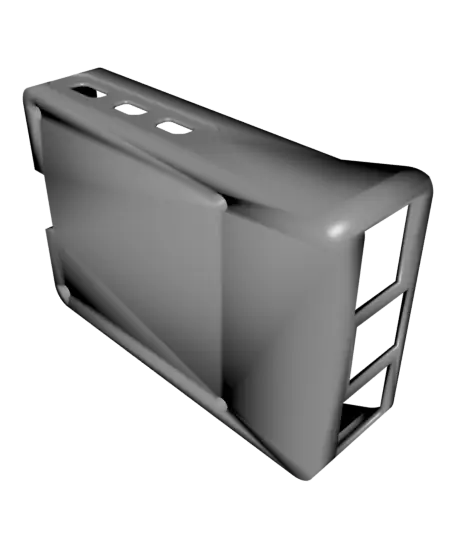
RASPBERRY PI 5 CUSTOM CASE
por Gagankumar M K en Thangs
3D MODEL DESCRIPTION
Thangs entrega los archivos a usuarios con cuenta gratuita
Licencia
Solo uso personalSin licencia indicada
El autor no indicó una licencia: todos los derechos le pertenecen. Úsalo solo para imprimir en casa y consulta al autor para cualquier otro uso.
Al descargar aceptas respetar la licencia y dar crédito a Gagankumar M K.
Archivos (4)
- Raspberry_Pi_5_Top_case.stl STL · 1,8 MB
- Raspberry_Pi_5_top_case.3mf 3MF · 427 KB
- Raspberry_Pi_5_buttom_case.3mf 3MF · 461 KB
- Raspberry_Pi_5_Bottom_case.stl STL · 2,0 MB
- Categoría
- Para tu impresora
- Formatos
- STL, 3MF
- Descargas
- 294
- Publicado
Sobre este modelo
3D MODEL DESCRIPTION
THIS IS A CUSTOM DESIGNED RASPBERRY PI 5 CASE, USING 3D PRINTING YOU CAN GET ONE OF THESE, GOOD AND TIGHT FIT CASE, RECOMMENDED TO HAVE THE OFFICIAL ACTIVE COOLER FAN BY RASPBERRY PI The printer that i have used is the Anycubic Kobar 2 Neo (https://store.anycubic.com/products/kobra-2-neo) good and affordable printer with lots of features, this print came out pretty well expect for that exhaust that is given in the design you can remove it after the print if the design is not needed.
The setting that i have used is from the Anycubic Slicer (https://store.anycubic.com/pages/anycubic-slicer) itself, but the setting could be the same in most of the slicer softwares.
the bottom case has a tight fit for the Raspberry Pi 5, so be careful while placing it.
current design doesn't have the holes or gaps required for the GPIO pins from the Raspberry Pi 5, since this one i have used it for my Tv for using Multiple OS operations.
There's direct airflow to the Active cooler fan intake so more efficient in cooling.
I HAVE USED M2X8 4PCS SCREWS AND NO NUTS REQUIRED. _(copyright : Logo from - Raspberry Pi Foundation (https://www.raspberrypi.com/) )_
3D PRINTING SETTINGS The printer Used : Anycublic Kobar 2 NEO 1. Layer Height : 0.18mm 2. First Layer height : 0.15mm 3. Infill Density : 13-15% 4. Infill pattern : Gyroid 5. Infill fill pattern : Monotonic 6. Generate support : Tree (avoid to generate the supports in the Raspberry Pi logo and the other one too) 7. Filament : PLA (Ender PLA+) 8. First layer Fan OFF 9. Retraction Length: 2mm 10.Retraction Speed :80mm/s 11. Retract on layer change
Descripción original del autor, publicada en Thangs.



