
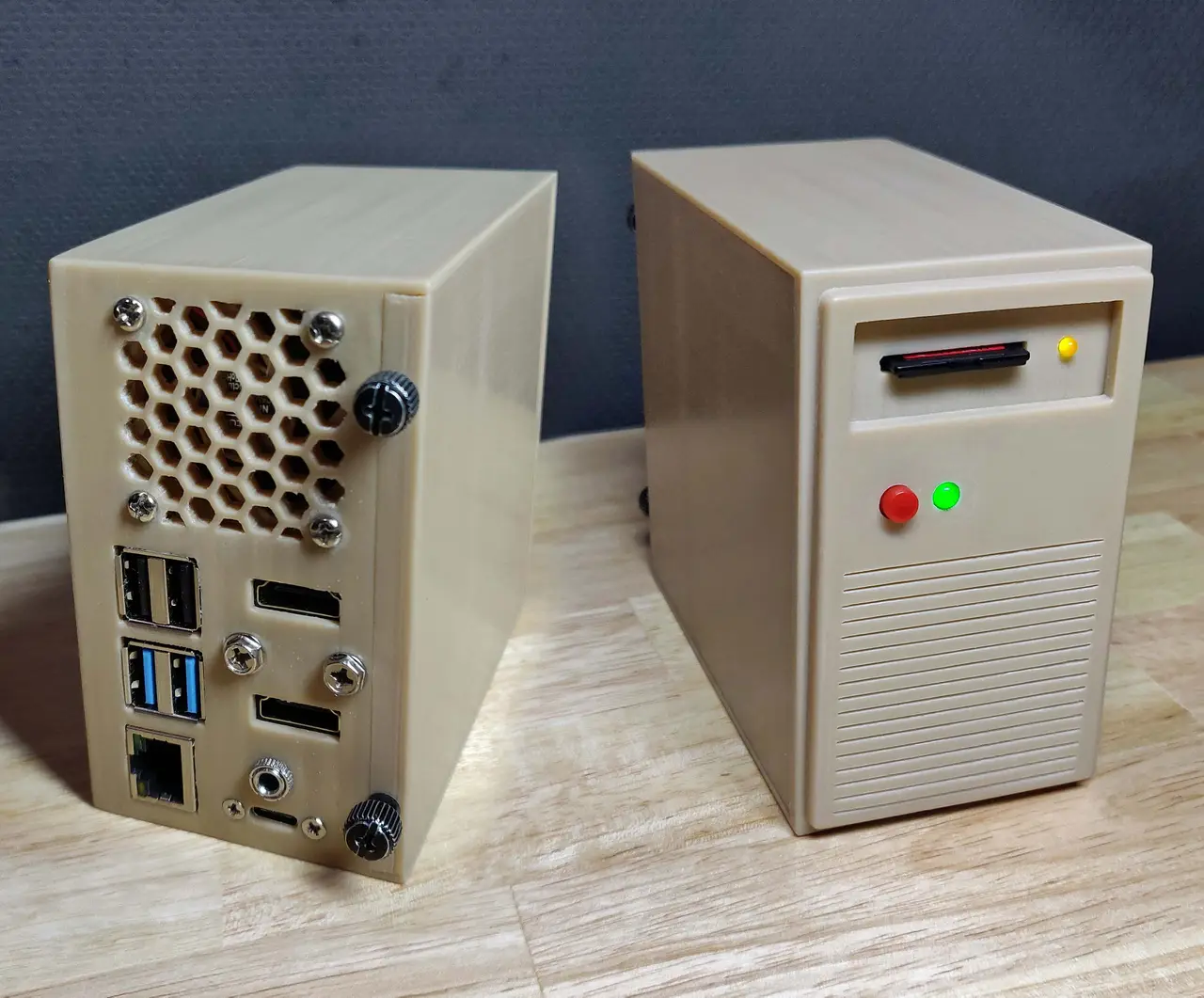
Raspberry Pi 4 case - Retro tower desktop
por Brian Larson en Thingiverse
A retro style beige Raspberry Pi 4 tower case. It has a working power button, LED, and IO activity LED. The SD/microSD card can be inserted like a floppy disk to swap between different operating systems. It also has 2 HDMI ports, audio jack, and USB-C power on the rear of the case. There is space...
Licencia
Solo uso personalCC BY-NC 4.0 — Atribución, no comercial
Puedes imprimirlo y modificarlo para uso personal dando crédito. No se permite vender las impresiones.
Al descargar aceptas respetar la licencia y dar crédito a Brian Larson.
Archivos (14)
- Raspberry_PI_4_Retro_Case_Default.stl STL · 1,7 MB
- Raspberry_PI_4_Retro_Case_Circular_Grill.stl STL · 1,7 MB
- Raspberry_PI_4_Retro_Case_Large_Grill.stl STL · 1,7 MB
- Raspberry_PI_4_Retro_Case_Side_Panel.stl STL · 365 KB
- Raspberry_PI_4_Retro_Case_HDMI_Holder.stl STL · 73 KB
- Raspberry_PI_4_Retro_Case_Front_Panel.stl STL · 197 KB
- Raspberry_PI_4_Retro_Case_SD_Tray.stl STL · 130 KB
- config_txt_example.txt TXT · 2 KB
- Raspberry_PI_4_Retro_Case_V2_Default_Tall.stl STL · 1,8 MB
- Raspberry_PI_4_Retro_Case_V2_Front_Panel_Tall.stl STL · 196 KB
- Raspberry_PI_4_Retro_Case_V2_Side_Panel_Tall.stl STL · 394 KB
- Raspberry_PI_4_Retro_Case_V2_Default.stl STL · 1,7 MB
- Raspberry_PI_4_Retro_Case_V2_Circular_Grill.stl STL · 1,7 MB
- Raspberry_PI_4_Retro_Case_V2_Large_Grill.stl STL · 1,7 MB
- Categoría
- Tecnología
- Formatos
- STL, TXT
- Descargas (todas las plataformas)
- 8,492
- Publicado
También en
Sobre este modelo
A retro style beige Raspberry Pi 4 tower case. It has a working power button, LED, and IO activity LED. The SD/microSD card can be inserted like a floppy disk to swap between different operating systems. It also has 2 HDMI ports, audio jack, and USB-C power on the rear of the case. There is space for a 40mm exhaust fan and a 40mm or 50mm front intake fan. There is also enough space for a large cooler like the ICE tower. I also made a Raspberry PI 5 version of the case as a remix. https://www.thingiverse.com/thing:6572558 NOTE: There is now a slightly improved V2 of the case. Changes: Added version of case that is 1.5cm taller Increased hole size for push button Added hex cutout to use the included nut for a push button Moved wall ridges to prevent interference with tall connections on GPIO V2 cases still use the original side and front panel unless there was a size change Parts needed (links at the end): Micro SD to SD Card extender: 1 Micro HDMI to HDMI Adapter Cable: 2 Panel-Mount USB-C Extention Cable: 1 40mm 5V fan (for exhaust): 1 Low-Profile CPU Cooler or ICE Tower Cooler: 1 SPST Momentary Mini Push Button: 1 5mm LED with resistor: 1 3mm LED with resistor: 1 #6-32 UNC thumbscrew (standard PC case screw): 2 #6-32 UNC screw or M3 screw (standard PC case screw): 6 various wire/header connectors (for connecting fans/LEDs/power button) Optional: Front 5V 40mm/50mm fan: 1 (note: I've not needed this even when overclocking the Raspberry Pi) Noctua NF-A4x10 to replace CPU Cooler fan: 1 Panel-Mount 3.5mm AUX Male to Female Extension Cable: 1 (note: pre-made cables may be too long and should be shortened.) Assembly instructions Prepare all parts note: any places that require screwing plastic parts together can be replaced with glue if you are way too confident/lazy. - Print out all parts with whatever material/color you would like. - (optional but helpful) Use a thread tap on all screw holesStart Assembly
- Tap threads for push button. If you don't have a tap, you can use the push button to create the threads. You may need to use a file to help make sure the push button fits if you don't have a tap. - Press fit 3mm LED into the main case. Glue can be added, but the press fit should hold it fine. - Press fit 5mm LED into the main case. Glue can be added, but shouldn't be needed. - Put SD card extender in the SD card tray and attach to the case with screws or glue. This may require a long screw driver that can reach through the fan grill or a very short one that will fit in the case. This is easer to do before anything else is in the way. - (Optional) Attach front fan with screws - Screw/Glue in front panel. Make sure LEDs are visible and the push button does not get stuck. - Put HDMI adaptors in the HDMI holder, but don't mount it in the case. Connect wires to the GPIO Header
- (Optional) Make a simple splitter for the CPU/Case fan(s). I have the fans connected to 3.3V (pin 1) and ground (pin 9). The fans can use a 3.3V or 5V pin for power and any unused ground. - The push button goes across pin5/pin6 (polarity doesn't matter). - The power LED goes to pin8(+) and pin14(-). - The GPIO LED goes to pin35(+) and pin39(-). - Connect all wires, connectors, and micro SD card extender to the raspberry pi before carefully placing it in the case. At this point all cables/extenders should be connected to the Raspberry pi, but not the case. (note: if using the ICE or low profile heatsinks, they should not be attached at this point)Finish Assembly
- Use the brass spacers/mounts/standoffs from the cooler to screw the Raspberry PI to the case. These 4 brass pieces should now be going through the Raspberry Pi's mount points into the case. - Add thermal paste or the thermal pad to the processor and attach the CPU cooler with the included screws. - Screw in the HDMI Holder. - Screw in the USB-C extender - Screw in the Audio jack - Attach the rear exhaust fan. - Slide the side panel on and add thumb screwsconfig.txt setting
- (Optional over clock setting -- Use at your own risk) # overclock arm_64bit=1 hdmi_enable_4kp60=1 over_voltage=15 arm_freq_min=100 arm_freq=2350 gpu_freq=750 gpu_mem=512 - Enable GPIO LED and IO activity LED # Additional overlays and parameters are documented /boot/overlays/README dtoverlay=act-led,gpio=19 enable_uart=1 - Enable the power button: https://github.com/Howchoo/pi-power-button
https://www.amazon.com/gp/product/B07YHN83NJ or https://www.amazon.com/gp/product/B06X3Y4BBB https://www.amazon.com/gp/product/B07K21HSQX https://www.amazon.com/gp/product/B075R7QBQD https://www.amazon.com/gp/product/B00NEMGCIA https://www.amazon.com/dp/B07V35SXMC or https://www.amazon.com/dp/B07ZV1LLWK https://www.amazon.com/dp/B075LDGHHS/ or any similar button https://www.amazon.com/dp/B08G4WXFX1/ or https://www.amazon.com/dp/B08G4XC341 https://www.amazon.com/dp/B07X622RJN or (preferably) make your own. https://www.amazon.com/gp/product/B08R9KN46J (these fans work well, but are a bit loud even at 3.3V) https://www.amazon.com/gp/product/B07CQPJJXY or https://www.walmart.com/ip/3ft-3-5mm-Mini-Stereo-TRS-Male-to-Female-Panel-Mount-Extension-Cable/248859634 or make your own https://smile.amazon.com/dp/B01C3RFHDC Although this case was made from scratch, I was inspired by this case by nilly667: https://www.thingiverse.com/thing:4362798. I wasn't sure if I was allowed to list this as a remix when it doesn't actually use anything from this case.
Descripción original del autor, publicada en Thingiverse.



