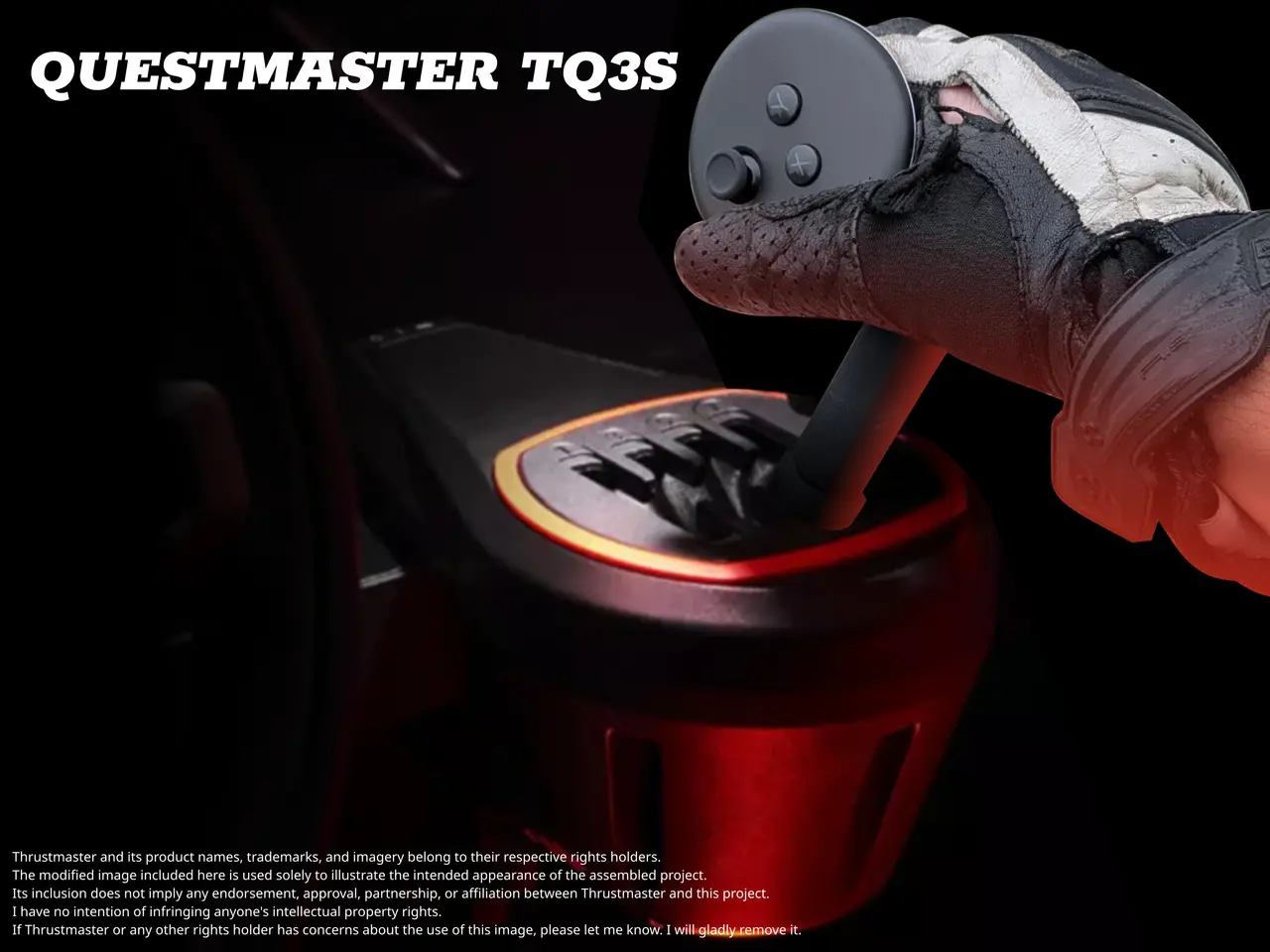
QUESTMASTER TQ3S
por zdPrint en Printables
Replace the shifter-knob of a TH8S with a Meta Quest controller to add haptic feedback and additonal input options.
Licencia
Solo uso personalCC BY-NC-SA 4.0 — Atribución, no comercial, compartir igual
Uso personal dando crédito; sin fines comerciales y las modificaciones con la misma licencia.
Al descargar aceptas respetar la licencia y dar crédito a zdPrint.
Archivos (3)
- Categoría
- Tecnología
- Formatos
- STL, ZIP
- Descargas
- 1
- Publicado
Sobre este modelo
This is my entry for the Printables-Contest Thrustmaster Custom Shifter Knob Function The QUESTMASTER TQ3S replaces the shifter-knob of a Thrustmaster TH8S with a Meta Quest controller to add the following functionality to a sim racing rig: Use case 1: PCVR controller input In PCVR mode, use the Quest controller to navigate the Quest software, the PC desktop, or in-game menus. The exact implementation depends heavily on your operating system and your choice of OpenXR runtime (assuming you actually have a choice), and is outside the scope of this entry. Use case 2: Telemetry-based haptic feedback Use the sophisticated hardware inside your controller to provide haptic feedback for RPM changes and other events. As a proof of concept, an APK is included that uses the Codemasters UDP telemetry protocol (as used in DiRT Rally 2.0 and other games) as an example. A settings file is also included, allowing you to adapt the Quest app to similar telemetry protocols. See ReadmeTelemetry.md for details. Bonus use case: go completely wireless (This is probably not worth the effort, but still kind of cool) A wireless shifter for either standalone Quest or PCVR. Using the built-in accelerometer, we could derive shift inputs from controller movements. The current RPM and gear can be used as plausibility checks (as demonstrated above), while the TH8S shift gate provides only the appropriate tactile feedback. Alternatively, use whatever hardware-mechanism you salvaged from your dad's car – I'd go for the Spyker. Installation The provided files are a direct replacement for the original battery cover of the Quest Controller and mounted directly on the official adapter piece (printfile) provided by Thrustmaster. No further hardware is needed for assembly. For clarification: The pedestal shown in the pictures is not needed and a mere "serving suggestion" if you don't have a TH8S available. Mounting options and hardware variants Despite the silly name, the TQ3S works with both the Quest 3 and the Quest 3S. Older models have different battery covers and would need corresponding modifications. The app should work with the older models as well, but expect lower haptic fidelity due to the less capable hardware inside their controllers. The uploaded model is designed for right-hand shifting, but uses the left Touch controller to allow for mounting! The ergonomics work surprisingly well that way, though (see pictures). If you want to use your left hand for shifting, make sure to mirror both the mount and the official adapter (resulting in a left-hand thread). There are two options, depending on where you position the shifter in your rig: the cleaner-looking "straight" version is intended for higher mounting positions in the cockpit, while the "tilted" version has been adapted for better ergonomics in lower positions (closer to those of a regular car). Printing Print in the orientation shown in the model. I use supports on the build plate only, and a small brim for good measure. Depending on your material, the "tilted" version might need additional support on the thread, but the original thread itself is quite forgiving and works just fine even with smaller irregularities in the print. My recommendation is using something like Extrudrs Greentec Pro CF that doesn't need supports. If you block supports inside the recess for the clip in the slicer, you can avoid damaging it when removing the supports later. I recommend using finer detail settings, both for appearance and for a better fit of the clips. However, no special settings are necessary, at least on my Qidi Q1 Pro. If your printer is less precise, check that the clips fit into their openings before forcing them in. The front clip might break under excessive force, and there is very little room left inside the controller housing to make it any stronger. That being said, mine has survived many opening and closing cycles without any manual modifications.
Descripción original del autor, publicada en Printables.