
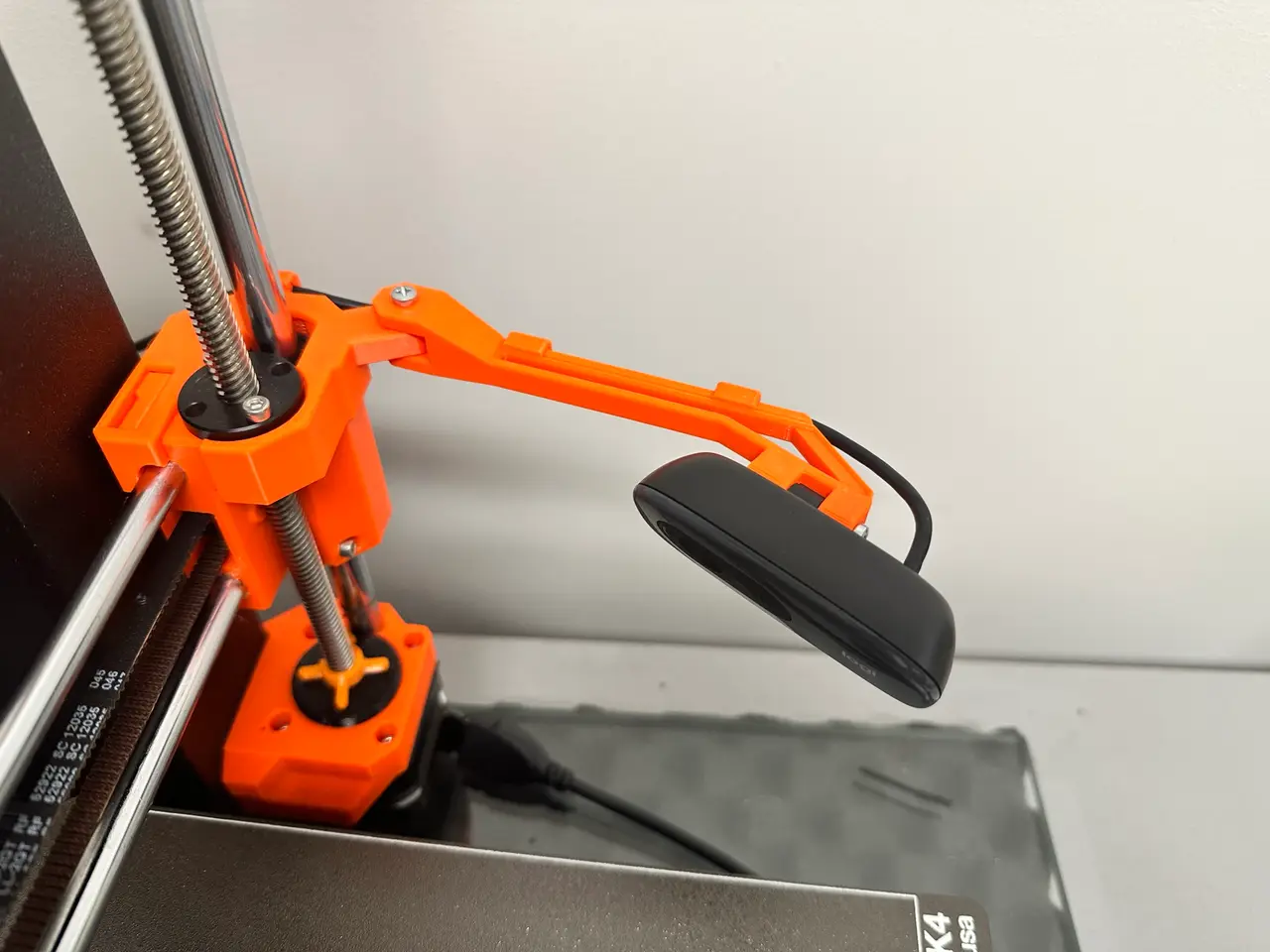
Prusa MK4 camera mount for Logitech C270/C310
por ebeeche en Printables
A sturdy camera mount that doesn't require any alteration to the Prusa MK4.
Licencia
Solo uso personalCC BY-NC 4.0 — Atribución, no comercial
Puedes imprimirlo y modificarlo para uso personal dando crédito. No se permite vender las impresiones.
Al descargar aceptas respetar la licencia y dar crédito a ebeeche.
Archivos (10)
- x-axis-base-v1_short.stl STL · 71 KB
- camera-arm-v1.stl STL · 81 KB
- cable-clamp-v1.stl STL · 4 KB
- x-axis-base-v1_short.step STEP · 173 KB
- camera-arm-v1.step STEP · 204 KB
- cable-clamp-v1.step STEP · 44 KB
- x-axis-base-v1_short.3mf 3MF · 55 KB
- camera-arm-v1 and clamps-v1.3mf 3MF · 79 KB
- x-axis-base-v1_short_0.4n_0.2mm_PETG_MK4_59m.gcode GCODE · 1,7 MB
- camera-arm-v1 and clamps-v1_0.4n_0.2mm_PETG_MK4_1h5m.gcode GCODE · 2,2 MB
- Categoría
- Para tu impresora
- Formatos
- STL, STEP, 3MF, GCODE
- Descargas
- 884
- Publicado
Sobre este modelo
Having a 3D printer without a camera is like driving at night without lights. I decided to create a base that doesn't require any alteration to the MK4 and can also serve as a starting point for others to create their own camera support. What you need - PETG filament (PLA is a good replacement) - One M3x25 screw - One M3x18 screw - One M3 nut - A Logitech C270 or C310 webcam
Printing Instructions - Filament used: Prusament PETG - Nozzle: 0.4 - Layer height: 0.2
x-axis-base-v1_short: 4 perimeters, 5 bottom solid layers. camera-arm-v1: 3 perimeters, 5 bottom solid layers, support enforcers (see image). cable-clamp-v1: 3 perimeters, 5 bottom solid layers. FYI: These parameters are the ones I prefer, but the ones that come by default still work perfectly. Assembly:
- Screw the camera to the arm using the M3x25 screw, no nut is needed on the other end. Do not over-tighten.
- Guide the cable through the rear slot of the arm and slide a couple of c-clamps to secure the cable.
- Attach the base to the arm using the M3x18 screw and nut.
- Place it on the printer as shown in the photos, the base should snugly fit to the x axis idler (right side).
- Adjust the camera's framing and gently tighten the screws.
- Attach the last c-clamp to the base.
- Enjoy!
Some inspiration was taken from: printables.com/model/454742-mk4-logitech-c270-x-motor-mount thingiverse.com/thing:3198607
Descripción original del autor, publicada en Printables.



