
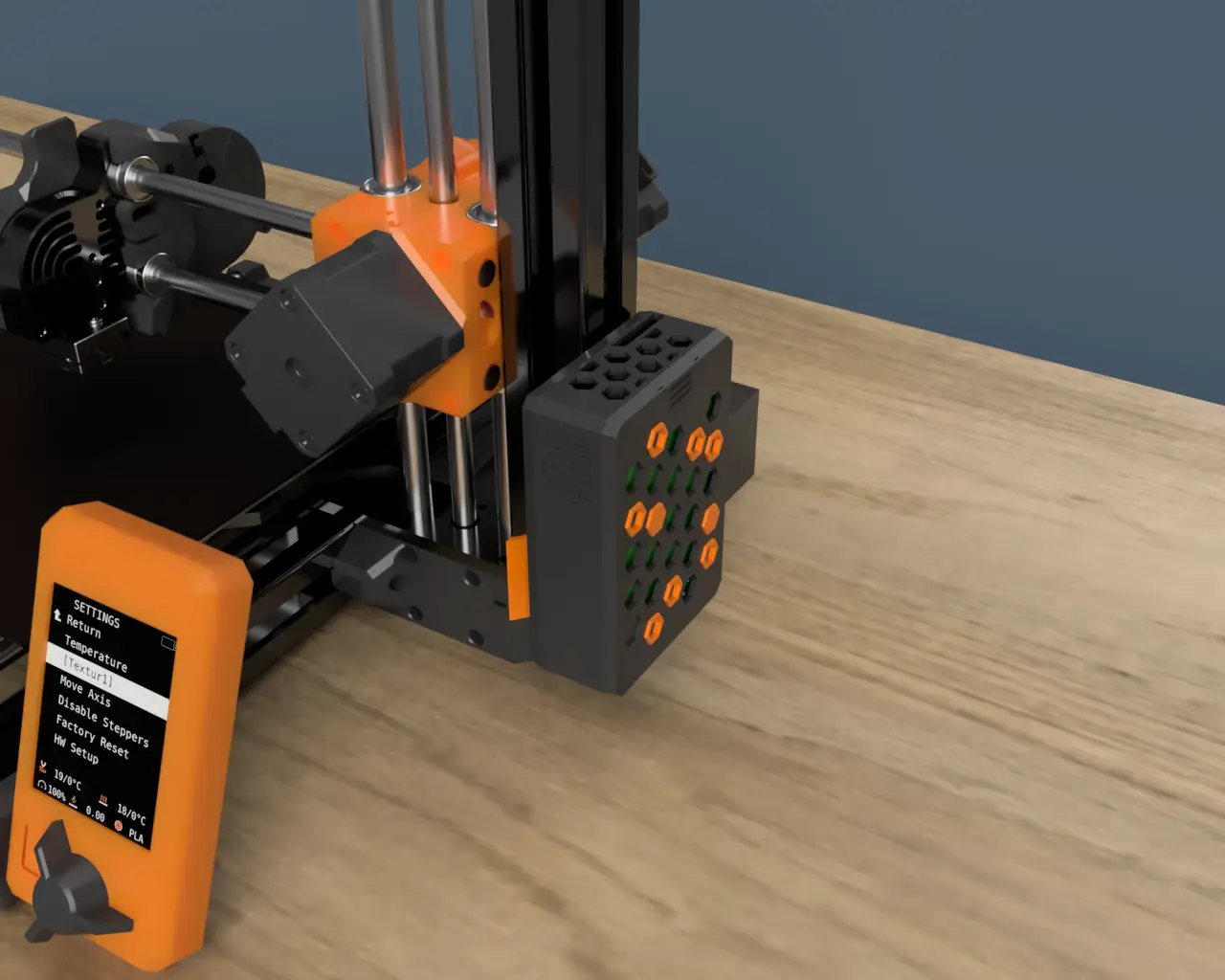
PRUSA MINI Raspberry Pi 4 B case and mount
por JayCee09 en Printables
Tired of your Raspberry Pi dangling around? Here's the solution ;-) A cool and customizable case for your Raspberry Pi
Licencia
Uso comercial permitidoCC BY-SA 4.0 — Atribución, compartir igual
Puedes usarlo y modificarlo dando crédito; las versiones modificadas deben compartirse con la misma licencia.
Al descargar aceptas respetar la licencia y dar crédito a JayCee09.
Archivos (11)
- RPi4-Case.stl STL · 498 KB
- RPi4-Case-accessories.stl STL · 146 KB
- T-Slot-clip.stl STL · 114 KB
- Lower-case.stl STL · 330 KB
- Upper-case_CamCable.stl STL · 168 KB
- Upper-case.stl STL · 168 KB
- MicroSD-cover.stl STL · 15 KB
- Hexagon-hole.stl STL · 2 KB
- Hexagon.stl STL · 1 KB
- RPi4-Case_0.2mm_PETG_MINI_4h7m.gcode GCODE · 3,7 MB
- RPi4-Case-accessories_0.2mm_PETG_MINI_1h21m.gcode GCODE · 2,7 MB
- Categoría
- Para tu impresora
- Formatos
- STL, GCODE
- Descargas
- 868
- Publicado
Sobre este modelo
Designed for Prusa MINI/MINI+ Main features - Easy to attach and detach from 30x30 aluminum extrusion of the MINI's z axis, no screws are necessary! - Easy access to the Pi's SD card, no more disassembly required! - In case you are also using a PiCam module, a dedicated version featuring a hole for the flat cable is provided. - The Pi case is divided in two halfs to insert the Pi easily and match perfectly with each other: attached via zero-gap Snap-fit joints.
If you like this design, please consider buying me a coffee to support me in the creation of many other useful designs as a sign of gratitude for the huge amount of time and effort. Thank you very much and happy printing! Updates 13/02/2022: Redisegned T-Slot-Clip so that the PTFE tube does not interfere with the cables on the side of the Raspberry Pi (see picture below). Printing - Layer height: 0.2 mm; - Material: PETG (recommended), PLA; - Supports: Only for the MicroSD-cover overhangs; - Orientation: the models are already in the proper orientation.
In the Lower-case there's a 0.2 mm thick bridge to prevent the corners of SD card slot from falling making too difficult the insertion of the MicroSD-cover (see picture below). Once print finishes, just cut it out as if it were a support.
Assembly - Attach the T-Slot-clip to the alluminum extrusion; - Insert the Pi into the Lower-case and secure it with four M2.5x4 mm screws; - Slide the Upper-case into the T-slot-clip; - Take the Lower-case with your Pi attached and join it to the Upper-case by simply pressing them together; - Insert the MicroSD-cover into it's slot in the Lower-case; - Insert the Hexagon or Hexagon-hole into their slots on the Lower-case in wichever pattern you like (you might need to glue them to the Lower-case depending on your printer accuracy); - Now you're good to go ;-)
If you are looking for a universal RaspberryPi4/Octoprint case I suggest you to give a look at this design too: Raspberry Pi 4B/Octoprint Honeycomb case da JayCee09 | Scarica il modello STL gratuito | PrusaPrinters Pro tips - PETG can cause a little bit of strings, to remove them you may just use a wind-proof lighter and they will disappear magically ;-)
Descripción original del autor, publicada en Printables.



