
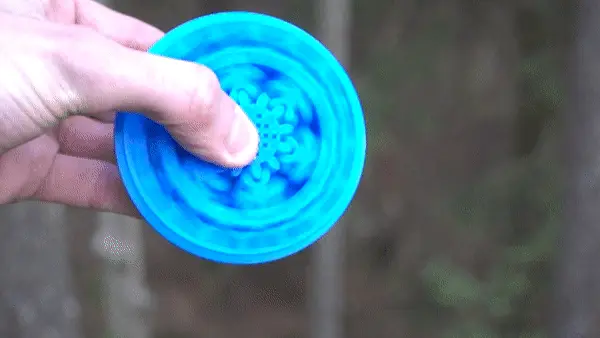
Print in Place- Distance Measuring Roll Tool
This is my Print in Place Distance Measuring Tool!
Cults3D entrega los archivos a usuarios con cuenta gratuita
Licencia
Solo uso personalLicencia de uso privado de Cults3D: puedes imprimirlo para ti. No se permite compartir el archivo ni vender las impresiones.
Al descargar aceptas respetar la licencia y dar crédito a SunShine.
Archivos (2)
- Roll-measure ABCD.stl STL
- Roll-measure Dots.stl STL
- Categoría
- Para tu impresora
- Formatos
- STL
- Descargas
- 36,500
- Publicado
Sobre este modelo
This is my Print in Place Distance Measuring Tool!
While not necessarily a precision tool, its just as fun to play with as with a tape measure!
See it in action here:
https://youtu.be/XR5OKNrGnmc
https://youtu.be/XR5OKNrGnmc
https://youtu.be/XR5OKNrGnmc
https://youtu.be/XR5OKNrGnmc
https://youtu.be/XR5OKNrGnmc
How to print:
-Use 0.2mm layer height or finer!
-NO supports
-PLA-Recomended
-The "point marked" version is slightly easier to print. but still quite difficult.
-Clearances in this part are 0.3mm. add Horizontal expansion compensation as required.
How to use:
-Step 0) Marking and prep: If you chose to print the friction weld version, you will need to friction weld a piece of 1.75mm filament into at-least one of the cycloid holes.
Using a rubber band to avoid the wheel from slipping is a good idea. (see video)
-Step 1) Zero out the tool: make sure the arrow on the grip is pointing straight down at the surface you want to measure. And that the mark (or letter) on the cycloid is in the zero position. (shown in video)
-Step 2) Measure: Roll the tool along the surface. Make sure you chose the correct rolling direction! There are arrows on the top indicating the rotational direction.
-Step 3a) read the "rest" measurement:
See picture, if the wheel doesn't stop with the grip-arrow pointing exactly at the Zero position, you will have to calculate how far past it it rolled. since the Wheel has 17-pins, you simply divide the "number of pins past 0" with 17. in the example shown, its 3 pins past 0. this means our rest is (3/17) X 0.25m
-Step 3b) read the full rotations measurement:
See the last picture. Now that we know our rest, we can rotate the wheel back to zero, and count how many full rotations the wheel has done. this we do by counting the cycloidal marks between our initial mark, and the current zero. in this case its 6. That leaves us with 6 X 0.25m for this step.
-Step 4) add up the rest and full rotation:
no simply ad the 2 together:
(3/17)x 0.25m + 6 x 0.25m=
((3/17)+6) x 0.25m = 1.544m
Check out my social media:
YouTube
Descripción original del autor, publicada en Cults3D.



