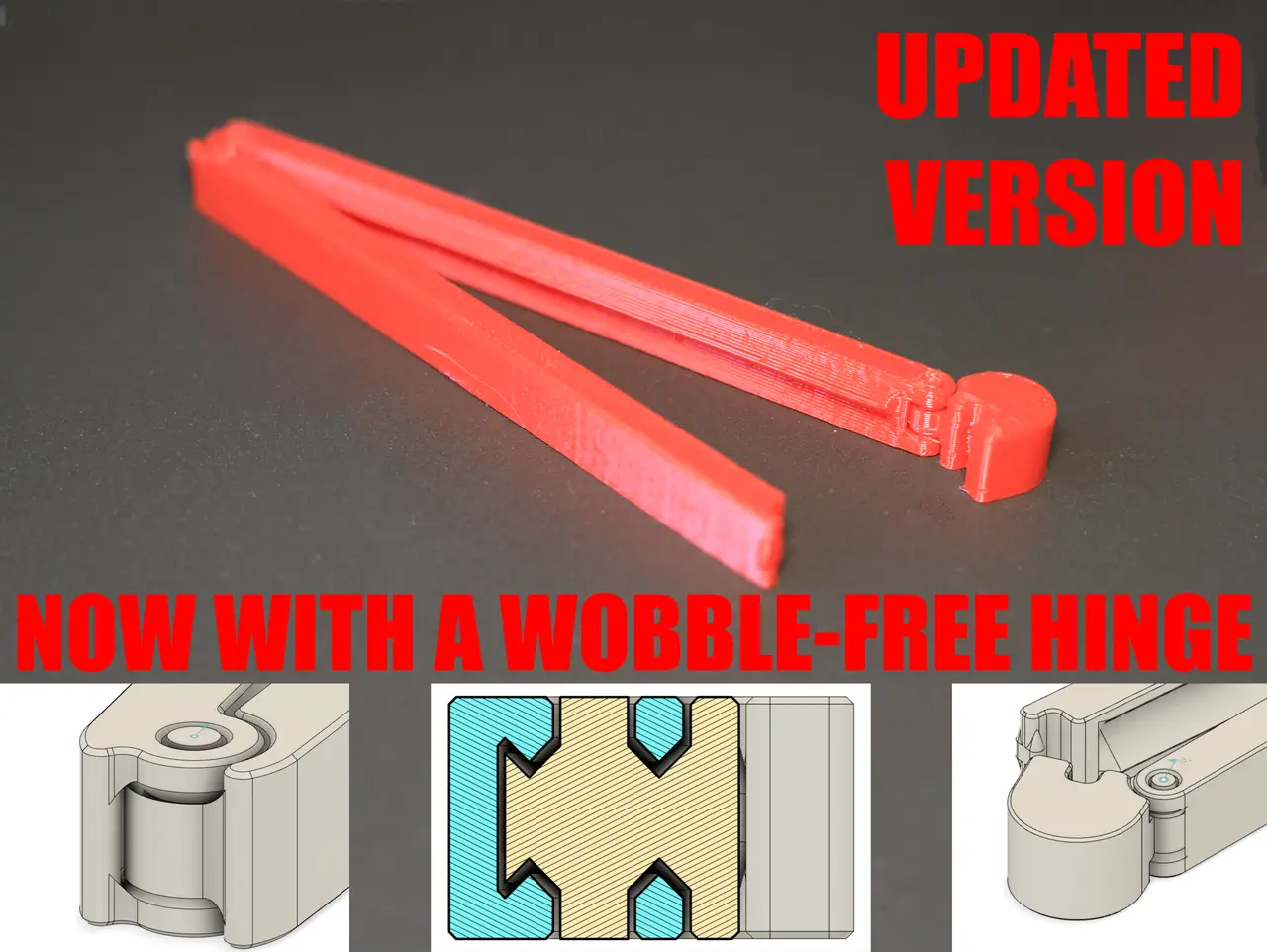
Print-in-Place Bag Clip 2 (Parametric)
por neoyarus en Printables
A 30–250 mm set of bag clips with an improved hinge and an editable source file.
Licencia
Uso comercial permitidoCC BY-SA 4.0 — Atribución, compartir igual
Puedes usarlo y modificarlo dando crédito; las versiones modificadas deben compartirse con la misma licencia.
Al descargar aceptas respetar la licencia y dar crédito a neoyarus.
Archivos (33)
- Print-in-Place Bag Clip 2.f3d F3D · 928 KB
- 30 mm Bag Clip 2.3mf 3MF · 409 KB
- 50 mm Bag Clip 2.3mf 3MF · 276 KB
- 80 mm Bag Clip 2.3mf 3MF · 258 KB
- 100 mm Bag Clip 2.3mf 3MF · 255 KB
- 120 mm Bag Clip 2.3mf 3MF · 257 KB
- 140 mm Bag Clip 2.3mf 3MF · 199 KB
- 160 mm Bag Clip 2.3mf 3MF · 192 KB
- 180 mm Bag Clip 2.3mf 3MF · 189 KB
- 200 mm Bag Clip 2.3mf 3MF · 184 KB
- 250 mm Bag Clip 2.3mf 3MF · 163 KB
- 30 mm Bag Clip 2_0.3mm_PLA_MK3S_23m.gcode GCODE · 1,1 MB
- 50 mm Bag Clip 2 v10_0.3mm_PLA_MK3S_30m.gcode GCODE · 1,2 MB
- 80 mm Bag Clip 2_0.3mm_PLA_MK3S_39m.gcode GCODE · 1,3 MB
- 100 mm Bag Clip 2_0.3mm_PLA_MK3S_46m.gcode GCODE · 1,4 MB
- 120 mm Bag Clip 2_0.3mm_PLA_MK3S_1h0m.gcode GCODE · 1,9 MB
- 140 mm Bag Clip 2_0.3mm_PLA_MK3S_1h8m.gcode GCODE · 2,1 MB
- 160 mm Bag Clip 2_0.3mm_PLA_MK3S_1h16m.gcode GCODE · 2,3 MB
- 180 mm Bag Clip 2_0.3mm_PLA_MK3S_1h24m.gcode GCODE · 2,4 MB
- 200 mm Bag Clip 2_0.3mm_PLA_MK3S_1h32m.gcode GCODE · 2,6 MB
- 250 mm Bag Clip 2_0.3mm_PLA_MK3S_1h44m.gcode GCODE · 2,6 MB
- 30-250 mm Bag Clip 2 Set_0.3mm_PLA_MK3S_10h4m.gcode GCODE · 18,2 MB
- 30 mm Bag Clip 2_0.3mm_PETG_MK3S_23m.gcode GCODE · 1,1 MB
- 50 mm Bag Clip 2 v10_0.3mm_PETG_MK3S_30m.gcode GCODE · 1,2 MB
- 80 mm Bag Clip 2_0.3mm_PETG_MK3S_39m.gcode GCODE · 1,3 MB
- 100 mm Bag Clip 2_0.3mm_PETG_MK3S_46m.gcode GCODE · 1,4 MB
- 120 mm Bag Clip 2_0.3mm_PETG_MK3S_1h1m.gcode GCODE · 1,9 MB
- 140 mm Bag Clip 2_0.3mm_PETG_MK3S_1h9m.gcode GCODE · 2,1 MB
- 160 mm Bag Clip 2_0.3mm_PETG_MK3S_1h16m.gcode GCODE · 2,3 MB
- 180 mm Bag Clip 2_0.3mm_PETG_MK3S_1h24m.gcode GCODE · 2,4 MB
- 200 mm Bag Clip 2_0.3mm_PETG_MK3S_1h32m.gcode GCODE · 2,6 MB
- 250 mm Bag Clip 2_0.3mm_PETG_MK3S_1h46m.gcode GCODE · 2,6 MB
- 30-250 mm Bag Clip 2 Set_0.3mm_PETG_MK3S_10h12m.gcode GCODE · 18,3 MB
- Categoría
- Hogar
- Formatos
- F3D, 3MF, GCODE
- Descargas
- 4,711
- Publicado
Sobre este modelo
What's new - Redesigned hinges that feel solid and last a lot longer - Reduced gap between the arms when closed - An easy to edit source file for all your customization needs - The clicky latch is now standard
How to print I recommend you use PETG for its great bed adhesion and mechanical resilience. You could use PLA too, but beware that it will deform over time due to the pressure of whatever you're clamping constantly pushing the arms apart and eventually bending them slightly. If you do choose PLA, you can restore the clip to its original shape by compressing it with some kind of clamp and putting it in warm water for 10 minutes. Common issues The latch is too tight - Try decreacing the extrusion multiplier in the slicer by 2–5% and printing again.
The latch is too loose - Try increasing the extrusion multiplier in the slicer by 2–5% and printing again.
One or both hinges are fused at the bottom - Try moving them carefully until they break free. The clip might still be savable. - Make sure you bed is clean and parts of the hinge don't come off during printing. - Make sure you are not printing to close to the bed
One or both hinges are fused all the way through - Make sure you bed is clean and parts of the hinge don't come off during printing. - Try decreacing the extrusion multiplier in the slicer by 2–5% and printing again. - Try lowering the temperature by 5°C and printing again - Try increasing the cooling
The gap between the arms is too wide - Put the clip in hot water for 5 minutes (60-80 degrees depending on material). You can also use the heated bed for this step. - Bend the arm that doesn't have the latch outwards a bit. - After it cools off you'll get much better clamping forces
How to edit If you want to make a custom-legth clip, add imbedded magnets, or change the design enitrely—download the .f3d file. Changing the length: - Find the Change Parameters option in the Solid tab (it might be in the dropdown menu titled Modify). - Find the cliplength parameter - Enter the desired value in mm and press enter
Enabling/disabling arm reinforcments - Find the Reinforcement group in the timeline - Right click and sellect Suppress/Unsuppress Features
Descripción original del autor, publicada en Printables.