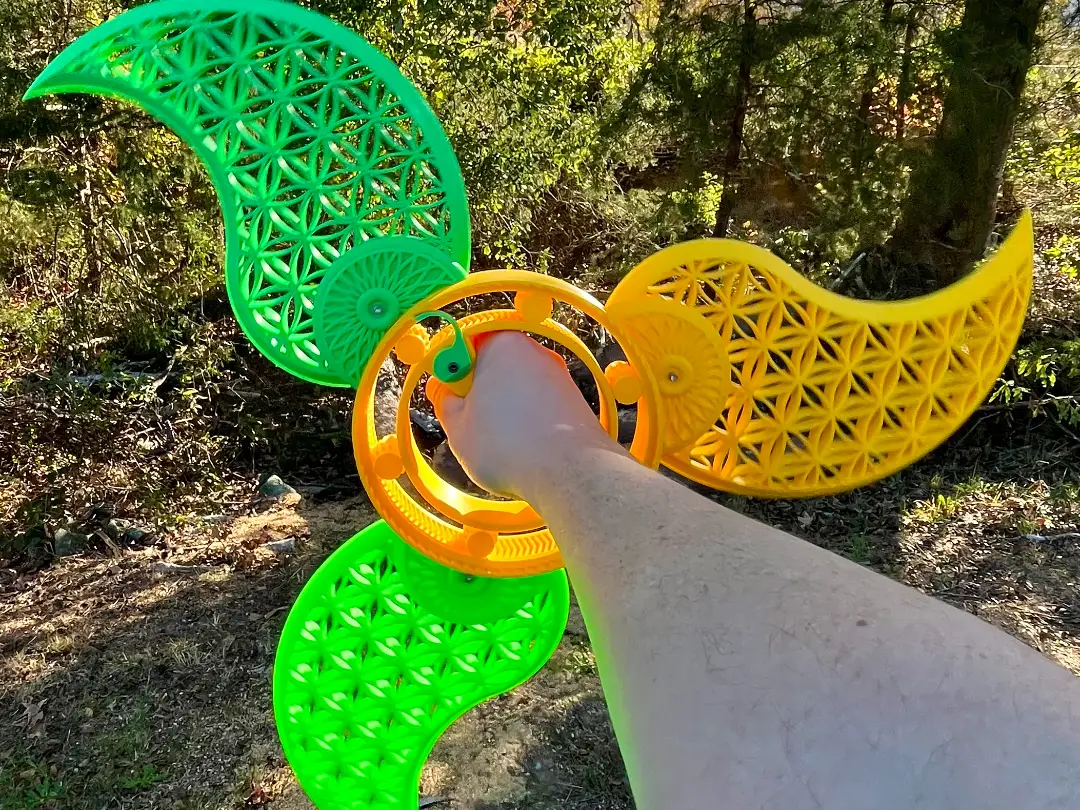
Planetary Spin Blades: XL Ratchet Gear Fidget
por K-Printz3D en MakerWorld
SMALL CHILDREN SHOULD NOT USE THIS ITEM. END USER ASSUMES ALL RISK! Update: 10/29/2026: I have made a slight change to the model to optimize the bottom contour for printing. I had some reports of stringing and other issues along these areas and layers. It wasn't normal stringing, it was an…
MakerWorld entrega los archivos a usuarios con cuenta gratuita
Licencia
Solo uso personalStandard Digital File License
Licencia estándar de archivos digitales: solo uso personal. No se permite compartir, revender ni subir el archivo a otros sitios, ni vender las impresiones.
Al descargar aceptas respetar la licencia y dar crédito a K-Printz3D.
Archivos (6)
- Planetary Spin Blades_102026_Blade STL_K-Printz3D_Updated 102926.stl STL · 86,5 MB
- Planetary Spin Blades_102026_Blade_STEP File_K-Printz3D_Updated 102926.stp STP · 2,7 MB
- Planetary Spin Blades_102026_Replacement Clutch Arm STL_K-Printz3D.stl STL · 336 KB
- Planetary Spin Blades_102026_Hub and Clutch STL_K-Printz3D_Updated 102926.stl STL · 50,5 MB
- Planetary Spin Blades_102026_Center Hub With Clutch_STEP File_K-Printz3D_Updated 102926.stp STP · 9,7 MB
- Planetary Spin Blades_102026_3MF Slice_K-Printz3D_Updated 102926.3mf 3MF · 31,7 MB
- Categoría
- Cosplay y props
- Formatos
- STL, STP, 3MF
- Descargas
- 93
- Publicado
Sobre este modelo
SMALL CHILDREN SHOULD NOT USE THIS ITEM. END USER ASSUMES ALL RISK!
Update: 10/29/2026: I have made a slight change to the model to optimize the bottom contour for printing. I had some reports of stringing and other issues along these areas and layers. It wasn't normal stringing, it was an entire outer wall failing to anchor. This issue should be totally fixed now. I've updated all of the files including the 3MF. I apologize to anyone who has been struggling to achieve a decent print of the center hub. No need to re-print the blades unless you want them absolutely flush.
Hey buds!
After a week of fast-paced development after work everyday, I have finally completed the Planetary Spin Blades!
I had to learn a few new modeling concepts to pull this one off so I'm super extra happy with how this turned out. If you're interested in seeing the journey, you can go check out my Youtube or TikTok for all of the videos from the last week. I hope you have as much fun as I did.
Printing details: The center hub prints in place. The 3MF is set up to use variable layer heights. It can print ok with straight 0.2mm layers but the handle contours along the bottom will be rough. If you slice this with your own setting, I highly suggest using adaptive layers to get the best balance of time/quality or using straight 0.14mm layers. No supports are needed. The Handy App tends to strip creator settings, I recommend slicing on your computer directly from the 3MF.
The blades are big and take up the whole plate so you can only print one at a time. The good news is that you can print them at 0.2mm layers with no problems at all. The blades have a hole in the mounting slot that needs support. Its already set up in the 3MF. If you need to slice this in your own slicer or whatever, I suggest you use manual grid supports and paint where you need it. Use a top Z distance of 0.15mm.
ASSEMBLY INSTRUCTIONS: All holes are sized for M3 bolts. The holes are tight for a nice secure hold. They will take some initial down force to get them started. Be careful not to over tighten. use manual screw driver so you can feel the stop and prevent stripping out. Don't use glue for this. The clutch-arm can potentially break and may need replacement depending on the filament and how hard you play with it. Glue will make repair impossible.
The clutch arm will need to be bolted in place using a 20-30mm bolt. Bolt threads into the flat side of the circle area. I suggest screwing the bolt in till its flush with the edge of the triangle post, clean anything that gets pushed out, then place it in the handle slot and hold it tightly while you finish bolting it on. This will make starting the second thread in the handle much easier.
The blades use 10-15mm bolts. Same approach as above. Start the bolt in the blade till its flush with the exit, clean the exit, mount the blade, then hold it tight while you finish the bolt. The fit of the blade is intentionally very tight, you may want to use a cloth and soft malet to get it in place if you lack the strength to press it by hand. Save the bolt for last if you use this method.
Please let me know what you think in the comments. I appreaciate all the feedback, likes, follow, and boost!
Thank you!!!
Boost MeBoost me for free and help me gain traction. Boost are the best way you can help an artist gain the exposure they may otherwise not receive. Thank you!
MUST READ LEGAL WARNING: Check your local laws on weapons before printing. Some states/jurisdictions consider items like this a felony even if they are plastic and relatively less lethal than their traditional metal counterparts. YOU ARE RESPONSIBLE FOR VERIFYING THE LOCAL LEGALITY OF THIS ITEM BEFORE YOU PRINT IT. I AM IN NO WAY LIABLE IF YOU BREAK YOUR LOCAL LAWS. This thing is way more dangerous than it appears. Do not threaten or use on people or animals. It is possible to critically strike yourself, so exercise extreme caution when using. SMALL CHILDREN SHOULD NOT USE THIS ITEM. END USER ASSUMES ALL RISK!
Descripción original del autor, publicada en MakerWorld.