
PLAb 3030 Extrusion Linear Carrier
por Louis Edelman en Printables
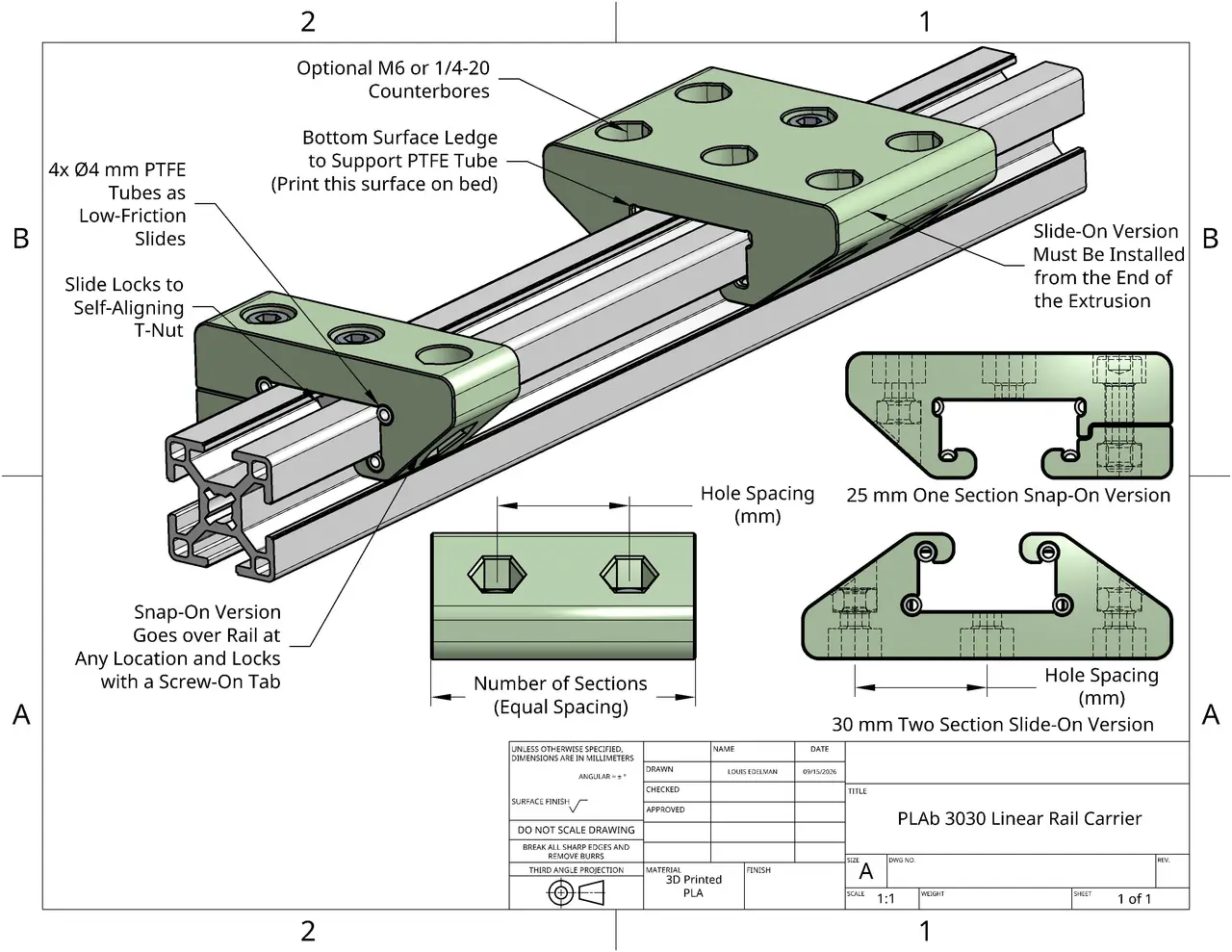
Carriers that use PTFE tube to create smooth linear motion on standard 3030 T-Slot aluminum extrusion as a rail.
Licencia
Uso comercial permitidoPuedes imprimirlo, modificarlo y venderlo dando crédito al autor.
Al descargar aceptas respetar la licencia y dar crédito a Louis Edelman.
Archivos (18)
- Carrier30-ISO-D25-N1-C-Snap.step STEP · 240 KB
- Carrier30-ISO-D25-N1-SnapTab.step STEP · 111 KB
- Carrier30-ISO-D25-N2-C-Snap.step STEP · 320 KB
- Carrier30-ISO-D25-N2-SnapTab.step STEP · 139 KB
- Carrier30-ISO-D25-N3-C-Snap.step STEP · 400 KB
- Carrier30-ISO-D25-N3-SnapTab.step STEP · 167 KB
- Carrier30-ISO-D40-N1-C-Snap.step STEP · 240 KB
- Carrier30-ISO-D40-N1-SnapTab.step STEP · 110 KB
- Carrier30-ISO-D40-N2-C-Snap.step STEP · 319 KB
- Carrier30-ISO-D40-N2-SnapTab.step STEP · 138 KB
- Carrier30-ISO-D40-N3-C-Snap.step STEP · 398 KB
- Carrier30-ISO-D40-N3-SnapTab.step STEP · 166 KB
- Carrier30-ISO-D25-N1-C-Slide.step STEP · 293 KB
- Carrier30-ISO-D25-N2-C-Slide.step STEP · 393 KB
- Carrier30-ISO-D25-N3-C-Slide.step STEP · 494 KB
- Carrier30-ISO-D40-N1-C-Slide.step STEP · 294 KB
- Carrier30-ISO-D40-N2-C-Slide.step STEP · 391 KB
- Carrier30-ISO-D40-N3-C-Slide.step STEP · 491 KB
- Categoría
- Herramientas
- Formatos
- STEP
- Descargas
- 519
- Publicado
Sobre este modelo
PLAb System We all love our friends at ThorLabs, but sometimes you just need a part and you don't have the cash or time to wait for one to arrive with your order of Lab Snacks. A component of the growing PLAb Collection of 3D printable optomechanics. This component turns 3030 (30 mm x 30 mm) aluminum extrusion into a stable, linear rail. The linear rail carriers are adjustable to desired hole spacing and length. Leverages standard press-fit M6 or 1/4-20 flat nuts for mounting and T-nuts for locking to the extrusion. Standard 4 mm outer diameter PTFE Tubing creates a slighly elastic, smooth mating surface between the carrier and the rail. This is the same standard size as most 3D printer Bowden tubes. As such, are widely available at extremely low cost. The carriers can be paired with the PLAb Optical Breadboard and PLAb 3030 Feet. Please share what you build with PLAb as Makes here on Printables. If you have an issue, need a customized version for your application, or just have a suggestion please drop a comment or reach out to me via my profile page.
License and Support If you find the system useful, please share it with your colleagues. If it makes your lab easier or cheaper to setup, perhaps Buy Me a Coffee so I can continue to develop the system and keep it free and openly available under the Open Community License (OCL) with the General Attribution (GAtt) Plugin. The use of PTFE Bowden tubing for a linear rail was inspired by Printabot over on YouTube. Configurations A subset of carrier options are included as downloads directly here on Printables. These M6 nut, 25mm and 40mm spaced models are what I use most in my lab. If you need a different size, you can generate just what you need in the OnShape Configurator. If you do download from the OnShape documents, please download one of the files or drop a like here on Printables. That way this project can be found by others :). Parameters - Slide or Snap: Dropdown sets the model to Slide-On or Snap-On - Slide-On which prints as one piece and slides on from the end of the extrusion
- Snap-On which prints in two pieces and can be attached at any point without a clear path to the end of the extrusion. The two parts are labeled "Snap" and "SnapTab".
- Counterbored: Checkbox for counterboring the mounting holes or not. - Snap-On versions must be counterbored and will hide this option.
- Nut Type: Dropdown to select M6 (ISO) or 1/4-20 (ANSI) nut pocket sizing
- Hole Spacing (mm): Sets the distance between mounting holes in the X and Y directions - Minimum of 25 mm for M6 nut type, 25.4 mm for 1/4-20 nut type.
- Set as D<XX> in part numbers
- Number of Sections: Number of rows of mounting holes to produce a 3xN array of mounting holes - N<XX> in part numbers
- Tube Tolerance Adjust (mm): A fudge factor on the diameter of the 4mm PTFE slots that can be adjusted up or down by small amounts to better fit your specific tubes and printer tolerances. - Recommend making adjustments in 0.05mm increments as needed if tubes are too tight or too loose for you particular print. Negative adjustments for loose tubes, positive for tight tubes.
Part Naming Examples - Slide-On Verions - Carrier30-<ISO or ANSI>-D<Hole Spacing in mm>-N<Number of Sections>-<C or F>-Slide
- Snap-On Versions - Carrier30-<ISO or ANSI>-D<Hole Spacing in mm>-N<Number of Sections>-Snap
- Carrier30-<ISO or ANSI>-D<Hole Spacing in mm>-N<Number of Sections>-SnapTab
- For Example: - Carrier30-ANSI-D25.4-N3-C-Slide is a Slide-On 1/4-20 nut model with three rows at 25.4 mm (1 inch) spacing with counterbores.
- Carrier30-ISO-D25-N2-C-Snap is a Snap-On M6 nut model with two rows at 25 mm hole spacing with counterbores. It must be printed with the accompanying Carrier30-ISO-D25-SnapTab.
Recommended Print Settings The system is designed to be as simple to print as possible. No supports, no special materials, no slicer tricks. I started developing the system on a Prusa Mk3s and am now using a Snapmaker U1 and Prusa XL. General printing guidelines are as follows: - The holes generally print cleanest at a 0.2 mm layer height on a 0.4mm nozzle however thicker layers and larger nozzles should not cause any issues.
- These parts are optimized first for PLA
- Tougher filaments like PETG or PCTG can be used is greater toughness of thermal stability is required for your application. - Typically these filaments sacrifice some fidelity so some tuning of tube tolerance will be needed.
- Use three perimeters with at least four top and bottom layers for best results.
- Infill is not critical here. I usually use 10% Adaptive Cubic.
- Print orientation should have the tear drops of the mounting holes pointing upwards. The side with the tube retaining boss should be placed down on the build platform. - An example of good part orientation is shown in the slicer image below.
Assembly and Use Instructions Required Components - 3030 Four Slot T-Slot Framing Aluminum Extrusion - Tested on both solid and hollow variants
- 4mm Outer Diameter PTFE Tubing - Sold cheaply as 3D printer Bowden Tubing
- The thickness of the tube wall controls the rigidity of the sliding motion and can be tuned to user preference. A thicker wall, i.e. smaller inner diameter, will create a more rigid motion.
- Assorted M6 or 1/4-20 Socket Cap Screws and Flat Nuts
- Self-Aligning M6 30 Series T-Slot Fasteners - Non-ball or spring locking versions are are recommended as the retaining mechanism causes a significant increase in sliding friction.
Slide-On Variant Assembly - Slide the PTFE tubing into each of the four circular slots running the length of the carrier from the open, unsupported end.
- Cut-off the excess with a sharp blade
- Slide-onto the end of the 3030 extrusion with the unsupported, open end of the PTFE tubing slots first for easiest installation.
- Insert M6 or 1/4-20 standard nuts into the bottom nut pockets. - You will want to thread a bolt through the top and use the mechanical advantage of the screw to assist in seating the press-fit.
- Insert a T-Slot fastener into the top slot of the rail.
Descripción original del autor, publicada en Printables.



